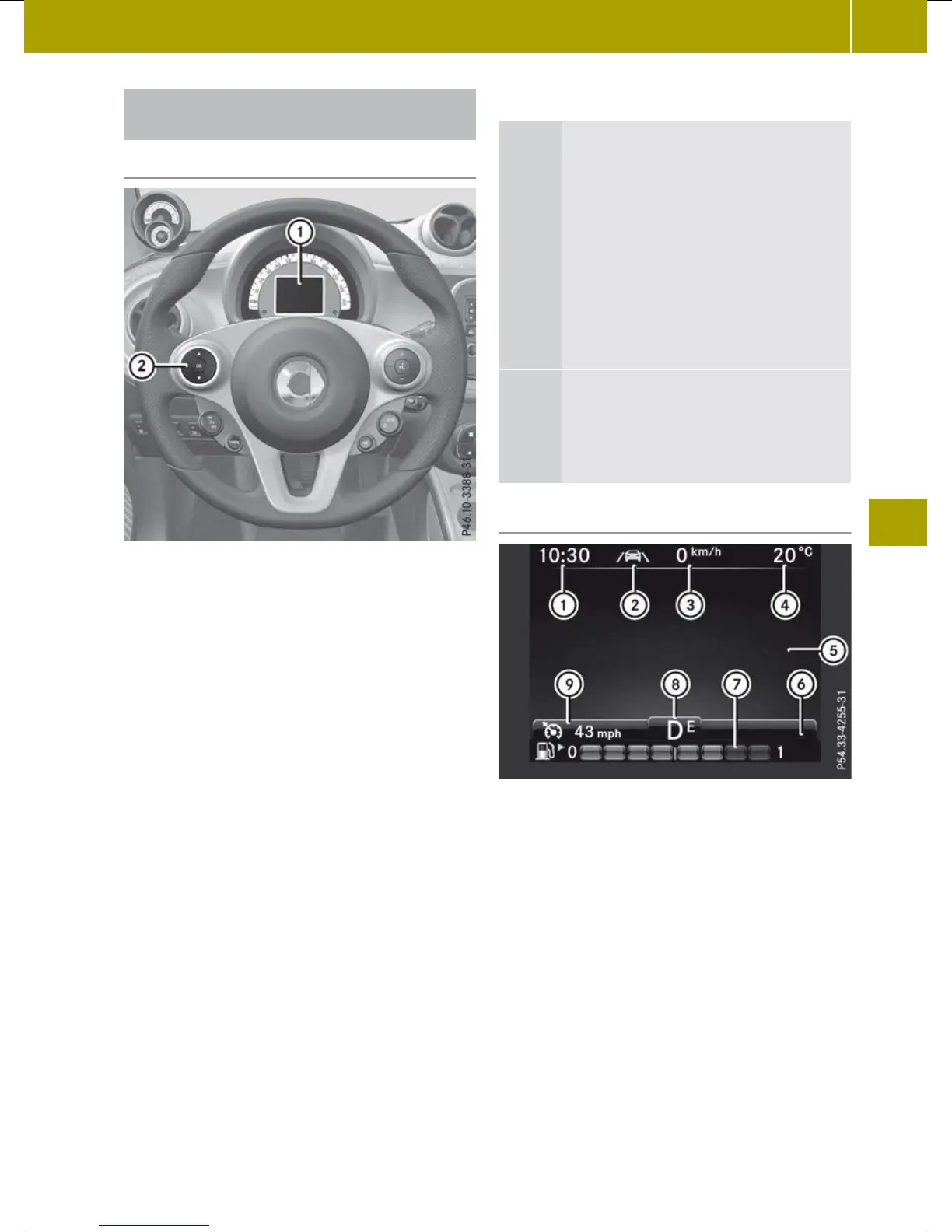
On-board computer with a colour dis-
play
Operating the on-board computer
:
Colour display
;
Left control panel
X
To activate the on-board computer:
unlock the vehicle and open a door.
If you do not subsequently lock the door,
the on-board computer will remain
active for approximately
15 minutes
without any further activity.
or
X
Turn
the key to position 1 in
the ignition
lock.
You can control the display and the settings
in the on-board computer using the steer-
ing wheel
buttons on left control panel ;.
Left control panel ;
9
:
Press briefly:
R
To scroll through a menu
R
To
scroll
through a sub-menu or
list
Press and hold:
R
To switch directly to the Dis‐
tance menu at menu level
R
To switch directly to the back
function at the submenu level
a
R
To confirm the selection
R
In certain menus, to switch to
the Reset values? function
R
To hide the display message
Colour display
:
Time (Y page 163)
;
à Lane Keeping Assist indicator
lamp (Y page 151
)
=
Digital speedometer
(Y page 165)
?
Outside temperature display
(Y page 155)
A
Display field for display messages,
menus and lists
B
6 Reserve fuel display (Y page 155)
C
6 Fuel level (Y page 155)
D
Transmission display
Vehicles with manual transmission:
¿ Standard display
Displays and operation
159
>> On-board computer and displays.
Z















 To Next Page