20 • ENGLISH
MEMORY FUNCTION
Recalling Measurements in
Memory
This monitor stores and recalls up to 60
measurements per memory bank/user, and features
3 averaging modes–
• All readings in memory
• A.M. (morning) measurements
• P.M. (evening) measurements
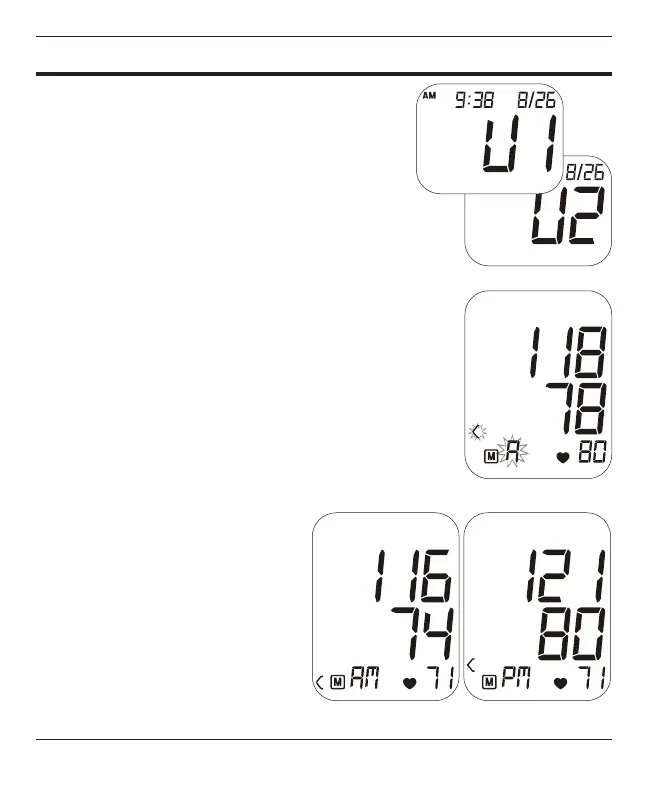
1. When the unit is OFF, press and release the
M button to get the memory bank. The display
will show the current memory bank in use, U1
or U2. Press the POWER button to alternate
banks. If no selection is made, the unit will
default to the memory bank displayed
2. Press the M button again; next display will
show the average of ALL results in the memory
bank, an A will appear on the bottom left of the
display, Fig 2.
3. Press M again to display the A.M.
average, then the P.M. average,
Fig 3.
—A.M. is dened as measurements
taken between 5:00 a.m. and 9
a.m.
—P.M. is dened as measurements
taken between 6:00 p.m. and 8
p.m.
Fig. 3
Fig. 2
Fig. 1



 To Next Page