5
INSTRUCTION MANUAL
2019
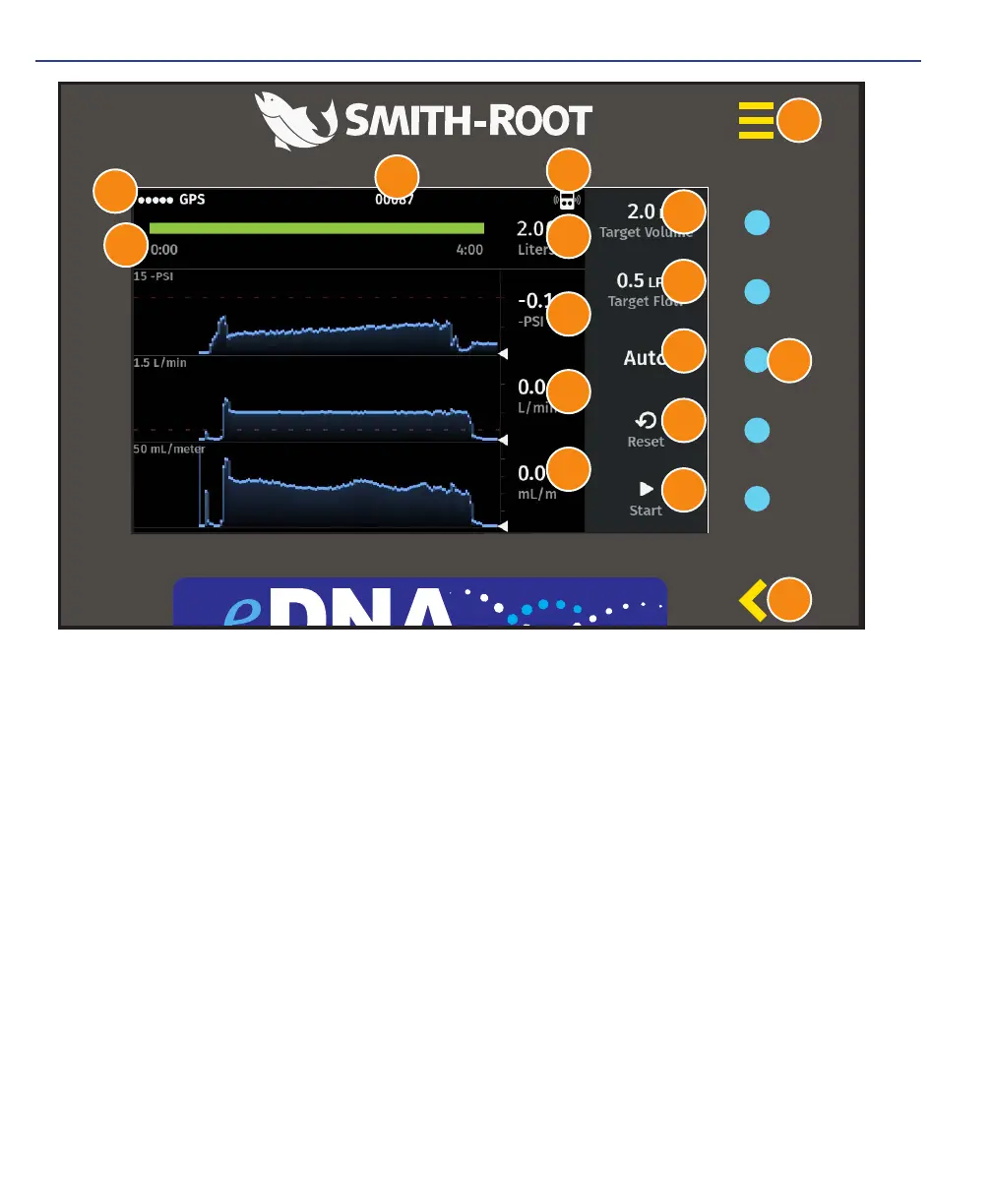
eDNA SAMPLER INTERFACE
1. Menu button
2. Item select buttons
3. Back button
4. Target Volume – The target sample volume in liters (L)
5. Target Flow – The flow rate set point in liters per minute (L/min)
6. Mode – Mode selection between Auto/Manual (described below)
7. Reset – Creates a new sample data record
8. Start/Stop – Pump control. Initiate or end the water filtration cycle
9. Log ID – The event ID number in the .csv data record
10. GPS signal strength
11. Remote control connection indicator
12. Current sample
13. Sample collection time
14. Current pressure value
15. Current flow rate value (L/min)
16. Current transect rate: filtered volume per unit distance (ml/m)
eDNA Water Sampler Proof 3.13.19
www.smith-root.com
3 of 4
Shown inside universal control pad
eDNA WINDOW DECAL
4
1
2
3
10
11
15
12
13
14
16
9
5
6
7
8


 To Next Page