86
D315 | D305 User Manual Appendix 1
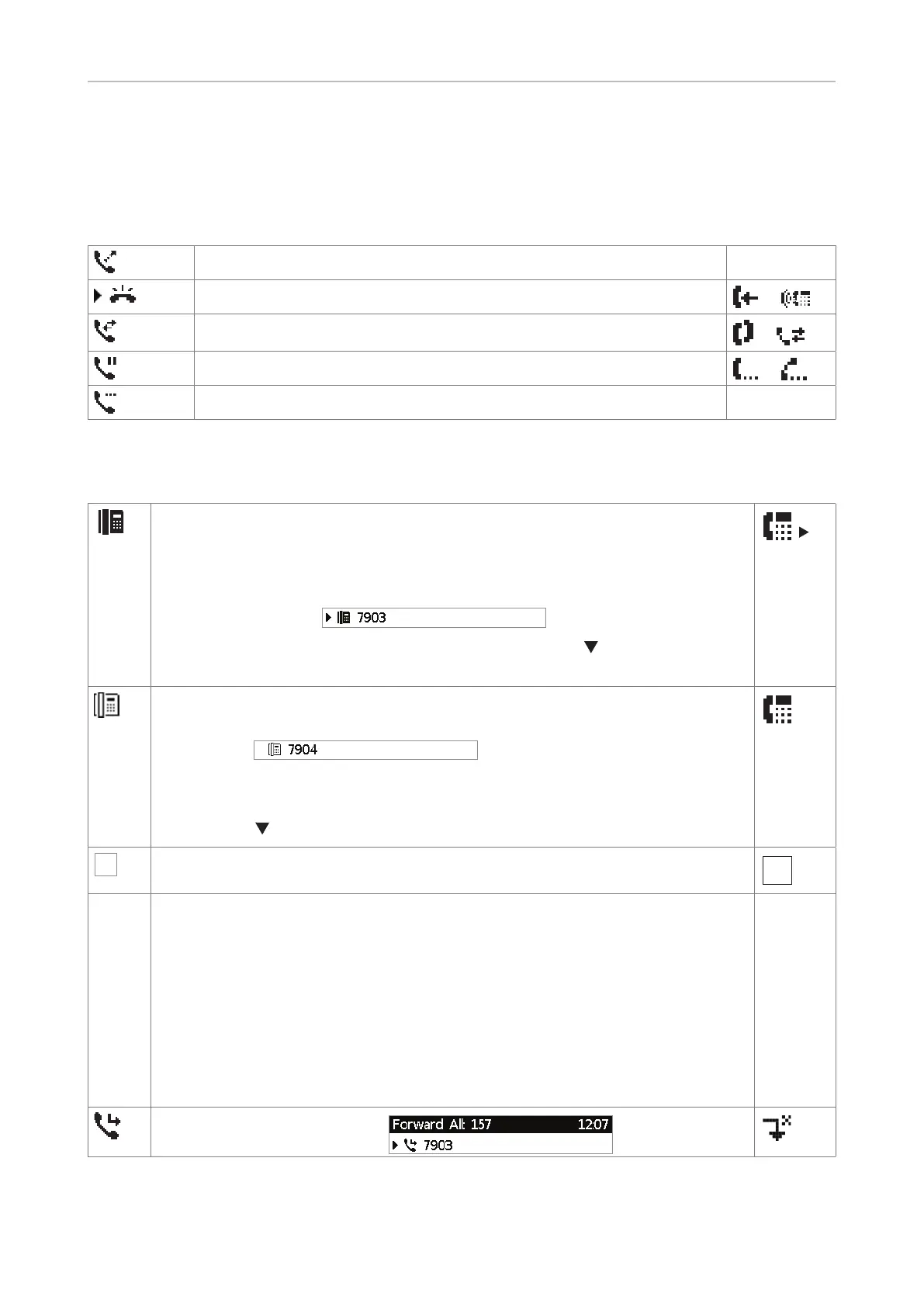
Display indications
On activity
Outgoing call ringing
Incoming call ringing
or
Connected (single connection or conference)
or
Holding call
or
Call being held by other party
On idle screen
Outgoing identity
• The current outgoing identity is indicated by the black phone symbol. When
you call someone, this is your identity for the call.
• If there is more than one active identity, an arrow precedes the current
outgoing identity:
.
• Select a dierent identity for the next call by pressing
on the navigation
key.
Active identity
• Other configured and active identities are indicated by the white phone
symbol:
.
• Active identities can be called.
• Active identities can be selected as the outgoing identity for making calls by
pressing
on the navigation key.
X
Identity not properly registered
By changing the status of an identity to "inactive" on the phone's web interface,
it can be deregistered without removing its registration settings. Inactive
identities are not shown on the idle screen. They cannot be called or selected
as the outgoing identity. To deregister the identity, open the phone's web
interface > Configuration Identity (1-4).
1. Change the "Identity active" setting to "o".
2. Click on "Re-Register".
3. Click on "Save".
Forwarding all incoming calls:



 To Next Page