14
D715/snom 715 User Manual Setting up the Phone
Connecting the phone
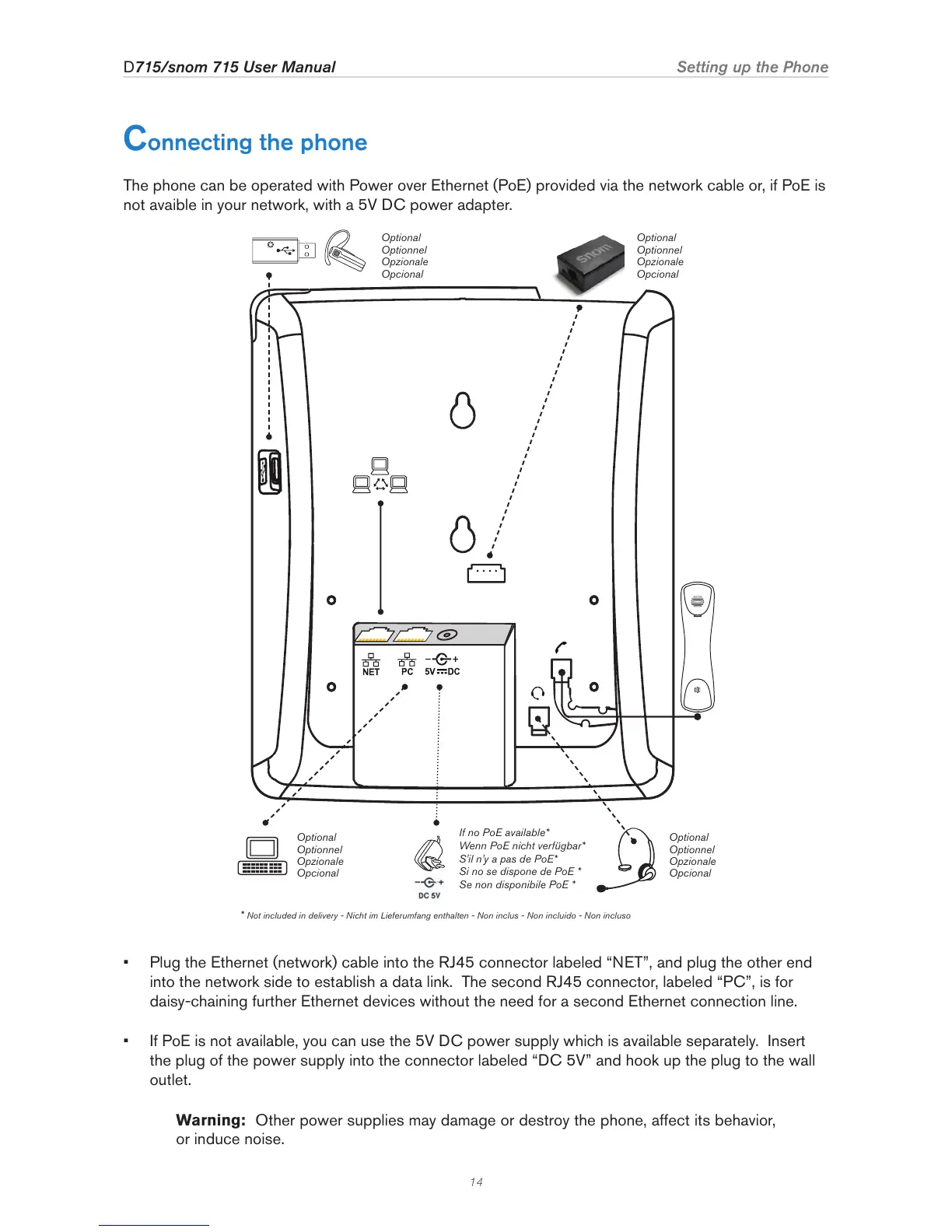
The phone can be operated with Power over Ethernet (PoE) provided via the network cable or, if PoE is
not avaible in your network, with a 5V DC power adapter.
Optional
Optionnel
Opzionale
Opcional
Optional
Optionnel
Opzionale
Opcional
If no PoE available*
Wenn PoE nicht verfügbar*
S'il n'y a pas de PoE*
Si no se dispone de PoE *
Se non disponibile PoE *
*
Not included in delivery - Nicht im Lieferumfang enthalten - Non inclus - Non incluido - Non incluso
Optional
Optionnel
Opzionale
Opcional
Optional
Optionnel
Opzionale
Opcional
• Plug the Ethernet (network) cable into the RJ45 connector labeled “NET”, and plug the other end
into the network side to establish a data link. The second RJ45 connector, labeled “PC”, is for
daisy-chaining further Ethernet devices without the need for a second Ethernet connection line.
• If PoE is not available, you can use the 5V DC power supply which is available separately. Insert
the plug of the power supply into the connector labeled “DC 5V” and hook up the plug to the wall
outlet.
Warning: Other power supplies may damage or destroy the phone, affect its behavior,
or induce noise.



 To Next Page