61
D715/snom 715 User Manual Configuring the Function Keys
Example 4, Programming a context-sensitive function key
The functionality "Forward all" redirects all incoming calls to another phone or a mailbox. In this
example, we will show you how to program turning it on and off onto one of the four context-sensitive
function keys underneath the phone's display.
1. On the phone's web interface, click on "Function Keys" in the menu on the left.
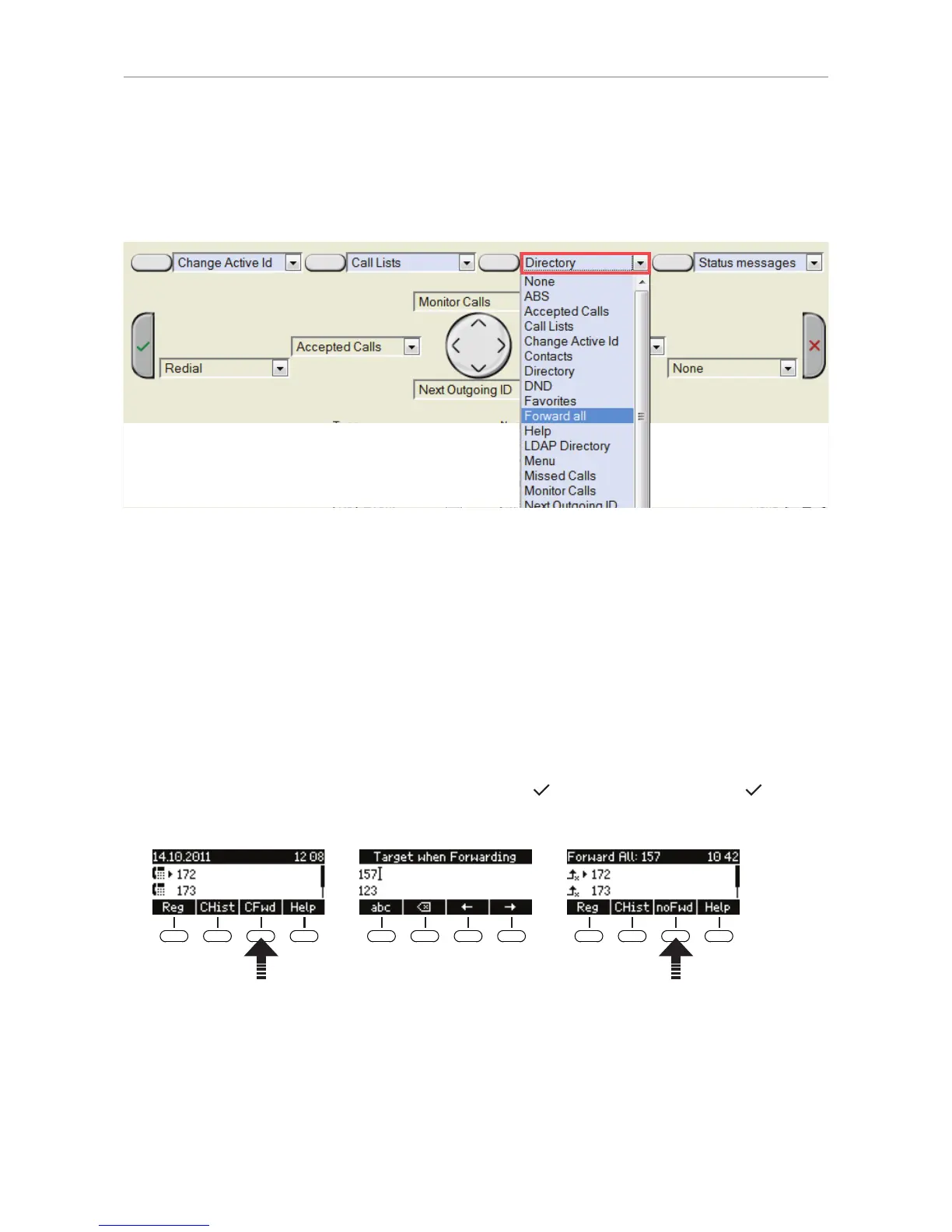
2. Click on the drop-down list of one of the context-sensitive, programmable function keys. In our
example, it is the second key from the right.
3. Select "Forward all" from the drop-down list.
4. Click on "Apply" and "Save".
Using the configured context-sensitive function key on the phone to turn forwarding of all calls on and
off:
1. Press the key (Fig. 1).
2. The display will prompt you to enter a forwarding target (Fig. 2). If one has already been set, the
display will propose that number; you can accept it with
or change it and then press .
3. To turn off forwarding of all calls, press the key again (Fig. 3).
Fig. 1 Fig. 2 Fig. 3



 To Next Page