53
D 725 | snom 720 User Manual Using the Phone
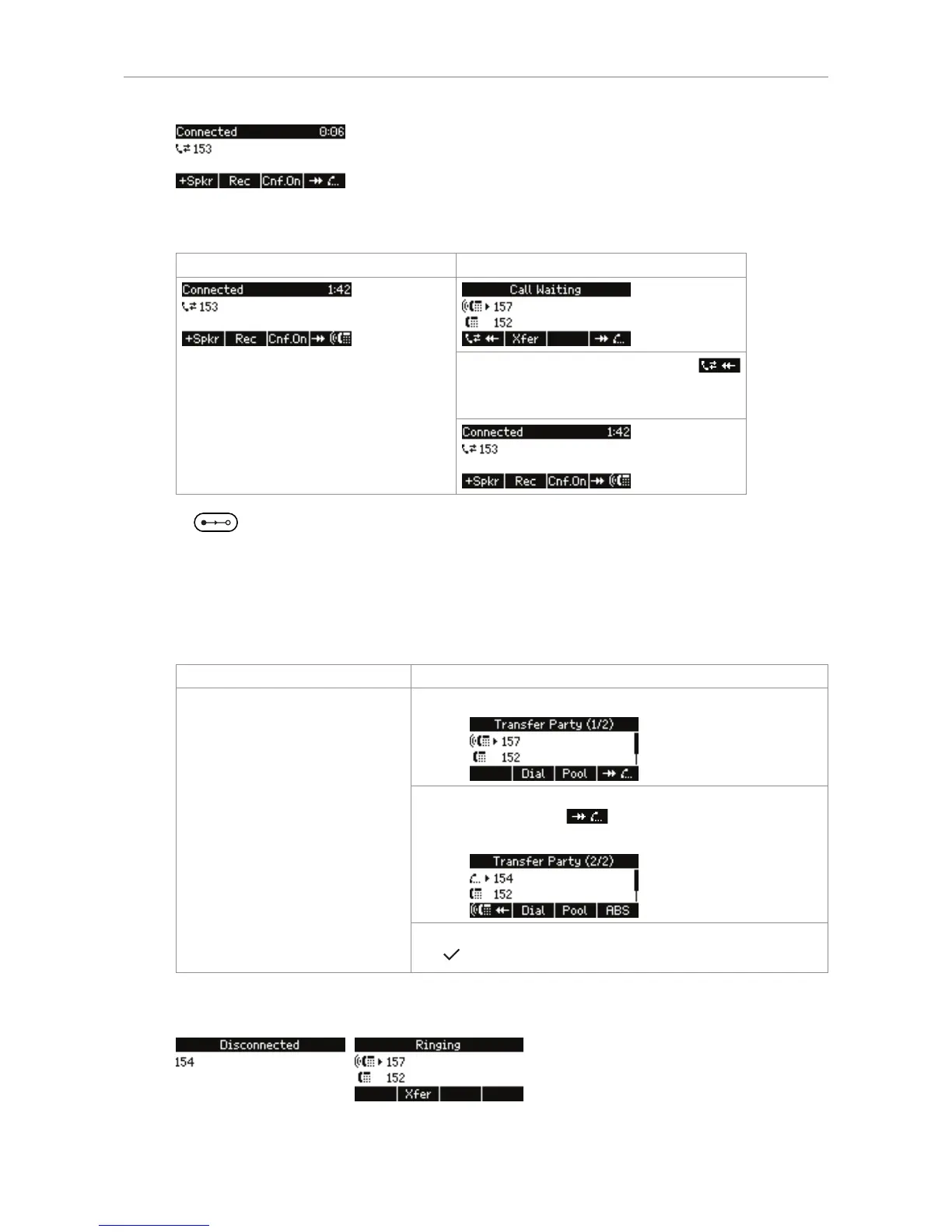
4. While you are on the line with 153, 157 calls you. Depending on your FW version, your display will
either continue to show the connected call or the incoming call.
Showing the active call Showing the waiting call
Press the function key underneath
to bring the connected caller 153 back
onto the screen.
5. Press .
Note: You can eliminate steps a through c by changing a setting on the web interface
of the phone. Open the web interface and click on Advanced > Behavior tab > Call join
on Xfer (2 calls). Click on the radio button on.
This will only work if you have only one call on hold. If you have more than one call on
hold, you will still need to select the held call that you wish to transfer.
Call join on Xfer is on Call join on Xfer is off
a. The "Transfer party" screen appears.
b. If the call you wish to transfer is not the one shown on
the screen, press to bring the next call, i.e., in
this case the call on hold, onto the screen.
c. When the call to be transferred is on the display, press
.
6. Your display will show the connections to 153 and 154, one after the other, being disconnected
from your phone.
7. Your display then shows 157 as ringing rather than as call waiting.



 To Next Page