EasyManua.ls Logo

Snom D785 - Alphanumeric Keypad Usage

Snom D785
117 pages
Print Icon
To Next Page IconTo Next Page
To Previous Page IconTo Previous Page
Loading...
26
D785 / D785N User Manual Getting to Know Your Phone
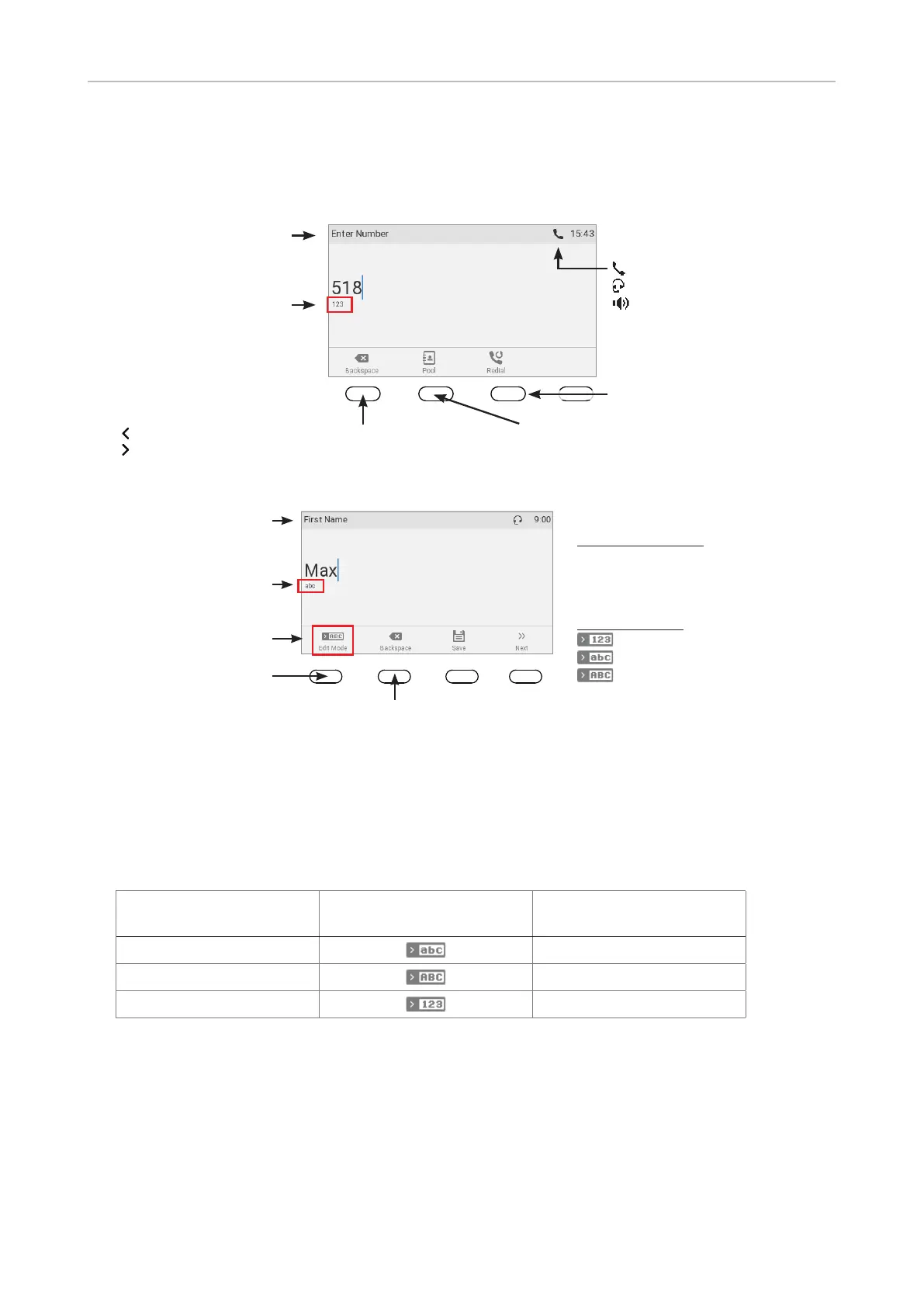
Alphanumeric Keypad
Input modes and navigation
Current audio
mode:
Handset
Headset
Speakerphone
Input mode numerals
when dialing
Delete character to
the left of the cursor
Activity
Move cursor to the left
Move cursor to the right
Pool: Directory,
LDAP, call lists
Redial
Fig. 1
Current input mode:
 Numerals
 Lower case
 Upper case
letters
Next input mode:
Numerals
Lower case
Upper case
letters
Delete character to
the left of the cursor
Current input mode
Status info
Next input mode
Changing input mode
Fig. 2




Text underneath cursor
= current input mode
Press function key to
switch to next input mode
Next input mode
123
abc
abc
ABC
ABC
123
Entering numerals, letters, special characters, and symbols



Numerals.

Table of Contents

Other manuals for Snom D785

Related product manuals