39 • UK
Return to contents
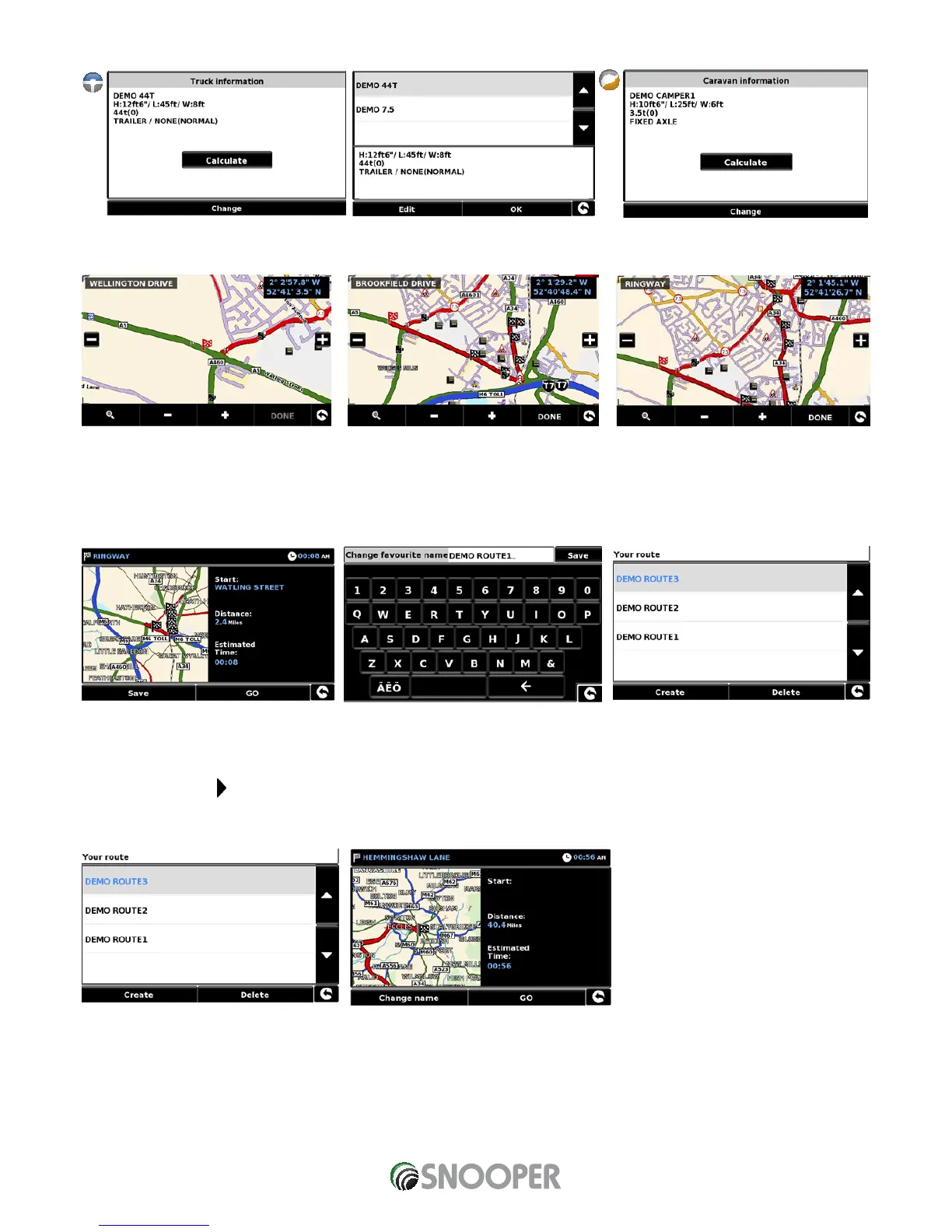
To calculate a route which is appropriate for your vehicle, once a second link has been added the following screen will be displayed:
if this is the correct vehicle press ‘Calculate’ or if you need to change the vehicle press ‘Change’.
6. Continue adding roads to ‘Your route’ until you have constructed your desired routing. For accurate routing select small ‘links’
7. Once the journey has been built press ‘Done’. A summary of the journey is displayed and you now have the option to ‘Save’ (by
pressing the ‘Save’ button) or start navigating by pressing ‘GO’ .
8. If you choose to save your route you can now change the name of your route. Once the name has been edited press ‘Save’.
9. Additional ‘My Routes’ can be created, saved and added by following steps #1-9
3.15.2 Navigating using My route
Press the centre of the screen to enter the ‘Navigate to’ menu
Press the black arrow twice
Press ‘Your route’
Select which My Route you want to use by pressing on the name; a summary screen will appear. To start navigating press ‘Go’.


 To Next Page