77 • UK
Return to contents
Pairing
In order to use the Bluetooth facility you must first ‘pair’ your unit with your mobile phone.
Once the phone is paired with the S7000, there is no need to do the pairing again unless the mobile phone is changed.
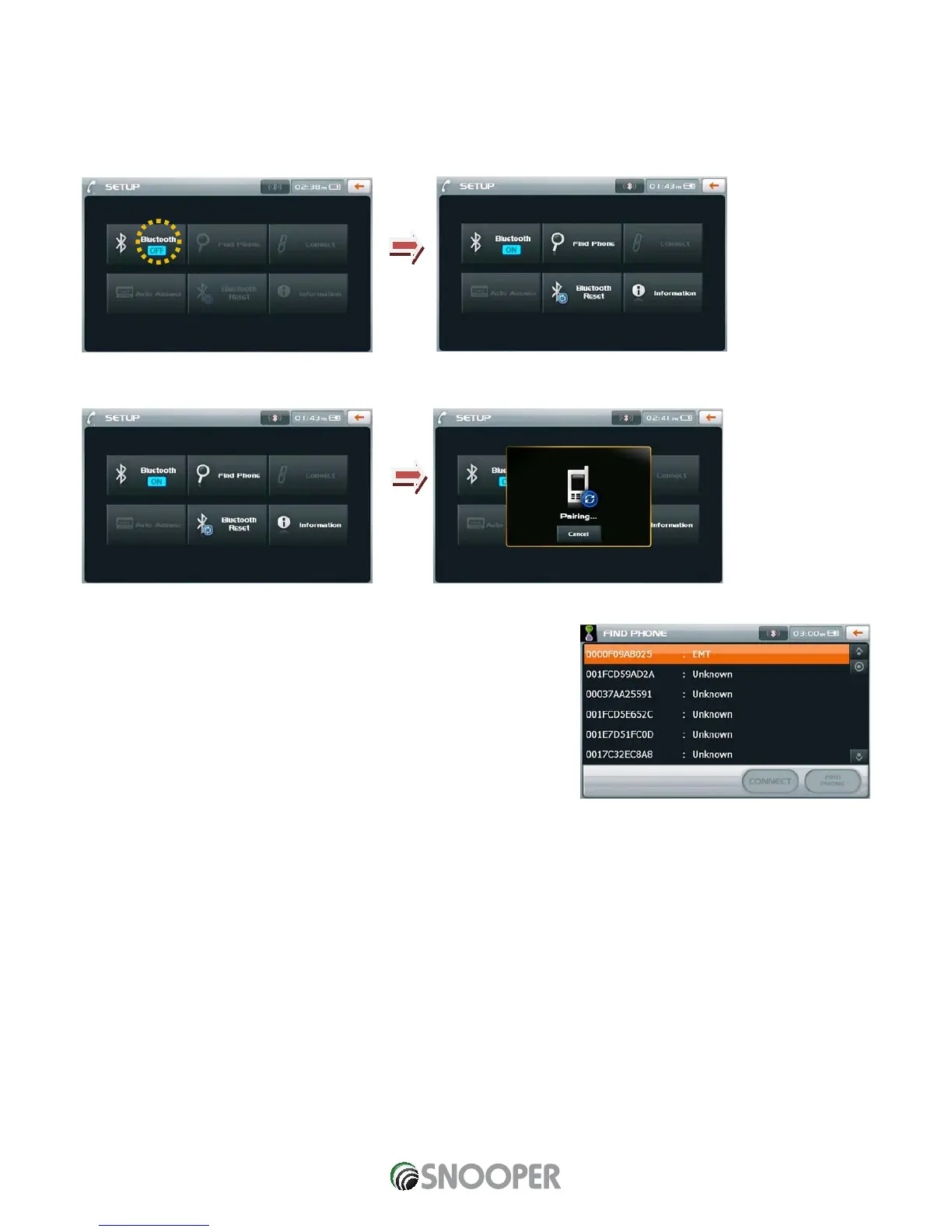
1. Activate the Bluetooth function by pressing the “Bluetooth” button on the Setup screen.
2. Once Bluetooth is activated press the “Find Phone” button.
3. A screen will display a list of Bluetooth devices found.
Note: In order for S7000 to pair with your mobile phone please ensure that the
bluetooth is switched ON and the phone is visible to other bluetooth devices.
4. Select your mobile phone from the list.
5. When the mobile phone displays a message to input a ‘Pin Code’, input ‘0000’
6. Once the phone and the S7000 are ‘paired’ you can exit this screen.
CAUTION! DEPENDING ON THE TYPE OF MOBILE PHONE, SOME MAY CONNECT AUTOMATICALLY WHEN THE “PAIRING” IS
COMPLETED.


 To Next Page