74 • UK
Return to contents
System Settings
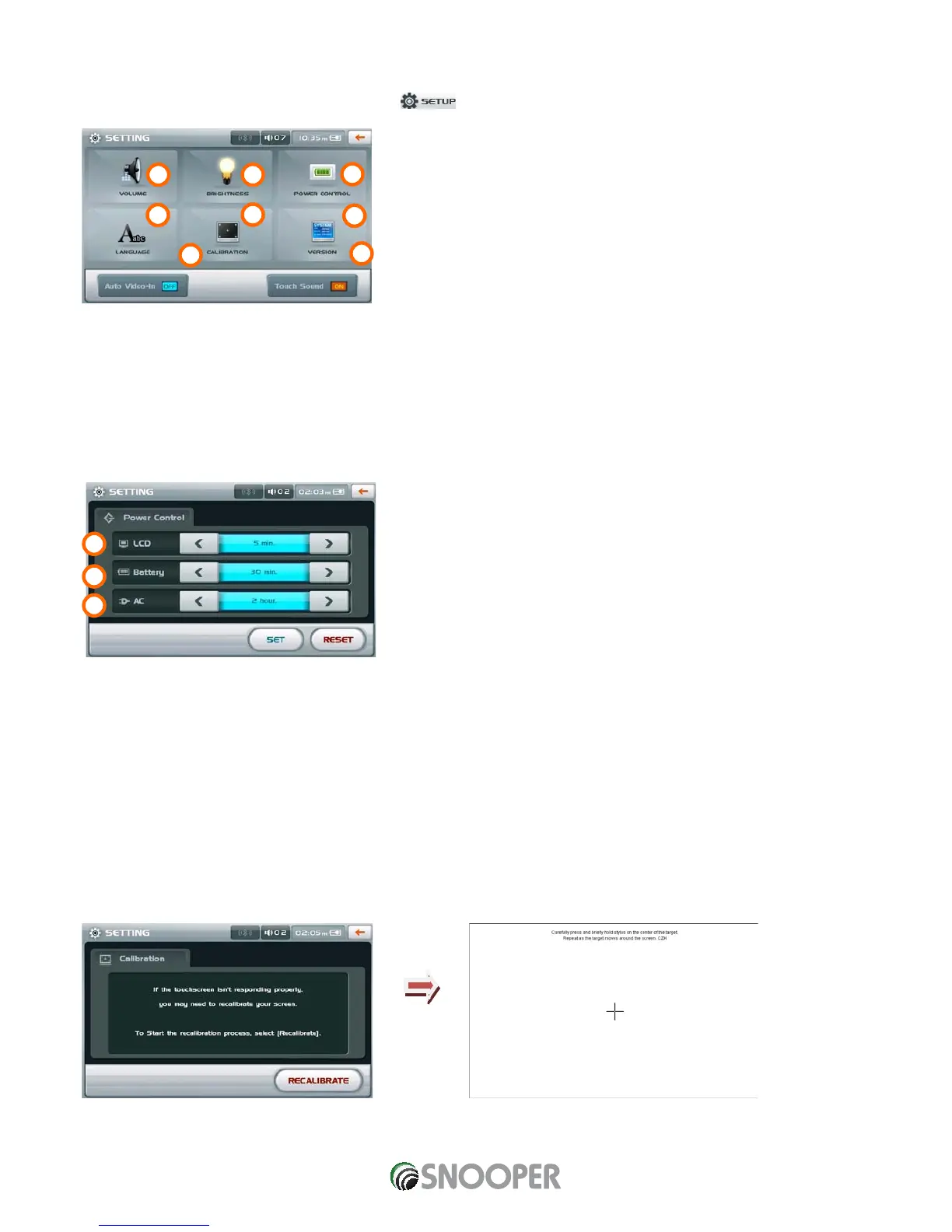
To enter the and adjust the systems settings press the button.
1. Volume – press this button to enter and adjust the systems volume control.
2. Brightness – press this button to enter and adjust the systems brightness control.
3. Touch Sound – select to switch touch screen sounds on or off
4. Language – press to enter and change systems language.
5. Auto Video-In
6. POWER CONTROL
A. Controls the time the LCD backlight will remain on before automatically switching
off. If you set to Always, the LCD will not automatically turn off. Please touch the
screen to turn the LCD screen on again when it is turned off.
B. Sets the time when the power will be automatically turned off if you are running the
device using the built-in battery only. If you select Always the device will not power
off automatically.
C. Sets the time when the power will be automatically turned off if you are running the
device using an AC power source or cigarette lighter adapter.
7. Touch Calibration
Use this function to re-calibrate the touch screen. Follow the on- screen instructions to recalibrate the screen.


 To Next Page