79 • UK
Return to contents
Phone Call
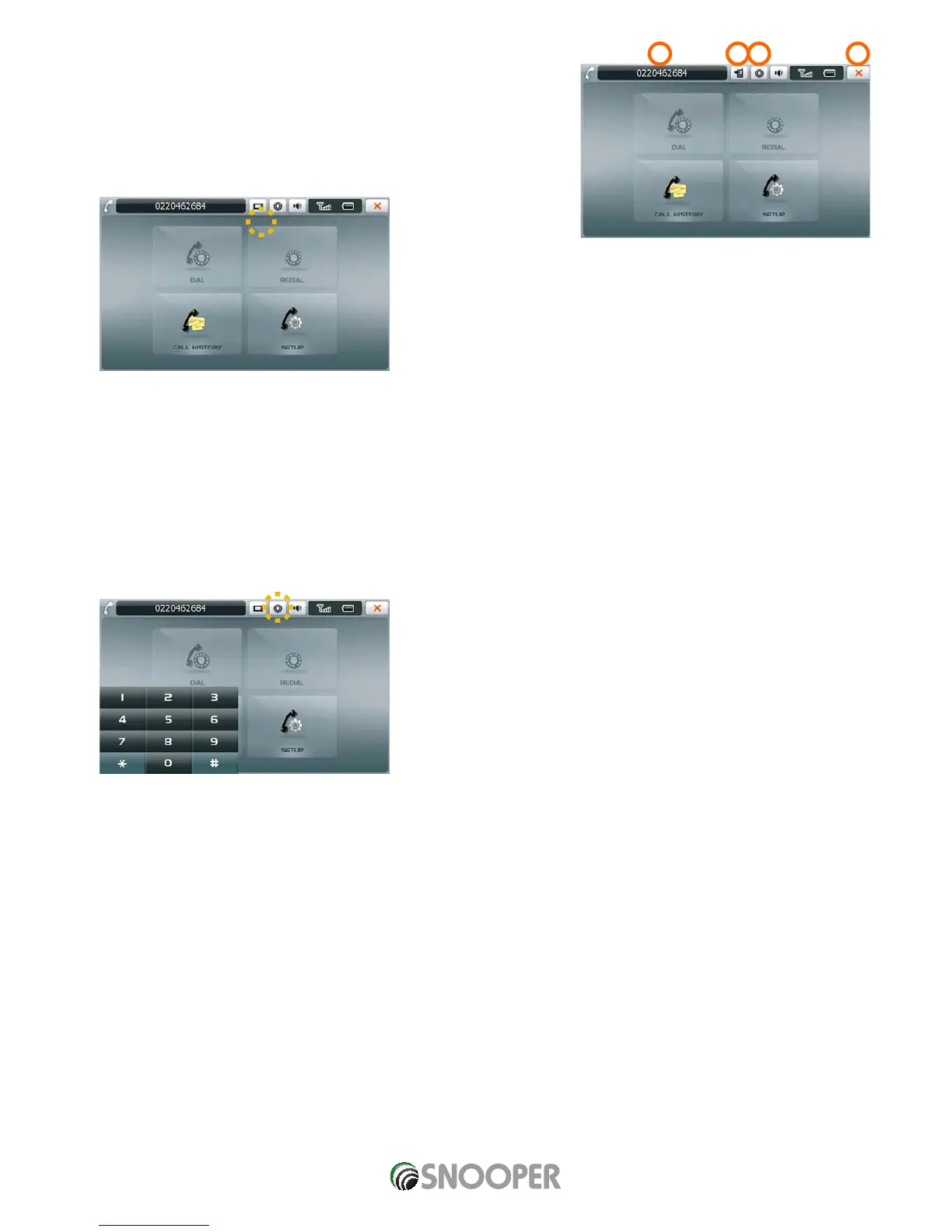
When in the Bluetooth main screen and you press ‘Redial’ or you make/answer a
call using the ‘Call’, ‘Dial’ or ‘Call History’ functions the following icons at the top of
the screen are displayed (see picture below).
1. Switches the phone call to the paired mobile phone and the icon is
changed as below.
When you press the changed icon, it switches the phone call back to the S7000.
CAUTION ! DEPENDING ON MOBILE PHONE, SOME TOOLS AUTOMATICALLY DISCONNECT BLUETOOTH CONNECTION AFTER
THE CONVERSION TO A MOBILE PHONE.
2. Indicates an incoming phone number or a phone call hour.
3. Ends phone call.
4. It is a button to indicate “Dial pad” on the left bottom corner as below when a digit
input is necessary. In order to hide “Dial pad” , press the button once more.


 To Next Page