Chapter 7 – Prestart Inspection
S2255RT S2755RT - 15286-1 33
Ÿ the joystick interlock is released.
Ÿ the drive/lift selector switch is in the lift position.
Ÿ the emergency stop button is pushed down.
Placing the drive/lift selector in the drive position, en-
gaging the interlock and moving the joystick, releases
the brakes.
8. Place the drive/lift selector switch in the lift position
and test the operation of the joystick in both direc-
tions. The drive functions should not operate with
the selector in the lift position.
Squeeze and hold the interlock switch against the joy-
stick. Test the joystick in both directions.
Ÿ
To raise the platform, push the joystick forward.
Ÿ
To lower the platform, pull the joystick backward.
Emergency Stop
To test the emergency stop button from the upper
controls:
1. Push the emergency stop button inward to turn off
all power.
2. Verify that the upper control platform and drive
functions do not operate.
Horn Button
The horn is operational when the machine is set up for
operation from the upper control panel.
Press the horn button to ensure that it sounds to warn
personnel in the area.
Lowering Alarm
To test the lowering alarm from the upper controls:
1. Raise the platform approximately 10′ (3 m).
2.
Lower the platform and make sure the alarm sounds.
Drive Alarm
Drive in both the forward and reverse directions to
ensure that the alarm sounds to warn personnel in the
area that the aerial platform is in motion.
Flashing Light
The machine may be equipped with an optional fl ashing
light located under the upper control box.
To inspect the fl ashing light:
1. At the lower controls, pull the emergency stop button
outward and turn the control select switch to either
the lower or upper control position.
2. Operate any control function and visually check to
see that the light is fl ashing approximately one fl ash
per second.
1. Make sure the battery disconnect is turned on.
2. At the lower controls, pull the emergency stop button
outward.
3. Turn the control select switch to the upper control
position.
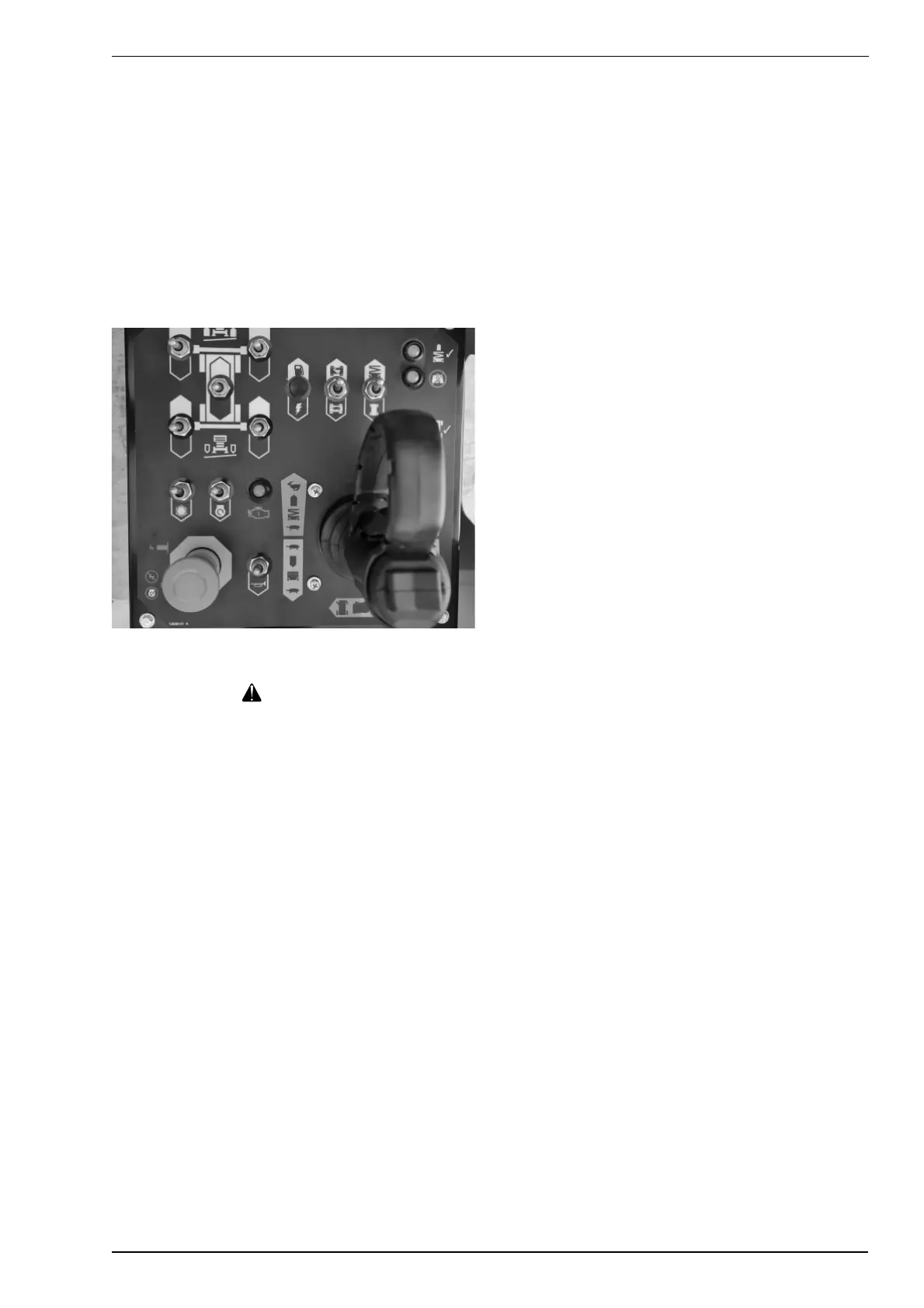
4. At the upper controls (refer to Figure 7.13), pull the
emergency stop button outward, then hold down the
choke/glowplug switch for approximately three (3)
seconds. Release the choke/glowplug switch and
hold down the start switch until the engine starts.
Figure 7.13 – Upper Controls
Warning
The potential for an accident increases when oper-
ating an aerial platform that is damaged or malfunc-
tioning. Death or serious injury could result from
such accidents. Do not operate the aerial platform
if it is damaged or malfunctioning.
5. Test the interlock switch by moving the joystick
without engaging the interlock switch.
If movement occurs, the interlock is not function-
ing properly. Do not operate the machine until the
problem is corrected.
6. Place the drive/lift selector switch in the drive po-
sition and test the operation of the joystick in both
directions. The lift functions should not operate with
the selector in the drive position.
Squeeze and hold the interlock switch against the
joystick. Test the steer switch in both directions
using the steering switch.
Ÿ To steer to the right, hold down the right side of
the steer switch.
Ÿ To steer to the left, hold down the left side of
the steer switch.
7. Test the operation of the brakes while operating the
aerial platform from the upper controls. The brakes
are engaged when:


 To Next Page