Chapter 7 – Controls
20 S2646E/S3246E – 0410051
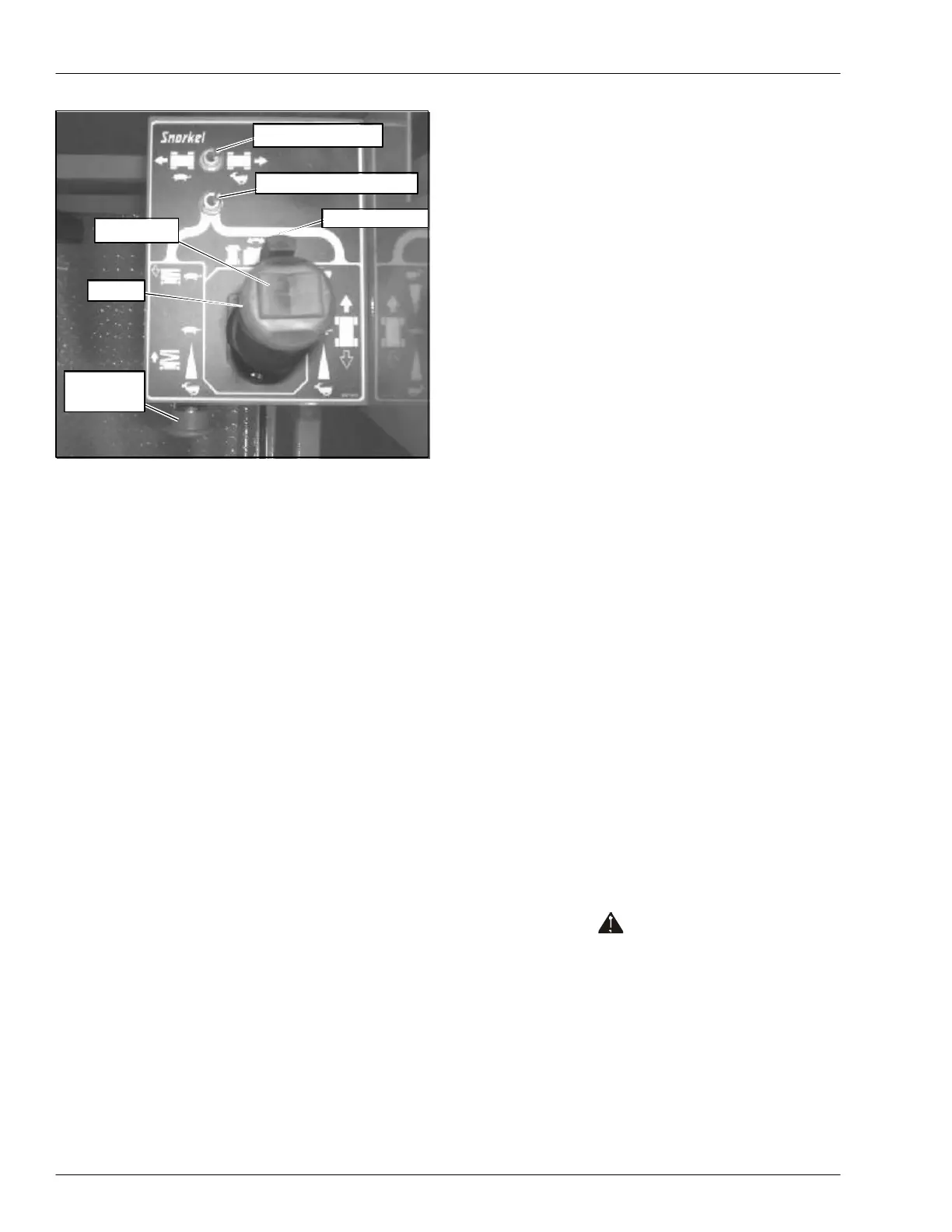
Figure 7.3 – Upper Controls
Emergency Stop Button
The emergency stop is a two-position red push button on
the front of the upper control box. Push the button in to
disconnect power to all control circuits at the upper con-
trols. Pull the button out to restore power.
Note
The lower controls override the upper controls. If the up-
per control emergency stop is engaged the lower con-
trols can still be used to operate the aerial platform.
Push the button in when the upper controls are not in use
to help protect against unintentional platform operation.
Drive/Lift Selector Switch
Place the drive/lift selector switch in the drive position to
drive the aerial platform using the joystick. The platform
will not raise or lower while driving.
Place the drive/lift selector switch in the lift position to
raise and lower the platform using the joystick.
Joystick
Use the joystick (refer to Figure 7.3) to operate the fol-
lowing functions.
• Aerial platform steering
• Aerial platform drive and speed
• Platform raise/lower and speed
Movement of the joystick in a given direction produces a
corresponding movement of the aerial platform. The steer-
ing and drive functions may be operated separately or
simultaneously.
Interlock
The joystick has an interlock switch in the handle. En-
gage the interlock by grasping the joystick and pulling
the switch toward the handle. Engage the interlock to
activate the steering, drive, or lift functions.
Steer Switch
The steer switch is a momentary contact, rocker switch
on top of the joystick. This switch controls the two front
wheels to steer the aerial platform.
To steer to the right, engage the interlock on the joystick
and hold down the right side of the steer switch. To steer
to the left, engage the interlock on the joystick and hold
down the left side of the steer switch.
Note
The steering wheels are not self-centering. Set the steer-
ing wheels straight ahead after completing a turn.
Drive Range Switch
The drive range switch has two positions to select drive
wheel operation:
• High (Rabbit) – for normal driving conditions.
• Low (Turtle) – for driving on grades up to 25 percent
that require low speed and high torque operation,
where high range is not sufficient to climb the grade.
Horn Button
The optional horn button is on the left side of the upper
control box. Press the button to sound the horn.
Battery Condition Indicator
The optional battery condition indicator gauge is on the
top of the upper control box. It indicates the level of avail-
able battery power to operate the aerial platform.
Circuit Breaker Reset Button
The electrical power outlet at the platform has a 15 amp
circuit breaker. The reset button in on the bottom of the
electrical box. The circuit breaker protects the electrical
wiring and components from electrical overload in the case
of a short circuit or other fault.
Caution
A tripped circuit breaker indicates a malfunction in
the electrical system. Component damage can re-
sult if the cause of the malfunction is not corrected.
Do not operate the aerial platform if the circuit
breaker trips repeatedly.
Push the reset button to reset the circuit breaker.
Steer Switch
Drive Range Switch
Interlock Switch
Drive/Lift Selector Switch
Emergency
Stop Button
Joystick


 To Next Page