3
EN
DATALOGGER H80-81 - 546226A - SOCOMEC
1. DocumenTaTion
All documentation on the DATALOG H80/H81 is available on the
SOCOMEC website at the following address:
http://www.socomec.com/datalogger-documentation
2. Preliminary oPeraTions
It is highly recommended to become thoroughly acquainted with the contents of this manual before conguring and
using DATALOG H80/H81.
To install and connect DATALOG H80/H81, a Quick Start guide is delivered with the device. It is also available at the
following address: Http://www.socomec.com/datalogger-documentation
DATALOG H80/H81 can be congured by connecting:
• directly to DATALOG H80/H81 via the available interfaces (HDMI interfaces, USB 2.0 and USB 3.0). User can
directly connect their devices (screen, keyboard, mouse), as indicated in the Quick Start guide,
• to the web server of DATALOG H80/H81, via the browser on a workstation connected to the network.
Here is the list of compatible browsers:
• Internet Explorer v9 and higher
• Firefox v24 and higher
• Chrome v30 and higher
We recommend the use of a screen with 1280 x 900 pixel format.
3. inTroDucTion
3.1. General presentation
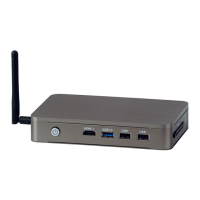
DATALOG H80/H81 is part of the range of communication gateways proposed by Socomec.
DATALOG H80/H81, installed at the heart of the energy ecosystem, allows you to:
• automatically collect energy data from meters and multi-uid measuring stations;
• pool, secure and store energy data;
• publish data to a system or an external application.


 To Next Page
 Loading...