Page 24
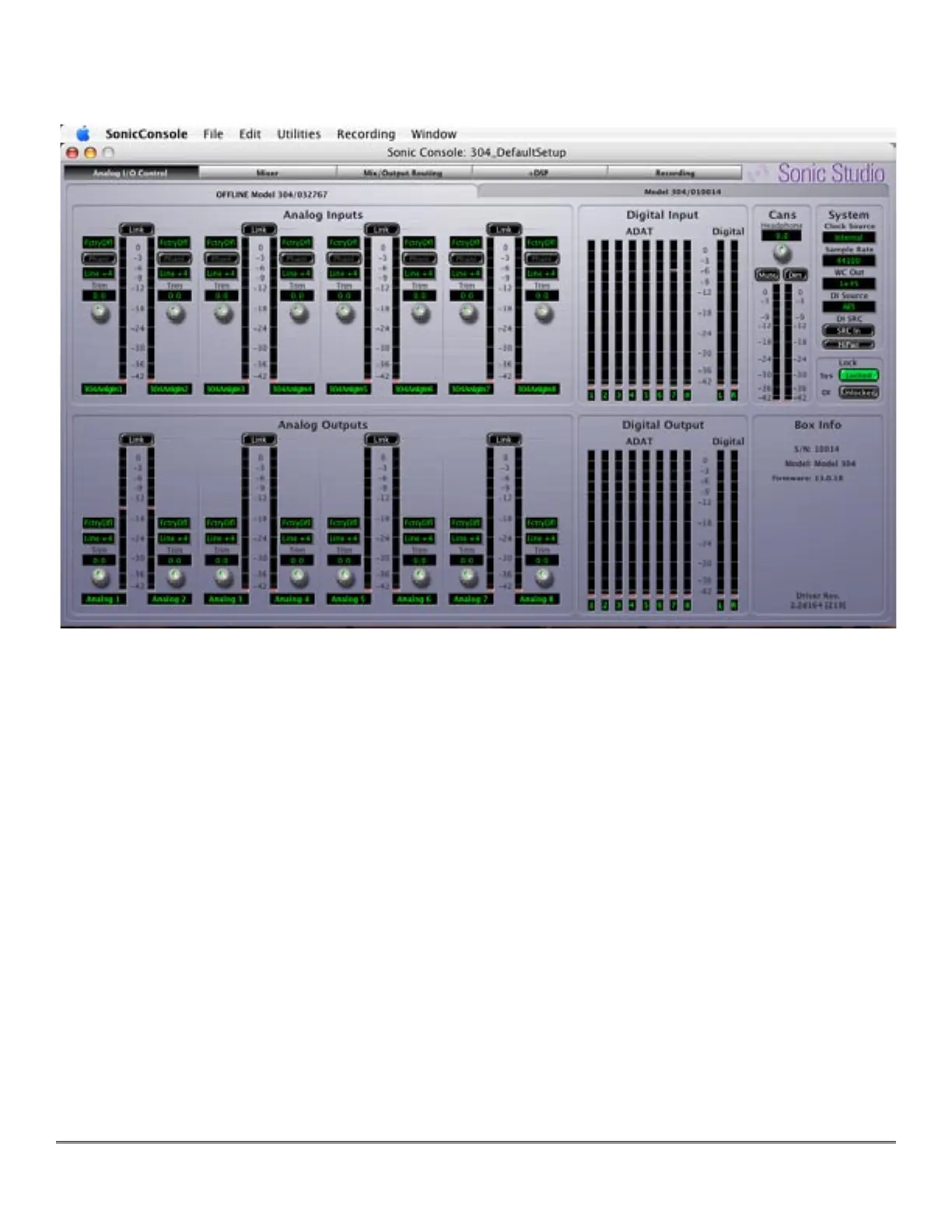
To access the Analog I/O Control pane, click on the Analog I/O Control button at the top left of
Sonic Console.
Figure 2 — The Analog I/O Control pane
The metering shows the labels entered in the Mix/Output Routing pane discussed below. The
System controls set operational parameters such as Clock Source, Sample Rate, WC (Word
Clock) output type, DI (Digital Input) selection and hardware SRC or sample rate conversion
capabilities.
3.1.1.1 Channel Level Meter
The channel level meters are of the peak reading, high-resolution, fast PPM type. They shows
the post converter level of the input signal for the associated channel. The peak hold bar indi-
cates the highest level seen on the channel since the last reset. You can reset the peak hold by
clicking on the meter. These meters are simply high resolution versions of the meters shown
on the front panel of the box. All the meter data is generated by the Series 300 hardware.
3.1.1.2 Optimizing Input Levels
The Analog to Digital converters (ADC) in most devices function best, with the lowest distor-
tion and best sound, when the peak level is around -6 dBFS. This is true of the ADCs in the
Series 300 models. Since you have full level control of the input with the gain trim knob, you
will find that you get the best quality recordings if you set the nominal peak level of the input



 To Next Page