SonicWALL NSA 240 Getting Started Guide Page 23
Connecting to Your Network
The SonicWALL NSA 240 ships with the internal DHCP server
active on the LAN port. However, if a DHCP server is already
active on your LAN, the SonicWALL will disable its own DHCP
server to prevent conflicts.
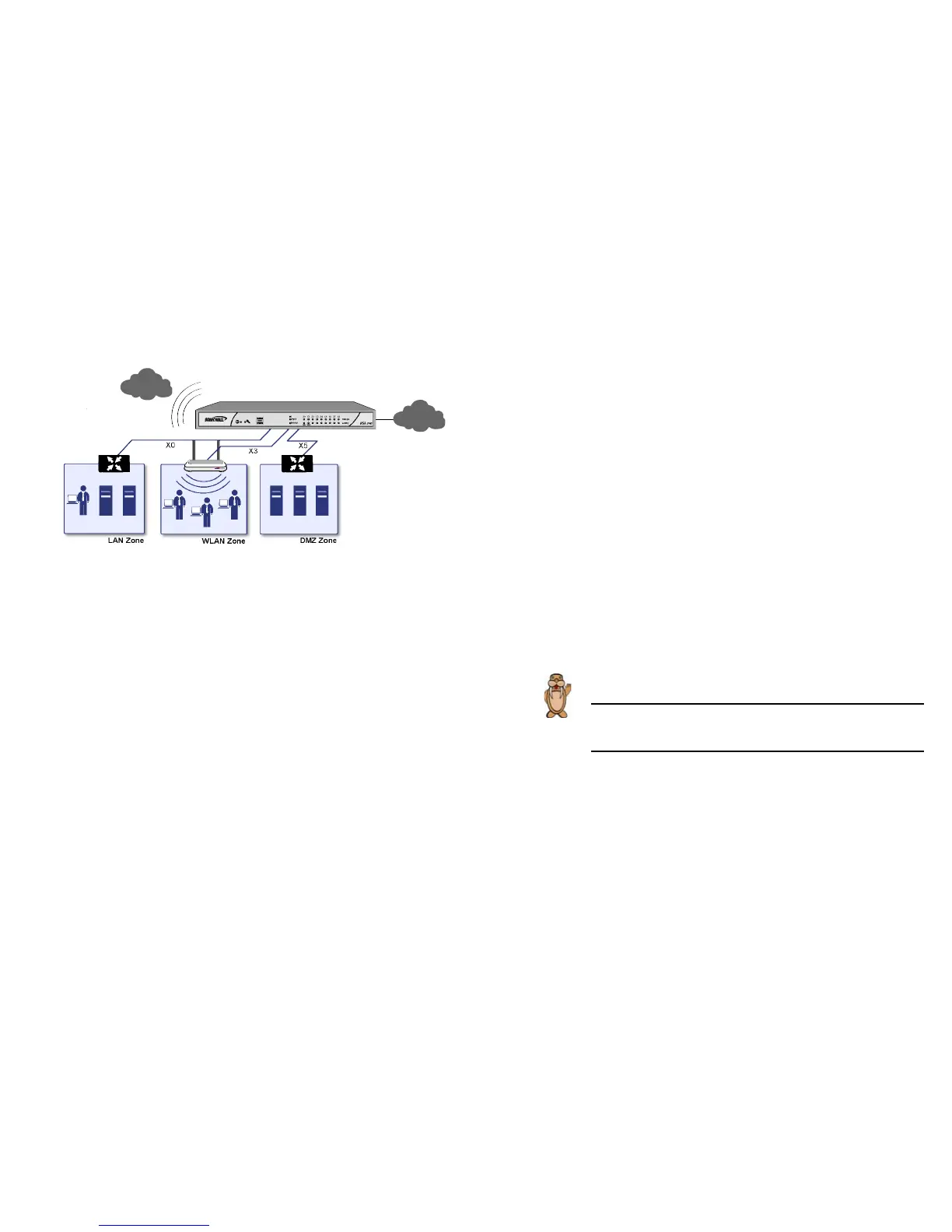
Ports X1 and X0 are preconfigured as WAN and LAN. The
remaining ports (X2-X8) can be configured to meet the needs of
your network. As an example, zones in the example above are
configured as: X1: WAN, X2: LAN, X3: WLAN, and X5: DMZ.
Testing Your Connection
1. After you exit the Setup Wizard, the login page reappears.
Log back into the Management Interface and verify your IP
and WAN connection.
2. Ping a host on the Internet, such as sonicwall.com.
3. Open another Web browser and navigate to:
<http://www.sonicwall.com>.
If you can view the SonicWALL home page, you have
configured your SonicWALL NSA appliance correctly.
If you cannot view the SonicWALL home page, renew your
management station DHCP address.
4. If you still cannot view a Web page, try one of these
solutions:
• Restart your Management Station to accept new
network settings from the DHCP server in the
SonicWALL security appliance.
• Restart your Internet Router to communicate with
the DHCP Client in the SonicWALL security appliance.
Next... Continue to Verifying Your Connection section,
on page 35 to verify your WWAN connection.



 To Next Page