Page 42 Enabling Security Services in SonicOS
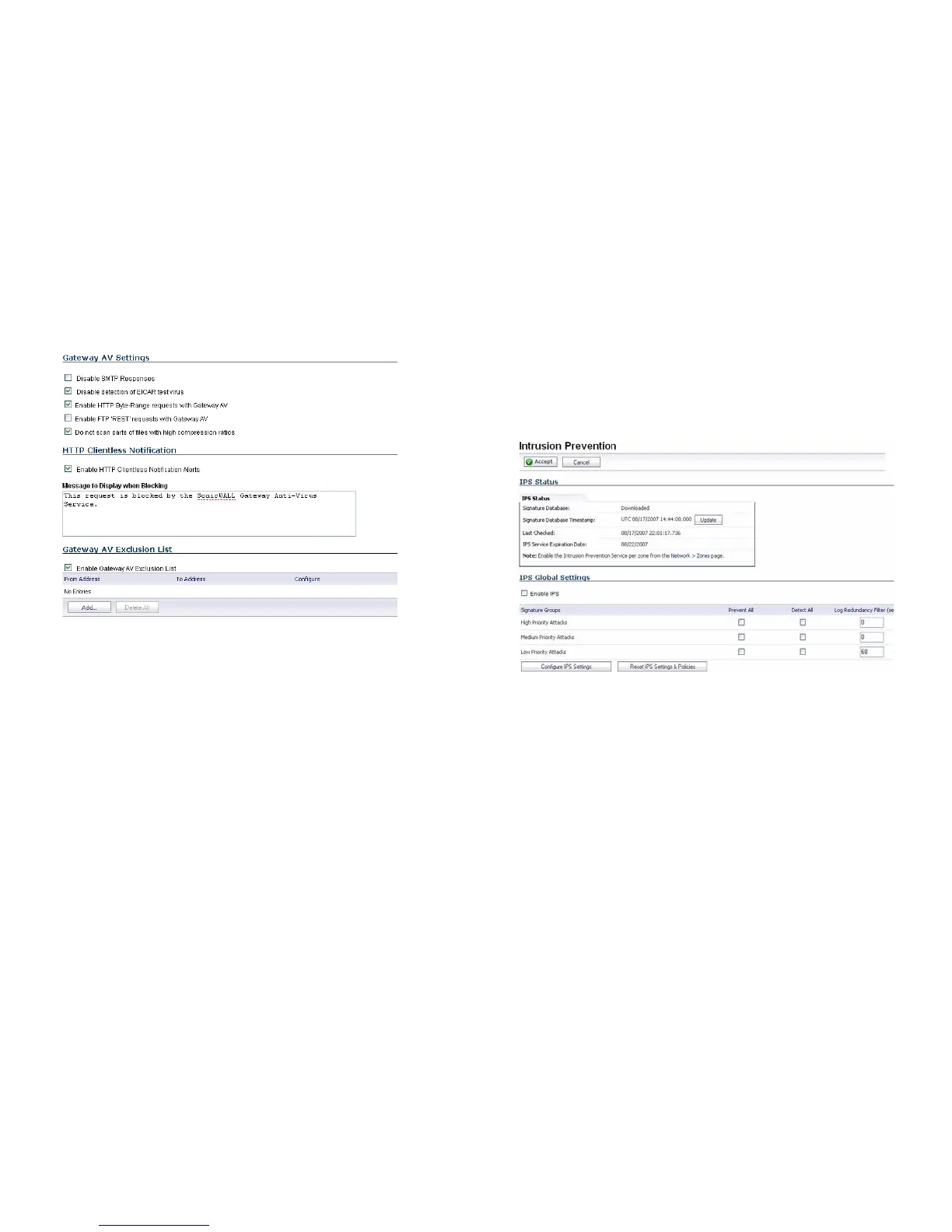
6. Select the Disable SMTP Responses box to suppress the
sending of email messages to clients from SonicWALL
GAV when a virus is detected in an email or attachment.
7. Select Enable HTTP Clientless Notification Alerts and
customize the message to be displayed when GAV detects
a threat from the HTTP server.
8. Select Enable Gateway AV Exclusion List and then click
Add to define a range of IP addresses whose traffic will be
excluded from SonicWALL GAV scanning.
9. When finished in the Add GAV Range dialog box, click OK.
10. In the Gateway AV Config View window, click OK.
11. In the Security Services > Gateway Anti-Virus page,
click Accept.
Enabling Intrusion Prevention Services
To enable Intrusion Prevention Services in SonicOS:
1. Navigate to the Security Services > Intrusion Prevention
page. Select the Enable Intrusion Prevention checkbox.
2. In the Signature Groups table, select the Prevent All and
Detect All checkboxes for each attack priority that you
want to prevent. Selecting the Prevent All and Detect All
check boxes for High Priority Attacks and Medium
Priority Attacks protects your network against the most
dangerous and disruptive attacks.



 To Next Page