
 Need help?
Do you have a question about the Sonim XP5plus and is the answer not in the manual?
Provides contact details and resources for obtaining product and technical support.
Details the comprehensive and limited warranty coverage for the device and its battery.
Lists all items included in the Sonim XP5plus phone packaging for user reference.
Outlines the technical specifications including chipset, bands, memory, battery, and connectivity.
Step-by-step instructions for correctly inserting the SIM card into the device.
Guides users on how to insert an optional memory card for expanded storage.
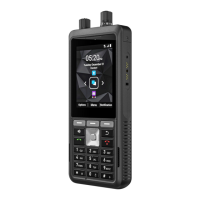
Provides a visual guide to the phone's physical layout, buttons, ports, and key features.
Instructions on how to power the device on and off using the dedicated key.
Explains the home screen as the primary interface for accessing device functions.
Details the meaning of various icons displayed in the status bar for device information.
Step-by-step instructions on how to take and save a screenshot of the device screen.
Guides users on how to change the text input language for messaging and other text entry.
Explains various text entry methods like KT9, uppercase, lowercase, and symbol input.
Instructions for setting custom or pre-loaded images as the home screen wallpaper.
Details how to use the search bar to find contacts, apps, and other device content.
Provides references to different system settings categories for further configuration.
Lists accessible quick settings like Wi-Fi, Data, Bluetooth, and Airplane mode.
Explains how to access and view missed calls, messages, and other notifications.
Covers connecting to Wi-Fi networks, adding new ones, and managing preferences.
Information on how to monitor and adjust data usage when connected via Wi-Fi.
Details managing mobile data, roaming, app data usage, and network selection.
Guides on sharing the phone's internet connection via mobile hotspot or USB tethering.
Enables restricting background app data usage to conserve mobile data.
Instructions for setting up and configuring Virtual Private Network (VPN) profiles.
Explains Bluetooth technology and its uses for device communication.
Step-by-step guide to activate and pair the phone with other Bluetooth-enabled devices.
How to view recently opened apps, installed apps, and manage their preferences.
Enables receiving and configuring alerts for public safety and emergencies.
Covers battery saver, percentage display, battery manager, and usage details.
Settings for brightness, wallpaper, screen timeout, and font size.
Configuration options for different sound profiles like Standard, Outdoor, Silence, and Meeting.
Settings for notification LED blink light and flash alerts for missed events or calls.
Adjusting media, alarm, ring, and notification volumes, plus vibration and ringtone options.
Options for quick profile switching, creating custom profiles, and managing voice noise cancellation.
View internal storage usage by app category and free up space.
Overview of privacy settings and how the permission manager controls app data access.
Specifies app permissions that grant access to body sensors, calendar, contacts, and more.
Enabling location services and managing app access to device location data.
Securing the phone with screen lock, PIN, and managing device admin apps.
Setting up screen lock methods, including None and PIN, for device protection.
Options to enhance usability for users with disabilities, including TTY mode and Talkback.
Settings for screen readers, adjusting speech rate, pitch, and language for text-to-speech output.
Setting device language, input methods, keyboard preferences, and system dictionary.
Configuring the device's date, time, and time zone, including format options.
Procedures for checking and installing system software updates for the device.
Options for resetting network settings, app preferences, or performing a factory data reset.
Features for adding, viewing, editing, and sending messages to contacts.
Modifying contact details and importing/exporting contacts from cloud or files.
Sharing contacts via Bluetooth/Messaging and configuring contact display settings.
Setting individual contact ringtones and forwarding calls to voicemail.
Instructions for making calls, dialing via contacts, and viewing call history.
Setting up speed dial contacts and configuring call display and sound preferences.
Setting up and managing calling accounts, including SIP settings for internet calls.
Configuring call forwarding rules and setting up call barring options.
Managing caller ID, call waiting, fixed dialing numbers, and voicemail settings.
Overview of sending text and multimedia messages.
Detailed steps for composing and sending SMS and MMS messages with attachments.
Configuring message notifications, storage limits, and old message deletion.
Includes settings for message templates, SMS signatures, and multimedia message options.
Instructions on how to delete individual messages or entire message threads.
Features available in the Utilities and Support tabs of the SonimWare SCOUT application.
Guides on how to access and navigate websites using the device's built-in browser.
Instructions for taking photos and videos, and adjusting camera settings.
How to view, manage, edit, and share photos and videos stored in the device's gallery.
Procedures for backing up and restoring device data, contacts, and media.
Using voice commands for device control and utilizing the clock for alarms and world time.
Using the sound recorder for voice memos and managing files with the File Explorer.
Instructions on how to listen to the radio using the FM radio feature, requiring a headset.
Playing music files and managing appointments and reminders in the calendar.
Specific features and settings available for the Sonim XP5plus models equipped with knobs.
Customizing programmable keys and configuring the channel select knob functionality.
Essential safety guidelines for operating the phone safely and legally.
Precautions regarding potential interference with personal medical devices like pacemakers.
Details on the functionality and limitations of making emergency calls on the device.
Tips for checking battery status, optimizing usage, and extending battery life.
Guidelines and steps for safely charging the device's battery.
Recommendations for storing the phone and battery to ensure longevity and minimize self-discharge.
Advice on safe headphone and earphone usage to prevent potential hearing damage.
Information on the device's compliance with FCC regulations regarding radio frequency energy exposure.
Statements regarding Federal Communication Commission and Industry Canada compliance.
Important warnings and precautions for using the device in hazardous environments.
 General
| Display Size | 2.8 inches |
|---|---|
| Operating System | Android 11 |
| RAM | 2 GB |
| Internal Storage | 16 GB |
| Rear Camera | 5 MP |
| Waterproof | IP68 |
| MIL-STD-810H | Yes |
| SIM | Single SIM (Nano-SIM) or Dual SIM (Nano-SIM, dual stand-by) |
| Screen Type | TFT |
| Resolution | 240 x 320 pixels |
| CPU | Quad-core 1.3 GHz Cortex-A53 |
| GPU | Adreno 308 |
| Loudspeaker | Yes |
| 3.5mm jack | Yes |
| NFC | Yes |
| Radio | FM radio |
| USB | USB Type-C 2.0 |
| Charging | Fast charging 18W |
| 2G bands | GSM 850 / 900 / 1800 / 1900 |
| 3G bands | HSDPA 850 / 900 / 1700(AWS) / 1900 / 2100 |
| Speed | HSPA, LTE |
| Push-to-Talk | Yes |
| Expandable Storage | microSD |
| Drop-to-concrete resistance | Up to 1.5m |
| WLAN | Wi-Fi 802.11 b/g/n, hotspot |
| Bluetooth | 4.2, A2DP |
| GPS | Yes, with A-GPS, GLONASS |
| Sensors | Accelerometer, proximity |
| Chipset | Qualcomm QM215 |
| 4G bands | 1, 2, 3, 4, 5, 7, 8, 12, 13, 17, 20, 25, 26, 28, 38, 39, 40, 41, 66 |

 To Next Page