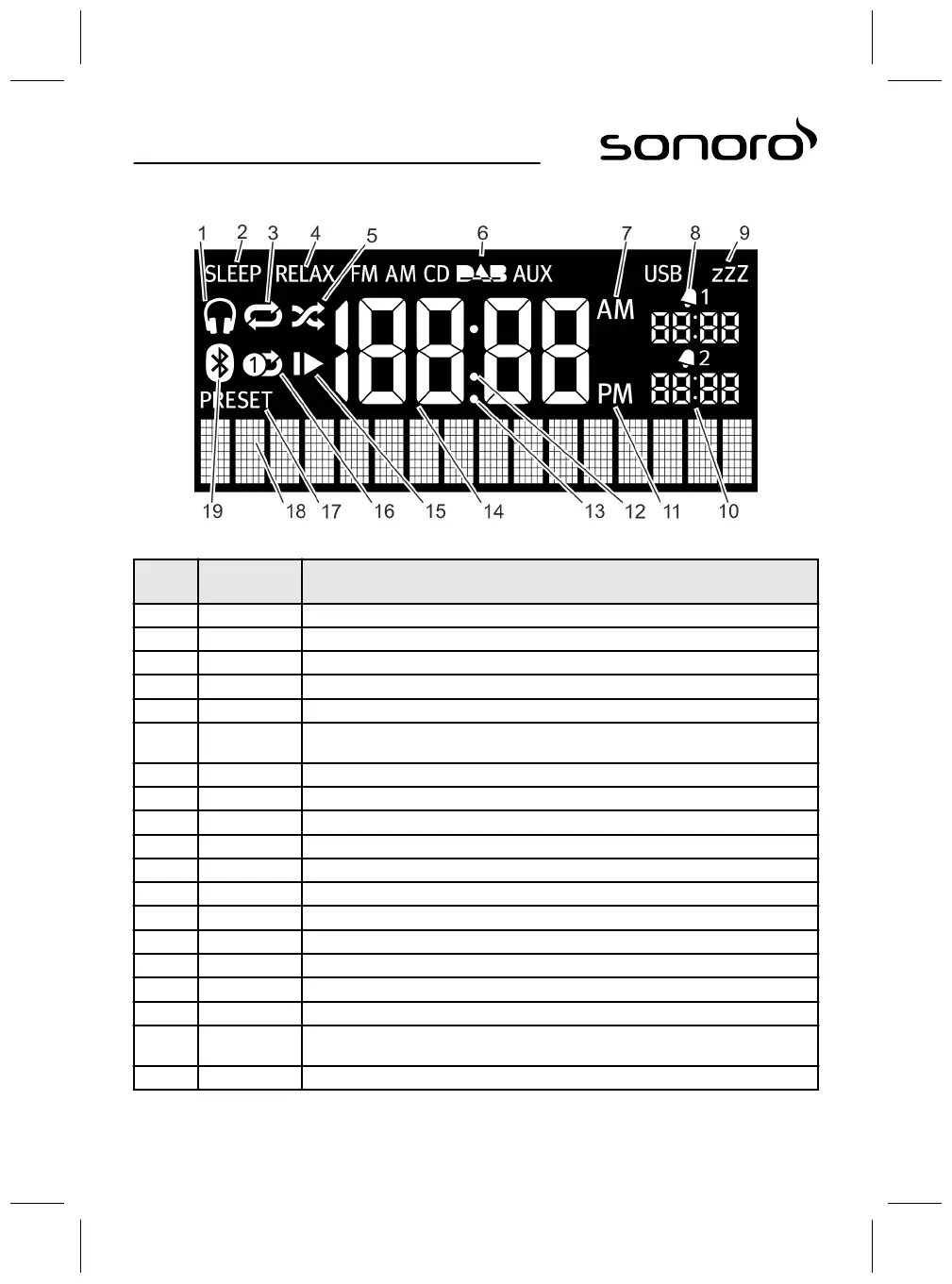
6 Display
Fig. 7: Display
Item
(Fig. 7)
Symbol Function
1 Headphones Headphones are connected.
2 Sleep The Sleep Timer is on.
3 Repeat CD: repeat all tracks on the CD.
4 Relax The Relax mode is on.
5 Shuffle CD: Random play order of individual tracks
6 FM/CD/DAB/
AUX/USB
Displays the selected operating mode.
7 AM Time suffix in the 12-hour setting.
8 Alarm 1 Displays the set Alarm 1 time.
9 Snooze The Snooze function is on.
10 Alarm 2 Displays the set Alarm 2 time.
11 PM Time suffix in the 12-hour setting.
12 Colon Flashes to indicate seconds.
13 Point For the FM frequency range (without RDS).
14 Time Displays the current time.
15 Resume CD: resume playback.
16 Repeat One CD: repeat one track.
17 Preset Station memory
18 Lower display
section
Display for date, menus, frequencies, etc.
19 Bluetooth Bluetooth is on.
56



 To Next Page