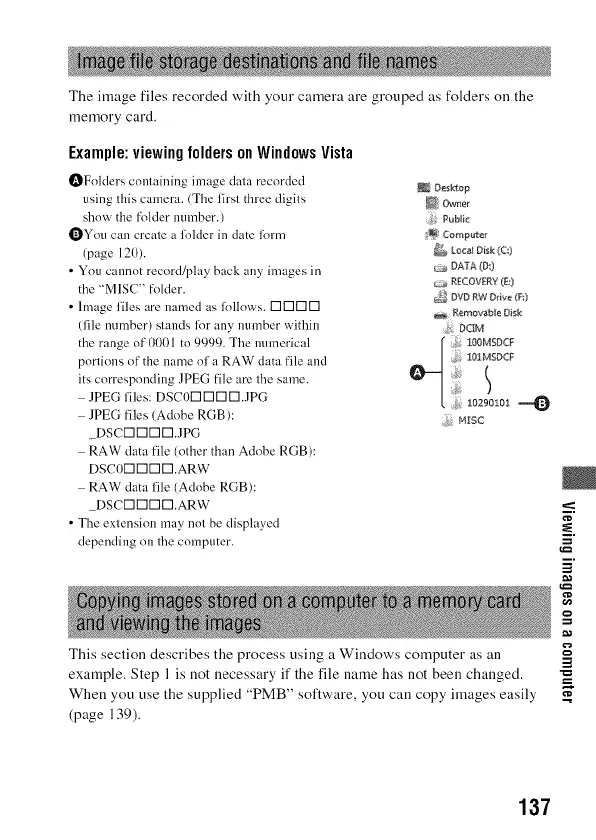
The image files recorded with your camera are grouped as folders on the
memory card.
Example:viewingfoldersonWindowsVista
OFolders containing image data recorded
using this cumera. (The first three digits
shnw the folder tmmber.)
OYou can create a lolder in date lorm
(page 120).
• You cannot record!play back any images in
the "MISC" folder.
• hnage files are named as lollnws. DI-II-II-I
(file number) stands lk)r any munber within
the range of 0(t01 to 9999. The munerical
portions of the name nf a RAW data file and
its corresponding JPEG file are the same.
JPEG files: DSCODDDD.JPG
JPEG files (Adobe RGB):
DSCD [][] [].JPG
RAW data file (other than Adobe RGB):
DSC0[] [][] [].ARW
RAW data file (Adobe RGB):
DSC[][][][].ARW
• The extension may not be displayed
depending on the computer.
Deskfop
_ Owner
f: Publlc
_ C¢<mputer
tacal Oi_k(c:)
E..x_RECOVER'((E;)
_,_ DVDRWDrive_F:}
17.erncecab[eDisk
_j, DCIM
!OIMSDCF
ioagolol
N;rSC
This section describes the process using a Windows computer as an
exainple. Step 1 is not necessary if the file name has not been changed.
When you use the supplied "PMB" software, you can copy images easily
(page 139).
i.
¢D
i
g
=
137



 To Next Page