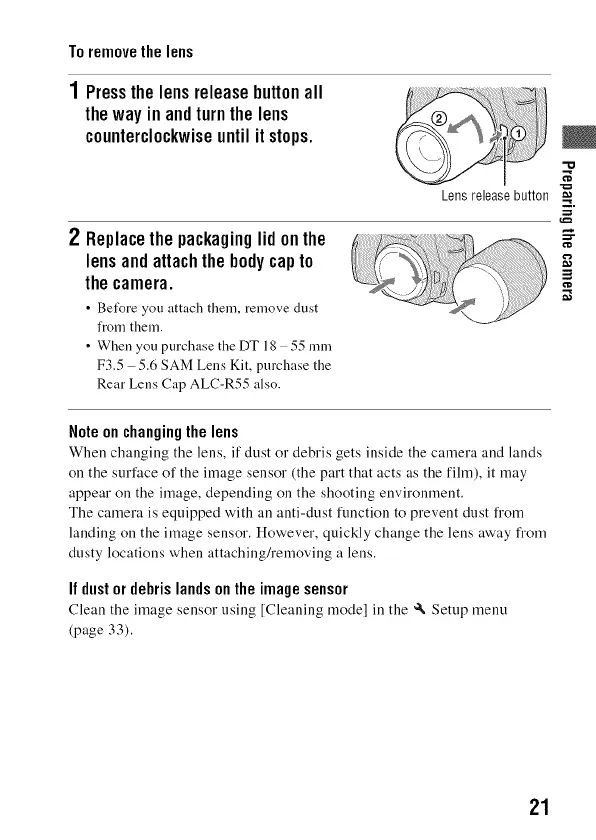
Toremovethelens
1 Pressthelensreleasebuttonall
thewayinandturnthelens
counterclockwiseuntilitstops.
2 Replacethepackaginglidonthe
lensandattachthebodycapto
thecamera.
• Bet_re you attach them, remove dust
from then1.
• When you purchase the DT18 55ram
F3.5 5.6 SAM Lens Kit, purchase the
Rear Lens Cap ALC-R55 also.
Lens release button
i i
Note on changingthe lens
When changing the lens, if dust or debris gets inside the camera and lands
on the surface of the image sensor (the part that acts as the film), it may
appear on the image, depending on the shooting environment.
The camera is equipped with an anti-dust function to prevent dust from
landing on the image sensor. However, quickly change the lens away from
dusty locations when attaching/removing a lens.
If dustor debris landson the imagesensor
Clean the image sensor using [Cleaning mode] in the _ Setup menu
(page 33).
21



 To Next Page