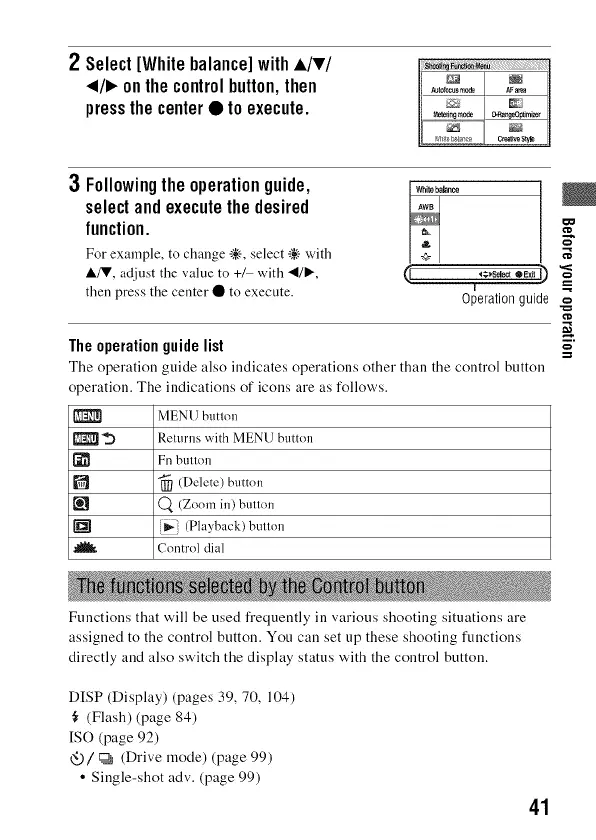
2 Select[Whitebalance]withA/v/
</1_onthecontrolbutton,then
pressthecenter• toexecute.
3 Followingtheoperationguide, _,h_,,_
selectandexecutethedesired ,w,
function. =_
For example, to change _.'-, select _÷ with +
&/V, adjust the value to +/ with _l/l_, _.
then press the center • to execute.
Theoperationguidelist
The operation guide also indicates operations other than the control button
operation. The indications of icons are as follows.
MENU button
1_ _) Retm'ns with MENU button
[_ Fn button
[] _ (Delete) button
(_ (Zoom in) button
_i (Playback) button
.J_ Control dial
F
,,,s_ ,E_0
T
Operation guide
o
Functions that will be used frequently in various shooting situations are
assigned to the control button. You can set up these shooting functions
directly and also switch the display status with the control button.
DISP (Display) (pages 39, 70, 104)
(Flash) (page 84)
[SO (page 92)
<__)/c_ (Drive mode) (page 99)
• Single-shot adv. (page 99)
41



 To Next Page