With an external wireless flash (sold separately), you can shoot with the
flash without a cord when the external flash is not attached to the camera.
By changing the position of the flash, you can shoot an image with a three
dimensional feel by highlighting the contrast of light and shadow' on the
subject.
For the actual steps of shooting, refer to the operating instructions of the
flash.
1Attachthewirelessflashtotheaccessoryshoeandturnboth
thecameraandtheflashon.
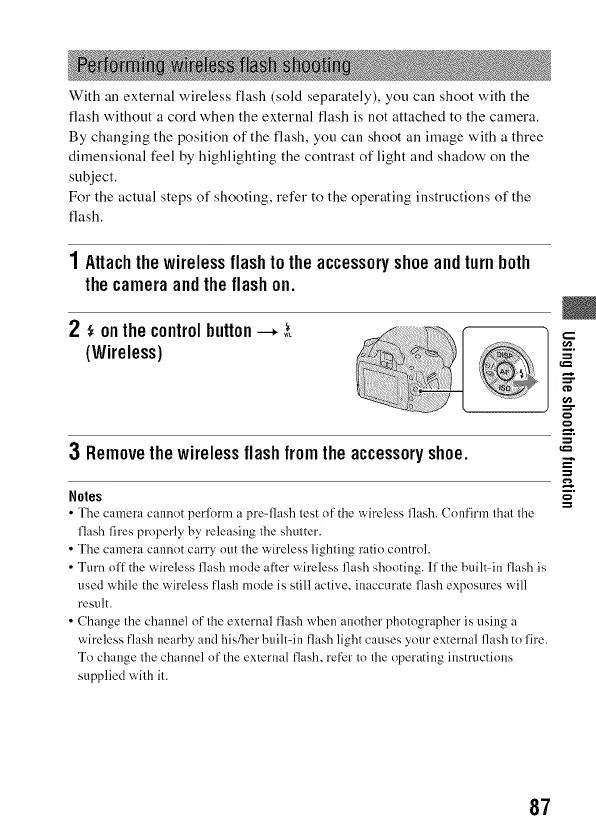
2 ,_onthecontrolbutton--, 3_
(Wireless)
....¢_;_:_i_i!_i:i!_!_ii!i!!iiii_i!ili%iii'_i_ ...._:_
3 Removethewirelessflashfromtheaccessoryshoe.
Noles
• The camera cmmot perlilrnl +_pre=flash test of the wireless fh+sh. Confirm th;it the
flash fires properly by releasing the shutter.
• Tile camera cannot carry out the wireless lighting ratio control.
• Turn off the wireless flash mode after wireless flash shooting. If the built-in flash is
used while the wireless flash mode is still active, inaccurate flash exposures will
result.
• Change the channel of the external flash when another photographer is using a
wireless flash nearby and his/her built=in flash light causes your external flash to fire.
To change the channel of the external flash, refer to the operating instructiolls
supplied with it.
=.
i.
87



 To Next Page