Imageprocessing
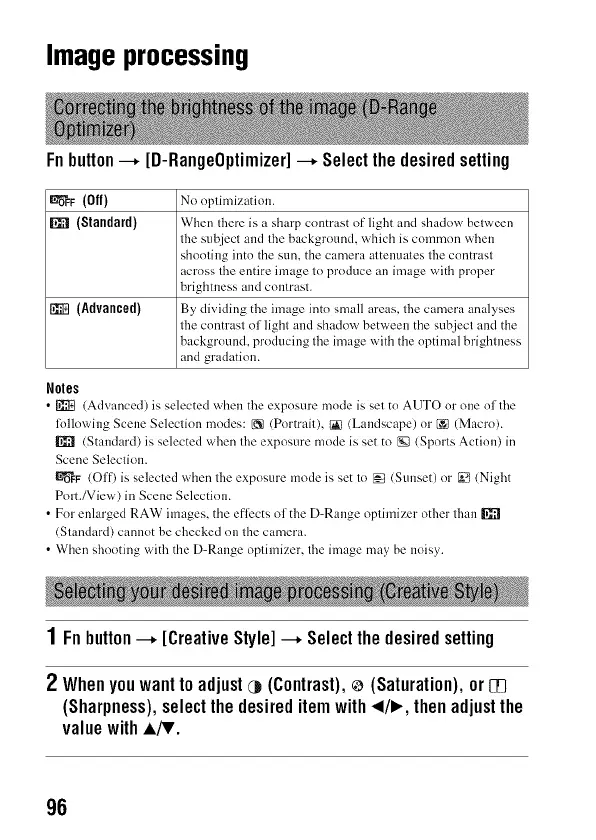
Fnbutton--4 [D-RangeOptimizer]--4 Selectthedesiredsetting
i_FF (Off) No optimizatioll.
Nil (Standard) When there is a sharp contrast of light and shadow between
tile suhject and tile background, which is common when
shooting into the sun, the camera attenuates tile contrast
across tile entire image to produce an image with proper
brightness and contrast.
gin (Advanced) By dividing the image into small areas, tile camera analyses
tile contrast of light and shadow between the subject and the
background, producing tile image with the optimal brightness
and gradation.
Notes
• _] (Advanced) is selected when the exposure mode is set to AUTO or one of the
lollowing Scene Selection modes: _ (Portrait), U_ (Landscape) or {N (Macro).
(Standard) is selected when tile exposure mode is set to g;_ (Sports Action) in
Scene Selection.
_F (Off) is selected wizen tile exposure mode is set to _ (Sunset) or [] (Night
Port./View) in Scene Selection.
• For enlarged RAW images, the eflccts of the D-Range optimizer other than
(Standard) cannot be checked on the camera.
• Wizen shooting with the D-Range optimizer, tile image may be noisy.
1 Fnbutton--, [CreativeStyle]--, Selectthedesiredsetting
2 Whenyouwanttoadjust_ (Contrast),_ (Saturation),orm
(Sharpness),selectthedesireditemwith_1/1_,thenadjustthe
valuewithA/v.
96



 To Next Page