Installation and Connections
Installation
44
Installation
1
Set IMG-FLIP to ON in the SYSTEM menu.
2
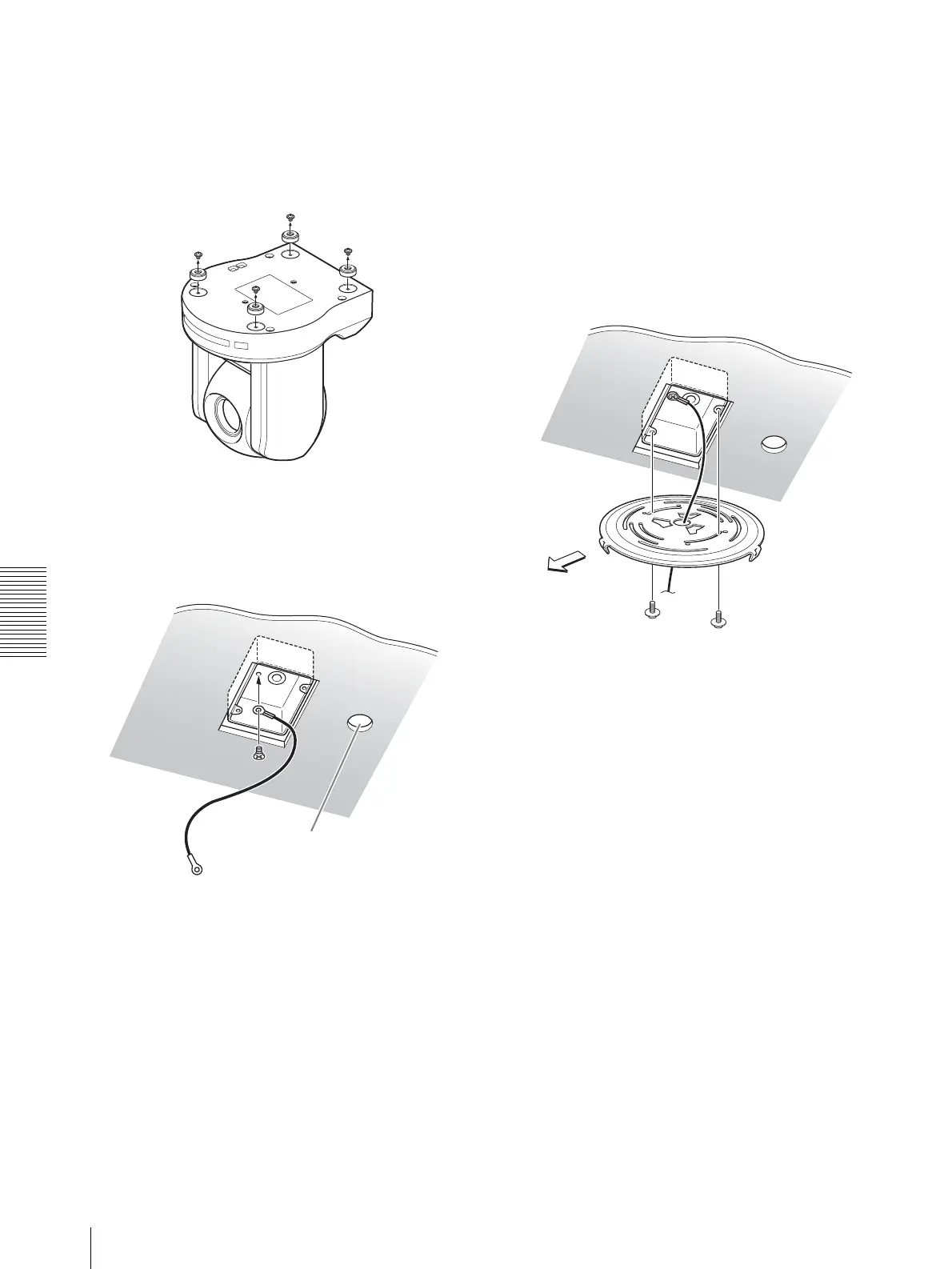
Loosen the four screws on the bottom of the camera
to remove the four feet.
3
Attach the wire rope to the junction box on the
ceiling.
Use an appropriate screw (not supplied) to attach
the wire rope to the junction box.
4
Attach the ceiling bracket (B) to the junction box on
the ceiling.
Align the holes in the bracket with those in the
junction box, and use appropriate screws (not
supplied).
There are three screw holes along the edges of the
ceiling bracket (B). Later, the front of the camera
will be positioned at one of the screw holes. Adjust
the direction of the ceiling bracket (B) so that the
camera will face the front and attach the bracket
securely.
Hole for connecting cables
Ceiling
Wire rope
(supplied)
Ceiling
bracket
(B)
Front of the camera
Ceiling




 To Next Page