Appendix
Presetting Items
59
Presetting Items
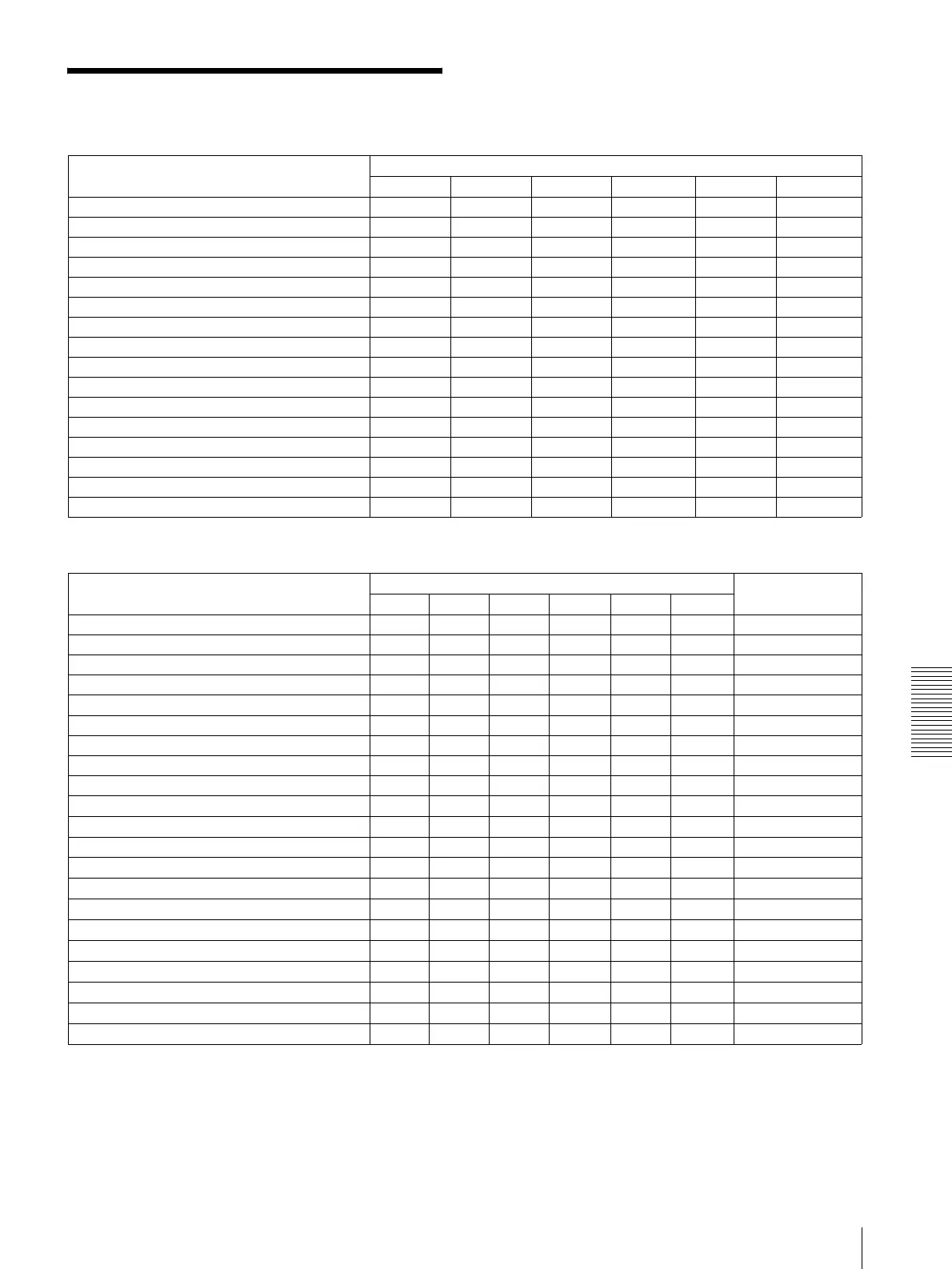
The following setting items can be stored in the memory of the camera.
Presetting menu items
* Default by resetting “—” means that the camera starts with the setting stored in Position 1, but you cannot reset the setting using the
RESET button.
** The default setting is obtained by resetting Position 1.
a : Setting items retained in memory when the power is turned off and on again. The camera starts with these settings.
× : Setting items cleared from the memory when the power is turned off and on.
Presetting item Presetting position number
123456
Pan/tilt position aaaa a a
Zoom position aaaa a a
Digital zoom on/off aaaa a a
Auto/manual focus mode aaaa a a
Focus position aaaa a a
White balance mode aaaa a a
Red/blue gain setting aaaa a a
Exposure mode aaaa a a
Shutter speed value aaaa a a
Iris value aaaa a a
Gain value aaaa a a
Brightness level aaaa a a
Exposure compensation on/off aaaa a a
Exposure compensation level aaaa a a
Back lighting on/off aaaa a a
Aperture level aaaa a a
Menu item Presetting position number Default by
resetting*
123456
EXPOSURE MODE aaaaaaFULL AUTO
EX-COMP aaaaaaOFF
SPOT AE a ×××××—
FOCUS AUTO/MANUAL aaaaaaON
NORMAL, INTERVAL, ZOOM Trg
a
×××××NORMAL**
WHITE BALANCE MODE aaaaaaWB. AUTO
WHITE BALANCE MANUAL R./B. GAIN aaaaaaWB. AUTO
D-ZOOM aaaaaaD-ZOOM ON
PAN-TILT LIMIT a ×××××—
PICTURE EFFECT
a
×××××OFF**
WIDE
a
×××××OFF**
APERTURE aaaaaa8
DATA MIX
a
×××××—
IR-RECEIVE
a
×××××—
IMG-FLIP
a
×××××—
PAN REVERSE
a
×××××—
TILT REVERSE
a
×××××—
DISPLAY INFO
a
×××××—
ANALOG OUPUT 1
a
×××××—
RGB/SYNC SELECT
a
×××××—
ANALOG OUTPUT 2
a
×××××—




 To Next Page