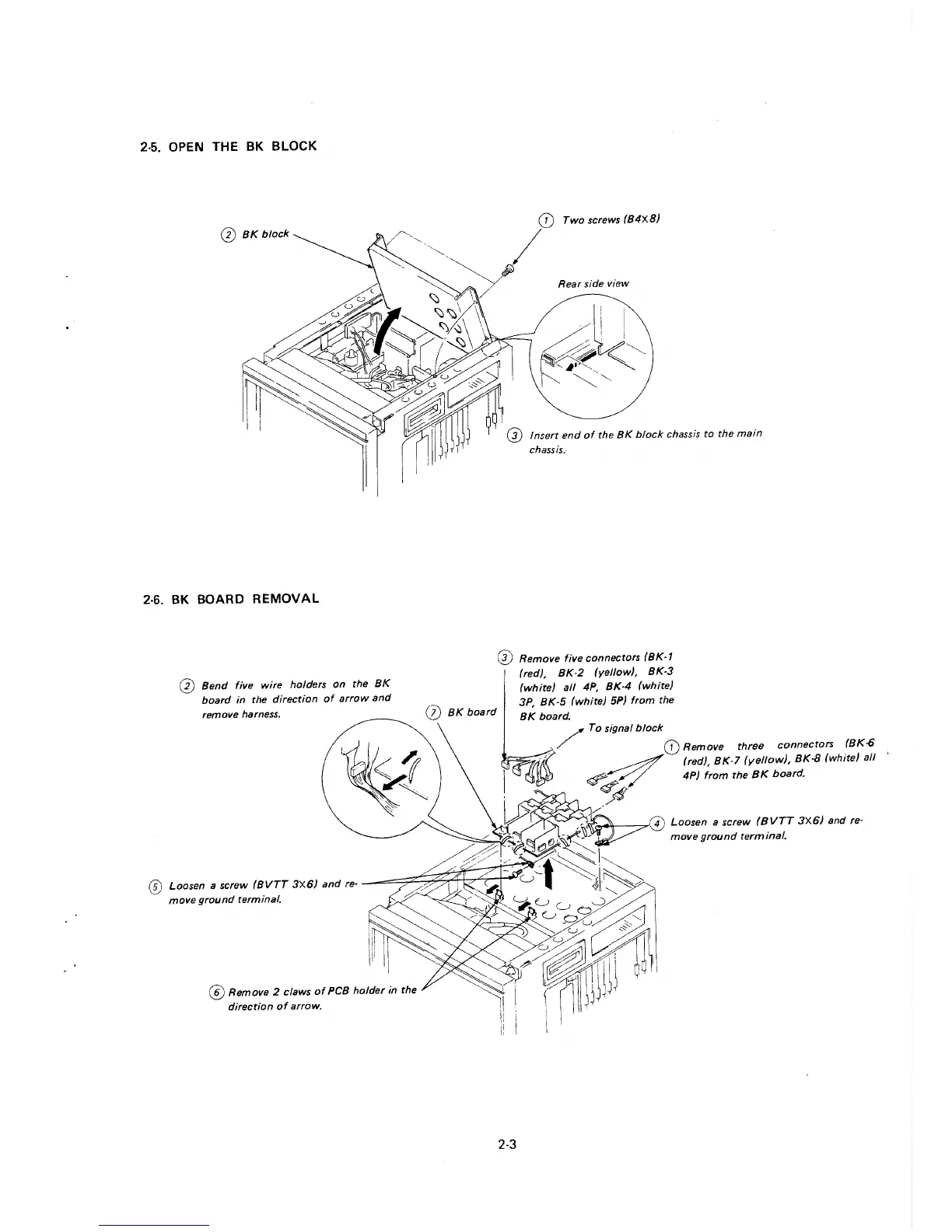
2-5. OPEN THE BK BLOCK
0 BK block
2-6. BK BOARD REMOVAL
0 Bend five wire holders on the BK
board in the direction of arrow and
remove harness.
0 BK board
Two screws (B4XB)
Rear side view
0 Remove five connectors (BK-1
(red), BK-2 (yellow), BK-3
(white) all 4P, BK-4 (white)
3P, BK-5 (white) 5P) from the
BK board.
/ To signal block
(D Remove three connectors (BK-6
~
(red), BK-7 (yellow), BK-8 (white) all
~// 4P) from the BK board.
/4
"''°'--~@ Loosen a screw (BVTT 3X6) and re-
move ground terminal,
(D Loosen a screw (BVTT 3X6) and re- --==:;;Z~~~t:z:1:;;;~
move ground terminal.
@ Remove 2 claws of PCB holder in the
direction of arrow.
2-3







 To Next Page