Cf)
....
z
w
::;;
....
Cf)
::J
3
<(
.;
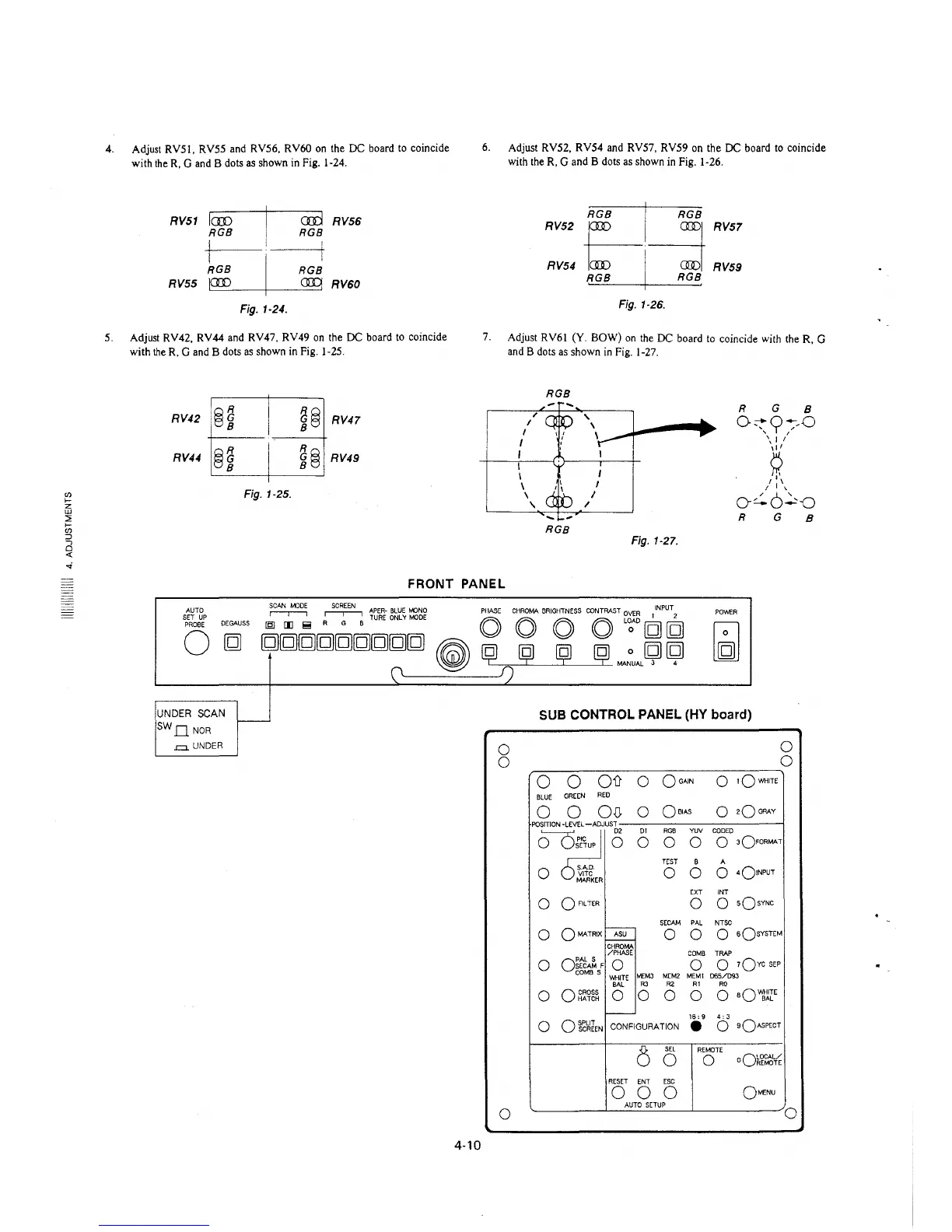
4. Adjust RVS!, RV55 and RV56, RV60 on the DC board to coincide
with the R, G and B dots as shown in Fig. 1-24.
RV51 fcro
RGB
cm RV56
RGB
RGB RGB
RV55 I._CID __ -+---®~ RV60
Fig. 1-24.
5. Adjust RV42, RV44 and RV47, RV49 on the DC board to coincide
with the R. G and B dots as shown in Fig. 1-25.
QjR
RV42 0
RV44 @~
Fig. 1-25.
RGQ
8
e RV47
RjQ
e RV49
6. Adjust RV52, RV54 and RV57, RV59 on the DC board to coincide
with the R, G and B dots as shown in Fig. 1-26.
RV52
~I~
RV57
RV54
RGB I RGB
RV59
Fig. 1-26.
7. Adjust RV6J (Y. BOW) on the DC board to coincide with the R. G
and B dots as shown in Fig. 1-27.
I
I
I
I
I
;
I
\
\
'
RGB
RGB
Fig. 1-27.
R G 8
O::tn~,o
'y,
'8'
,,,
/ I '
0~6~-0
R G
B
FRONT PANEL
AUTO
SET UP
PROBE
0
DEGAUSS
UNDER SCAN
SW D NOR
.=. UNDER
~
~
APER- BLUE t-NJNO PHASE CHROMA BRIGHTNESS CONTRAST OVER INPUT
[§J (E !!! A G B TURE ONLY MOOE O O O O L~AO [g] [g]
[g][g][g][g][g][g][g][g[g
~
~
ij ij
~
MA~UAL
~ ~
POWER
SUB CONTROL PANEL (HY board)
0
0
0
0
0 0
Oil 0
OGAIN
0
1QY-IHITE
BLUE
GREEN
RED
0 0
OD.
0
QoiAS
0
2Q GRAY
POSITION -LEVEL -ADJUST
o~O
01 RGB
YUV CODED
0 0 0
0 3OFORMAT
TEST
B
A
0 S.A.0.
0 0 0
4o!NPUT
VlTC
MARKER
EXT INT
0
0 FILTER
0 0
sQsYNC
SECAM PAL NTSC
0
OMA..TRIX
ASU
0 0
0 6OSYSTEM
CHROMA
/PHASE
COMB TRAP
0
o:t6A~ F
0 0
0 1Ovc SEP
COMBS
WHITE
MEM3 MEM2
MEMl 065/093
BAL
R3
R2
Al
RO
0
0 CROSS
HATCH 0 0 0 0 0
aQ~lIE
-
16, 9
4; 3
0
Ofc~lEN
CONFIGURATION
•
0
sQAsPECT
0
SEL
REMOTE
0
0
oQ~f~¼
RESET ENT ESC
0
0
0
OMENU
AUTO SETUP
0
0
4-10







 To Next Page