6
Name and Function of Parts
Front
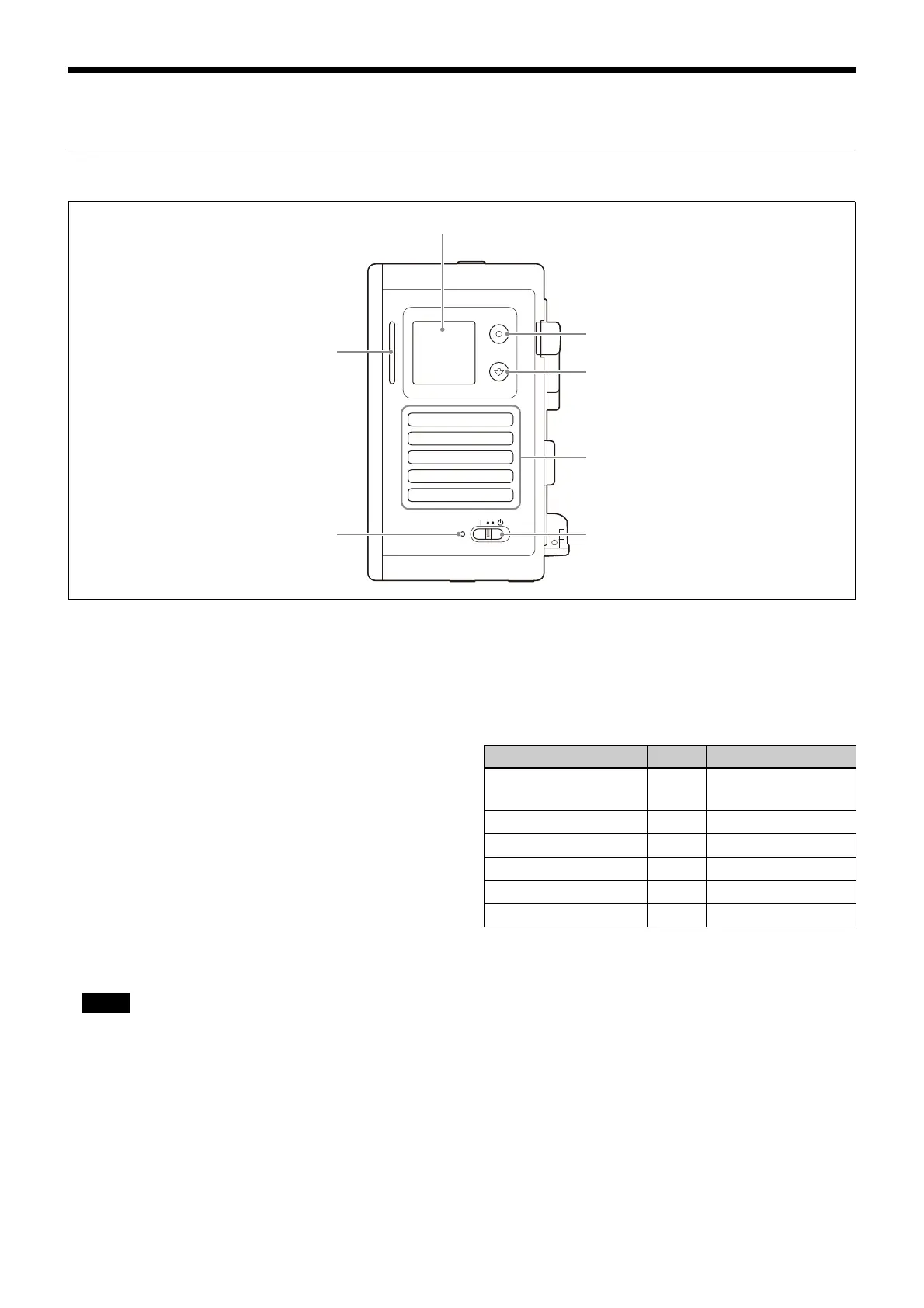
1Display
Displays the status of the unit and an access link
for the web
menu. You can also turn streaming
on/off using the Apply button and Forward
button.
Switch between display co
ntent using the Apply
button and Forward button.
2 Apply button
Switches between the main screen and subscreen
on the display
and applies settings on the
subscreen.
3Forward button
Switches pages on the main screen and
subscreen
on the display and changes selection
options of settings on the subscreen.
4Air intake vent
Do not block the air intake vent.
5Power switch
Switches the power of the unit to on/standby.
When switched to standby, the unit shuts
down
and transitions to standby mode.
The switch does
not completely disconnect the
power supply to the unit.
6 Power lamp
Lit when the power is
turned on.
7Status lamp
Indicates the status of the unit by the color and
state (lit/blinking).
You can check the description of cautions and
warnings on
the [System Message] tab of the
[Monitoring] page in the web menu or on the
Message screen on the display of the unit.
Note
Status lamp indication Color Description
Blinking Blue Booting/shutting
down
Lit Blue Streaming
Blinking White Updating firmware
High-speed blinking Orange Caution
Blinking Red Warning
High-speed blinking Red Warning













 To Next Page