33
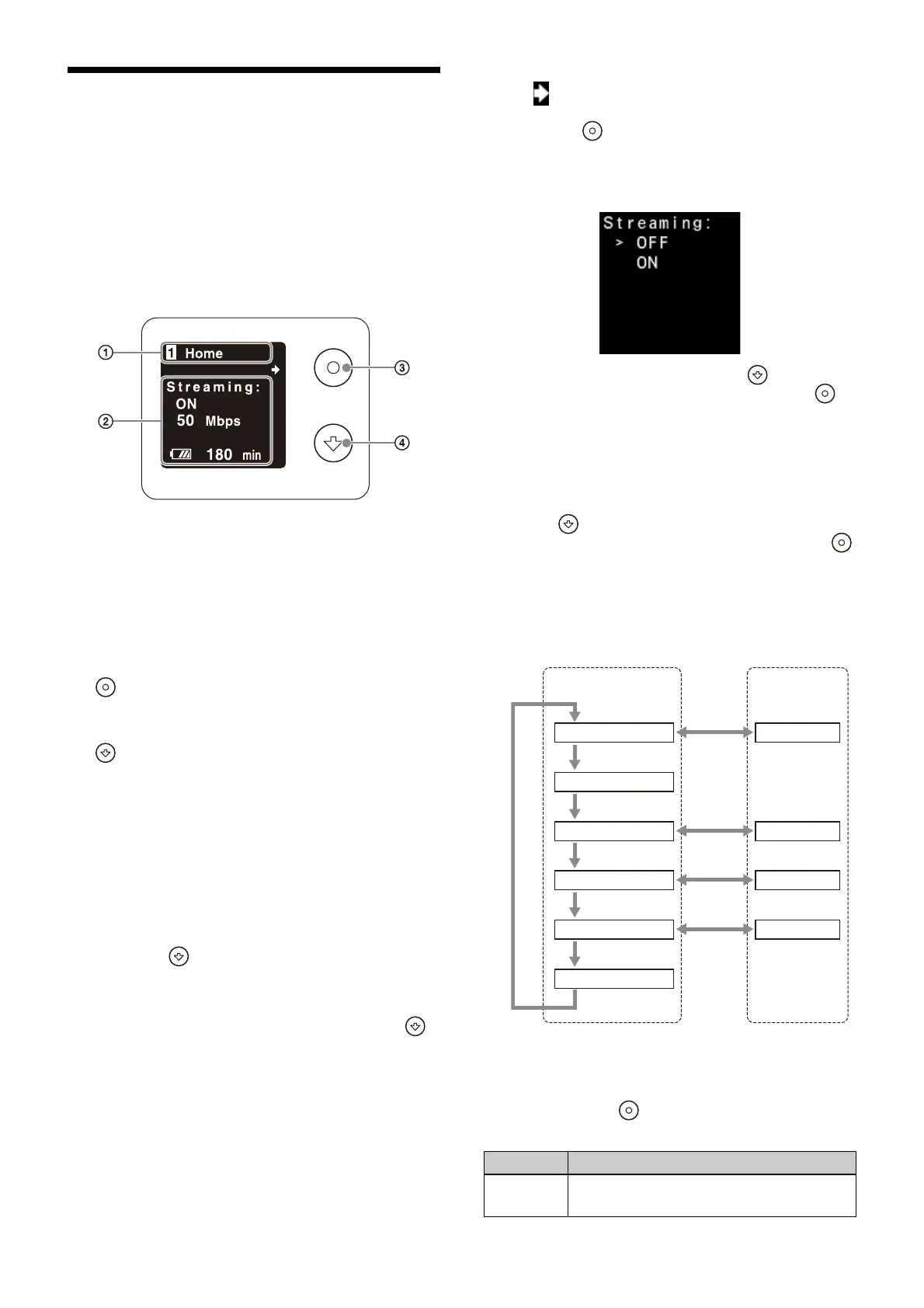
Display of the Unit
You can check the status of the unit and the
access link for the web menu on the display of the
unit.
You can also turn streaming on/off.
Switch between display co
ntent using the Apply
button and Forward button.
Display screen operations
Display
Title
Displays the title of th
e main screen.
Disp
lay area
Displays information and configuration
items.
Controls
(Apply) button
Switches between the main screen and
subscreen, and applies settings on the subscreen.
(Forward) button
Switches pages on the main screen and
subscreen
, and changes selection options of
settings on the subscreen.
Switching the main screen
1
Turn the power switch on to boot the unit.
The Home screen appears.
2
Press the (Forward) button.
The screen switches between Home, IN/OUT,
Network, Web Menu URL, System, and
Message screens in that order. Press the
(Forward) button on the
Message screen to
return to the Home screen.
If a warning or caution state occurs
on the unit,
the warning or caution is displayed on the
Message screen.
If you switch to the Message screen while not in
the warning
or caution state, “No Message” is
displayed.
Switching the subscreen
When is displayed on the 2nd line on the main
screen, you can switch to the subscreen by
pressing the (Apply) button.
Subscreens include screens for configuring
setting
s and screens that display information.
Screen for configuring settings:
Select a selection option using the (Forward)
button, and confirm the selection using the
(Apply) button.
After an option is applied, the display returns to
th
e main screen or the subscreen for selecting a
menu item.
Screen displaying information:
Press the (Forward) button to switch the
content displayed on the subscreen. Press the
(Apply) button to return to the main screen.
Display screens
Screen structure
Home screen
Main screen:
Displays the power supply and streaming status.
You can press the (Apply) button to display the
subscreen and turn streaming on/off.
Item Description
Streaming: Displays the streaming status (ON/OFF)
and tr
ansmit bit rate (Mbps).
Forward button
Main screen Subscreen
Apply
button
Apply
button
Apply
button
Apply
button
Forward button
Forward button
Forward button
Forward button
Forward button
Home screen
IN/OUT screen
Network screen
Web Menu URL screen
System screen
Message screen
Configure menu
Detail view
Detail view
Configure menu












 To Next Page