9
Preparation
Power Supply
You can use a battery pack or AC power via an AC
adaptor.
For safety, use only the Sony battery packs and AC
adaptors listed below.
• BP-GL95B Battery Pack
• AC-DN10A AC Adaptor
Using a battery pack
Insert the battery pack into the battery pack
mount (page 7) and slide the battery pack down
to lock it in place.
To remove it, unlock the battery pack by sliding i
t
up while pressing the battery release lever
(page 7), then remove it.
• Before use, charge the battery pack with a
battery charger.
• A warm battery pack immediately after use may
not
be able to be fully recharged.
Checking the remaining battery charge
When using a battery pack, the remaining battery
time or battery voltage is displayed on the Home
screen (page 33) of the display of the
unit and on
the [Power Status] tab (page 21) of the
[Monitoring] page in the web menu.
The remaining time is displayed in minutes by
ca
lculating how long the battery pack can be used
if the unit is used continuously at the current rate
of power consumption.
If the remaining battery charge becomes low
If the remaining charge of the battery pack falls
bel
ow a set value during use, the status lamp
blinks as a warning.
If the remaining charge is further reduced until
operation cannot
be continued, a message will be
displayed to inform you that the battery pack is
empty.
Replace the battery pack with one that i
s fully
charged.
Changing the remaining charge warning level
Change the settings on the [Power Setting] tab
(page 20) of the [Monitoring] page in the web
menu.
Using AC power (DC IN power)
The unit can be powered by connecting to an AC
power source using an AC adaptor.
The unit supports 11 V to 17 V input voltage range.
When switching to the DC IN power supply during
battery
operation, use a power supply with a
voltage in the range 12 V to 17 V for safer power
supply switching.
Using a battery pack and DC IN power
supply together
Whenever an active power supply is applied using
a battery pack and a DC IN power supply, the DC
IN power supply takes precedence.
When the power supply switches from battery
operation to the DC IN power supply, operation of
the unit may stop if the following occurs.
• Chattering of the connector contacts when
i
nserting or removing the DC connector
• Voltage drop when switching between power
supplies (more preval
ent when the external load
is greater)
Attaching to a Camcorder using
Rods
You can attach the unit to a camcorder fitted with
ø15 rods (option) using a rod bracket.
Attachment procedure
1
Attach ø15 rods to the camcorder.
2
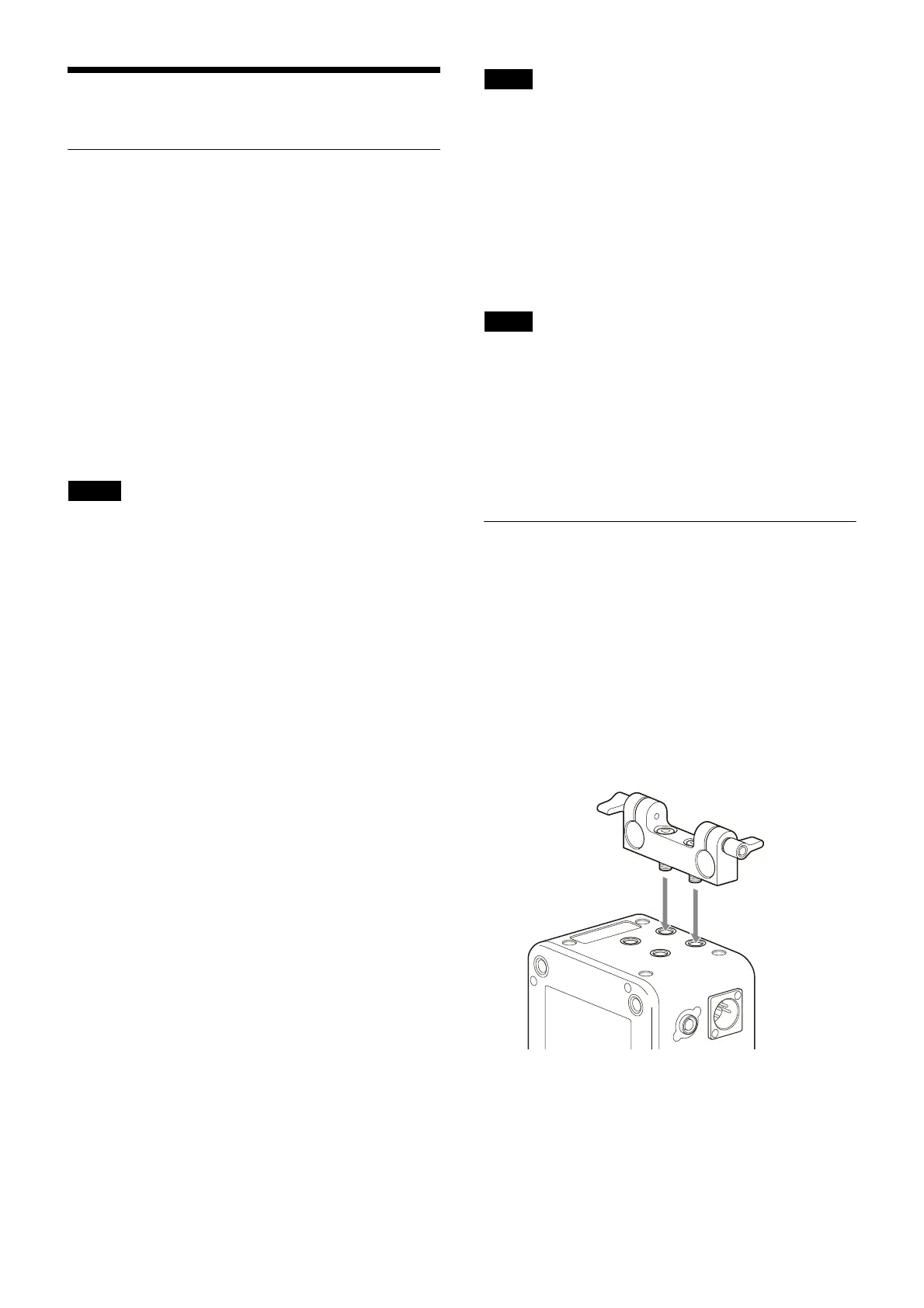
Attach the rod bracket to the bottom of the
unit.
There are two sets of mou
nting screw holes on
the bottom of the unit, and either set can be
used.
The screw holes (
1
/
4
inch) are 1/4-20UNC with
depth of 7.0 mm.
Notes
Note
Note










 To Next Page