34
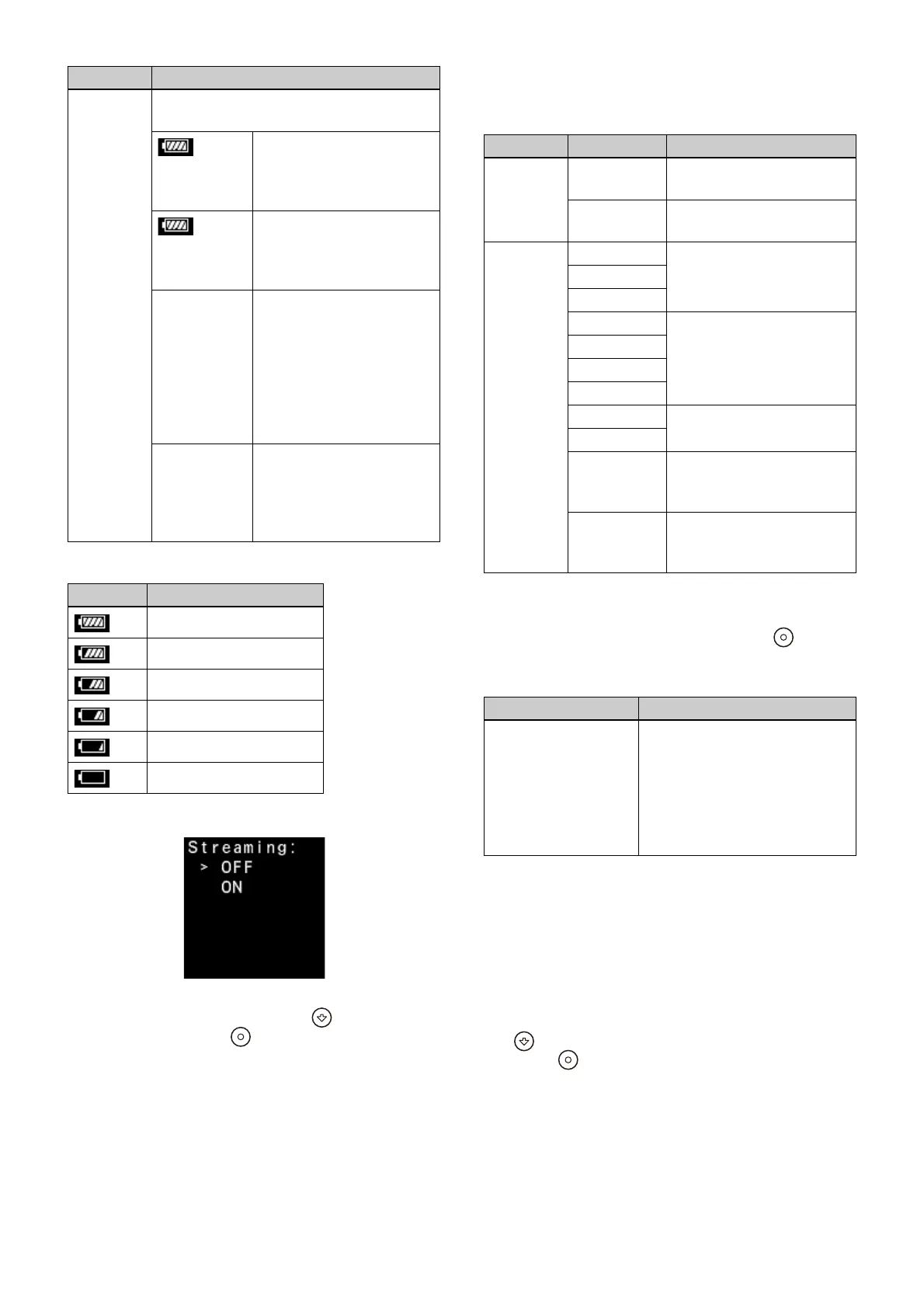
1) Battery level icon display
Subscreen:
Switches streaming on/off. The default value
is
OFF. Select ON or OFF using the (Forward)
button and press the (Apply) button.
If streaming cannot be started when Streaming is
set
to ON, it is automatically set to OFF, the status
lamp blinks orange for 3 seconds, and the reason
streaming cannot be started appears on the
Message screen.
IN/OUT screen
Displays the video input/output settings and
status.
Network screen
Main screen:
Displays the network status. Press the (Apply)
button to display the IP add
ress of the unit on the
subscreen.
Subscreen:
Displays the selected WAN port (for example,
[LAN: Selected])
.
The network link status and IP address of the LAN
connector or
USB connector are also displayed.
For details about WAN port selection, see
“Network tab” (page 29).
You can toggle the display between the LAN
conn
ector and USB connectors with each press of
the (Forward) button.
Press the (Apply) button to return to the main
screen.
Battery
level/
voltage
display
Displays the following according to the
ty
pe of power supply driving the unit.
** min
1)
Displays a battery level icon
and the remaining use time
(minutes) when using an
Info battery.
** %
1)
Displays a battery level icon
and the remaining capacity
(%) when using an Anton/
Bauer digital battery.
Batt: **V Displays the battery
vo
ltage (V) when using a
battery other than the
above or when [Battery
Remain] > [Voltage] is
selected in the web menu.
(See “Power Setting tab”
(page 20))
DC IN: **V Displays the input voltage
(V) on the DC IN c
onnector
when using an external
power supply connected to
the DC IN connector.
Display Description
100% to 91% charge
90% to 71% charge
70% to 51% charge
50% to 31% charge
30% to 11% charge
10% to 0% charge
Item Description
Item Description
Input
setting
SDI 1: IN Displayed for SDI connector
1 input setting.
SDI 1-4: IN Displayed for 3G-SDI (Quad
Link) input setting.
Input
signal
QFHD 59.94P QFHD: 3840×2160
QFHD 50P
QFHD 23.98P
FHD 59.94P FHD: 1920×1080
FHD 59.94i
FHD 50P
FHD 50i
HD 59.94P HD: 1280×720
HD 50P
No Signal Displayed when there is no
input or the input cannot
be
detected.
Mismatch Displayed when the input
signal does not match the
settings.
Item Description
<Dest.> Displays the transmit
destination nam
e and IP
address configured using
[Destination] on the [Settings]
tab of the [Streaming] page in
the web menu (see “Settings
tab” (page 23)).




 To Next Page