EasyManua.ls Logo

Sony CDP-3100 - Page 44

Sony CDP-3100
70 pages
Print Icon
To Next Page IconTo Next Page
To Previous Page IconTo Previous Page
Loading...
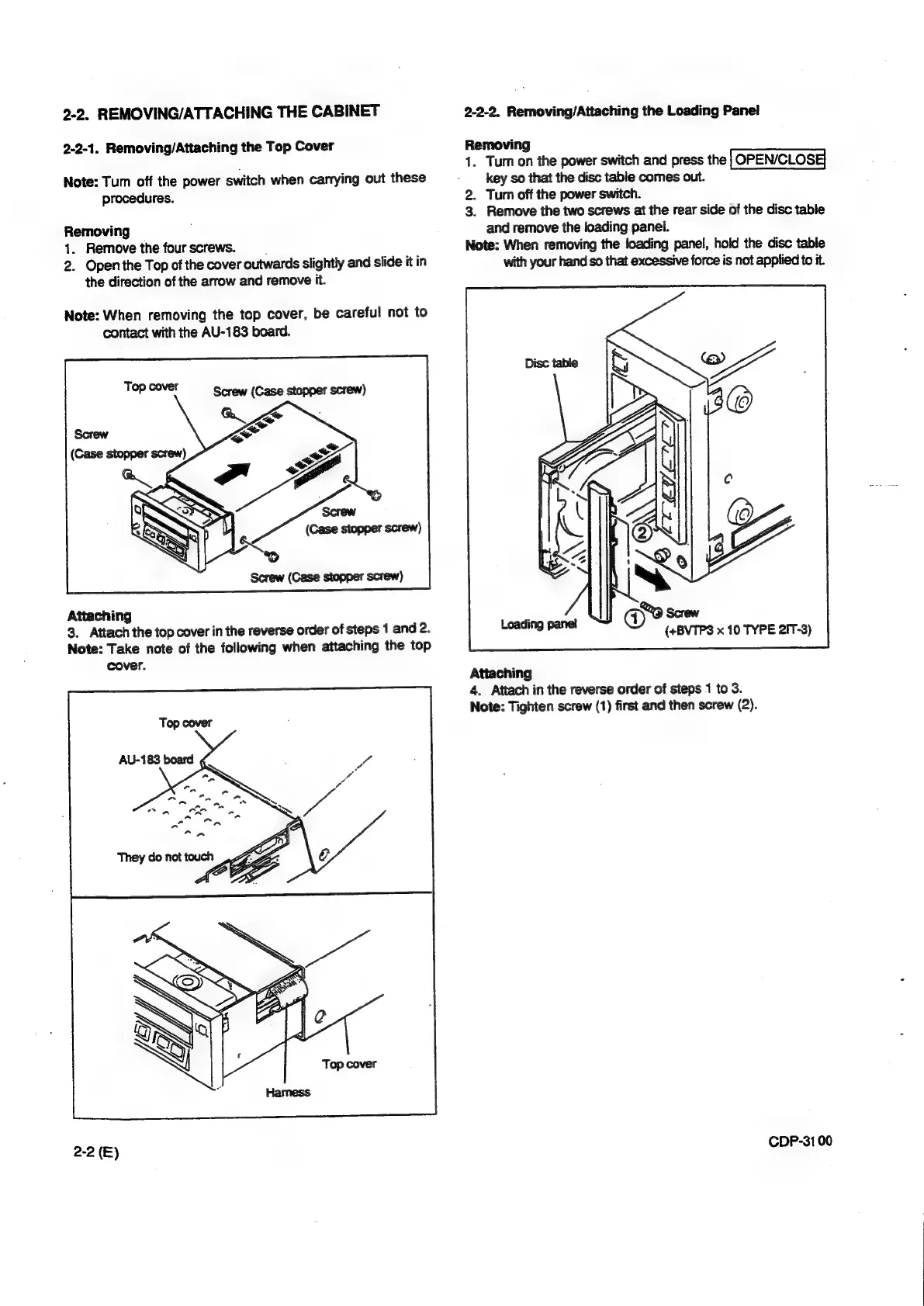
2-2.
REMOVING/ATTACHING
THE
CABINET
2-2-2.
Removing/Attaching
the
Loading
Pane!
2-2-1.
Removing/Attaching
the
Top
Cover
Removing
1.
Turn
on
the
power
switch
and
press
the
Note:
Tum
off
the
power
switch
when
carrying
out
these
-
key
so
that
the
disc
table
comes
out.
procedures.
2.
Turn
off
the
power
switch.
3.
Remove
the
two
screws
at
the
rear
side
of
the
disc
table
Removing
,
and
remove
the
loading
panel.
1.
Remove
the
four
screws.
Note:
When
removing
the
loading
panel,
hold
the
disc
table
2.
Open
the
Top
of
the
cover
outwards
slightly
and
slide
itin
with
your
hand
so
that
excessive
force
is
not
applied
to
it.
the
direction
of
the
arrow
and
remove
it.
Note:
When
removing
the
top
cover,
be
careful
not
to
contact
with
the
AU-183
board.
Screw
(Case
stopper
screw)
Attaching
3.
Attach
the
top
cover
in
the
reverse
order
of
steps
1
and
2.
Note:
Take
note
of
the
following
when
attaching
the
top
cover.
Attaching
4.
Attach
in
the
reverse
order
of
steps
1
to
3.
Note:
Tighten
screw
(1)
first
and
then
screw
(2).
CDP-31
00
2-2
(E)

Other manuals for Sony CDP-3100

Related product manuals