EasyManua.ls Logo

Sony CDP-3100 - Removing;Attaching the Front Panel; Replacing the Mechanism Deck

Sony CDP-3100
70 pages
Print Icon
To Next Page IconTo Next Page
To Previous Page IconTo Previous Page
Loading...
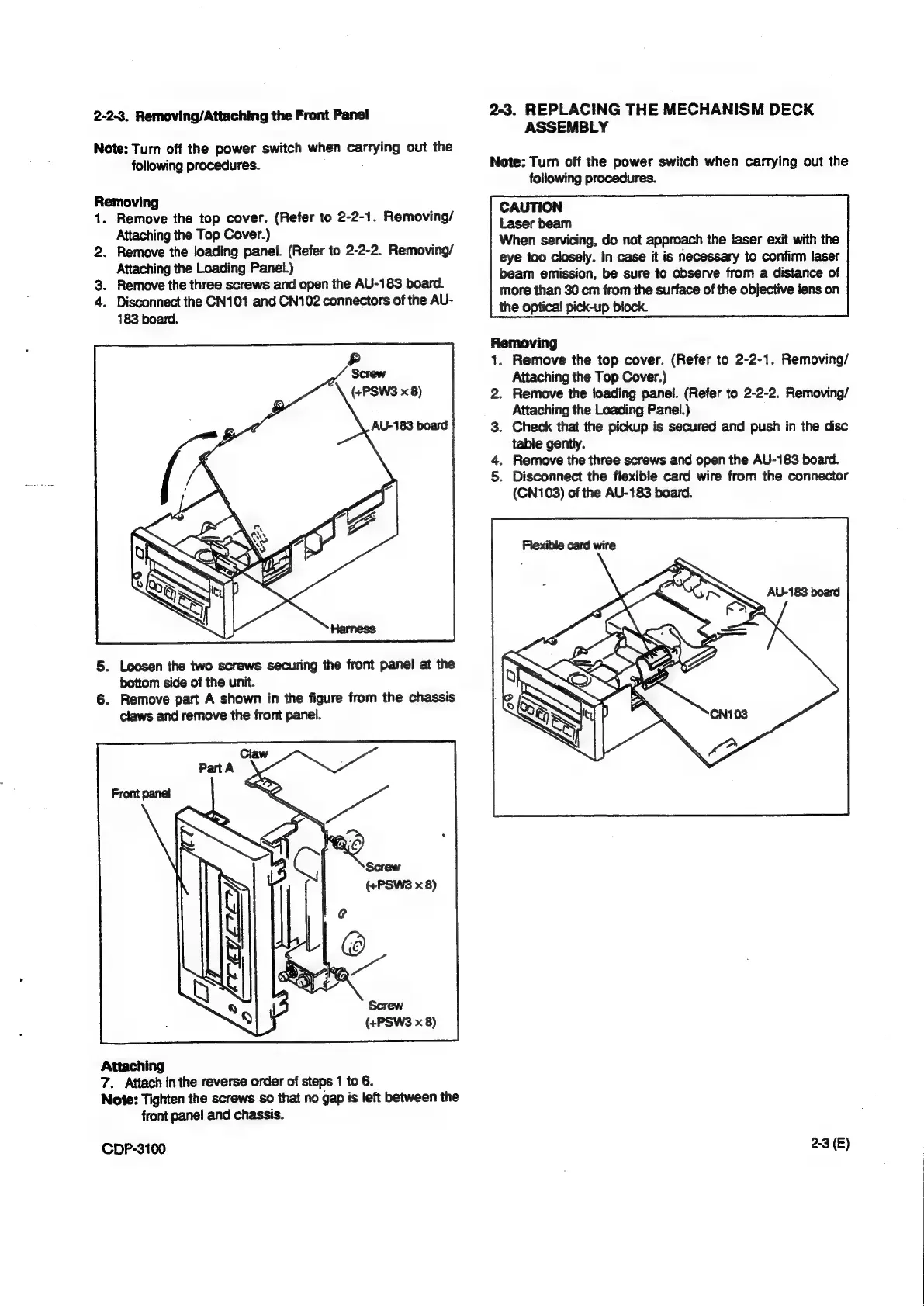
2-2-3.
Removing/Attaching
the
Front
Panel
Note:
Turn
off
the
power
switch
when
carrying
out
the
following
procedures.
Removing
1.
Remove
the
top
cover.
(Refer
to
2-2-1.
Removing/
Attaching
the
Top
Cover.)
2.
Remove
the
loading
panel.
(Refer
to
2-2-2.
Removing/
Attaching
the
Loading
Panel.)
3.
Remove
the
three
screws
and
open
the
AU-183
board.
4.
Disconnect
the
CN101
and
CN102
connectors
of
the
AU-
183
board.
ys)
Screw
(+PSWS
x
8)
5.
Loosen
the
two
screws
securing
the
front
panel
at
the
bottom
side
of
the
unit.
6.
Remove
part
A
shown
in
the
figure
from
the
chassis
claws
and
remove
the
front
panel.
(+PSWS
x
8)
Attaching
7.
Attach
in
the
reverse
order
of
steps
1
to
6.
Note:
Tighten
the
screws
so
that
no
gap
is
left
between
the
front
pane!
and
chassis.
CDP-3100
2-3.
REPLACING
THE
MECHANISM
DECK
ASSEMBLY
Note:
Turn
off
the
power
switch
when
carrying
out
the
following
procedures.
CAUTION
Laser
beam
When
servicing,
do
not
approach
the
laser
exit
with
the
eye
too
closely.
in
case
it
is
necessary
to
confirm
laser
beam
emission,
be
sure
to
observe
from
a
distance
of
more
than
30
cm
from
the
surface
of
the
objective
lens
on
the
optical!
pick-up
block.
Removing
1.
Remove
the
top
cover.
(Refer
to
2-2-1.
Removing/
Attaching
the
Top
Cover.)
2.
Remove
the
loading
panel.
(Refer
to
2-2-2.
Removing/
Attaching
the
Loading
Panel.)
3.
Check
that
the
pickup
is
secured
and
push
in
the
disc
table
gently.
4.
Remove
the
three
screws
and
open
the
AU-183
board.
5.
Disconnect
the
flexible
card
wire
from
the
connector
(CN103)
of
the
AU-183
board.
2-3
(E)

Other manuals for Sony CDP-3100

Related product manuals