EasyManua.ls Logo

Sony CDP-555ESD - Program Play

Sony CDP-555ESD
48 pages
Print Icon
To Next Page IconTo Next Page
To Previous Page IconTo Previous Page
Loading...
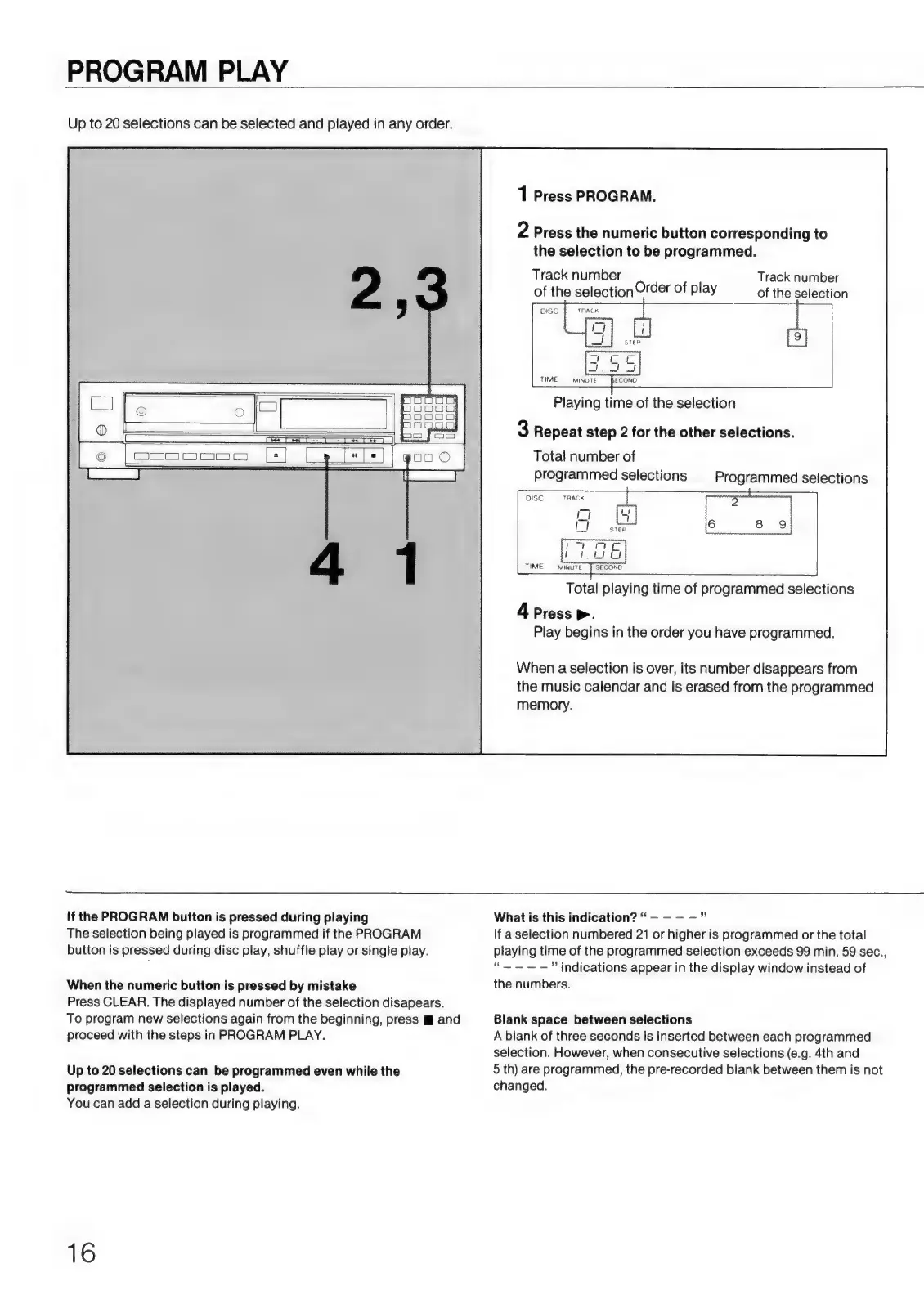
PROGRAM
PLAY
Up
to
20
selections
can
be
selected
and
played
in
any
order.
À
Press
PROGRAM.
2
Press
the
numeric
button
corresponding
to
the
selection
to
be
programmed.
Track
number
of
the
selection
Order
of
play
DISC
TRACK
Track
number
of
the
selection
TIME
Playing
time
of
the
selection
3
Repeat
step
2
for
the
other
selections.
Total
number
of
programmed
selections
Programmed
selections
DÉC
TAR
o
E
O
+
I
m
OG
TIME
MINUTE
£
SECOND
=3
UN
Total
playing
time
of
programmed
selections
4
Press
>.
Play
begins
in
the
order
you
have
programmed.
When
a
selection
is
over,
its
number
disappears
from
the
music
calendar
and
is
erased
from
the
programmed
memory.
If
the
PROGRAM
button
is
pressed
during
playing
The
selection
being
played
is
programmed
if
the
PROGRAM
button
is
pressed
during
disc
play,
shuffle
play
or
single
play.
When
the
numeric
button
is
pressed
by
mistake
Press
CLEAR.
The
displayed
number
of
the
selection
disapears.
To
program
new
selections
again
from
the
beginning,
press
m
and
proceed
with
the
steps
in
PROGRAM
PLAY.
Up
to
20
selections
can
be
programmed
even
while
the
programmed
selection
is
played.
You
can
add
a
selection
during
playing.
16
What
is
this
indication?
If
a
selection
numbered
21
or
higher
is
programmed
or
the
total
playing
time
of
the
programmed
selection
exceeds
99
min.
59
sec.,
“—
indications
appear
in
the
display
window
instead
of
the
numbers.
Blank
space
between
selections
A
blank
of
three
seconds
is
inserted
between
each
programmed
selection.
However,
when
consecutive
selections
(e.g.
4th
and
5
th)
are
programmed,
the
pre-recorded
blank
between
them
is
not
changed.

Related product manuals