EasyManua.ls Logo

Sony CDP-555ESD - Disc Playing

Sony CDP-555ESD
48 pages
Print Icon
To Next Page IconTo Next Page
To Previous Page IconTo Previous Page
Loading...
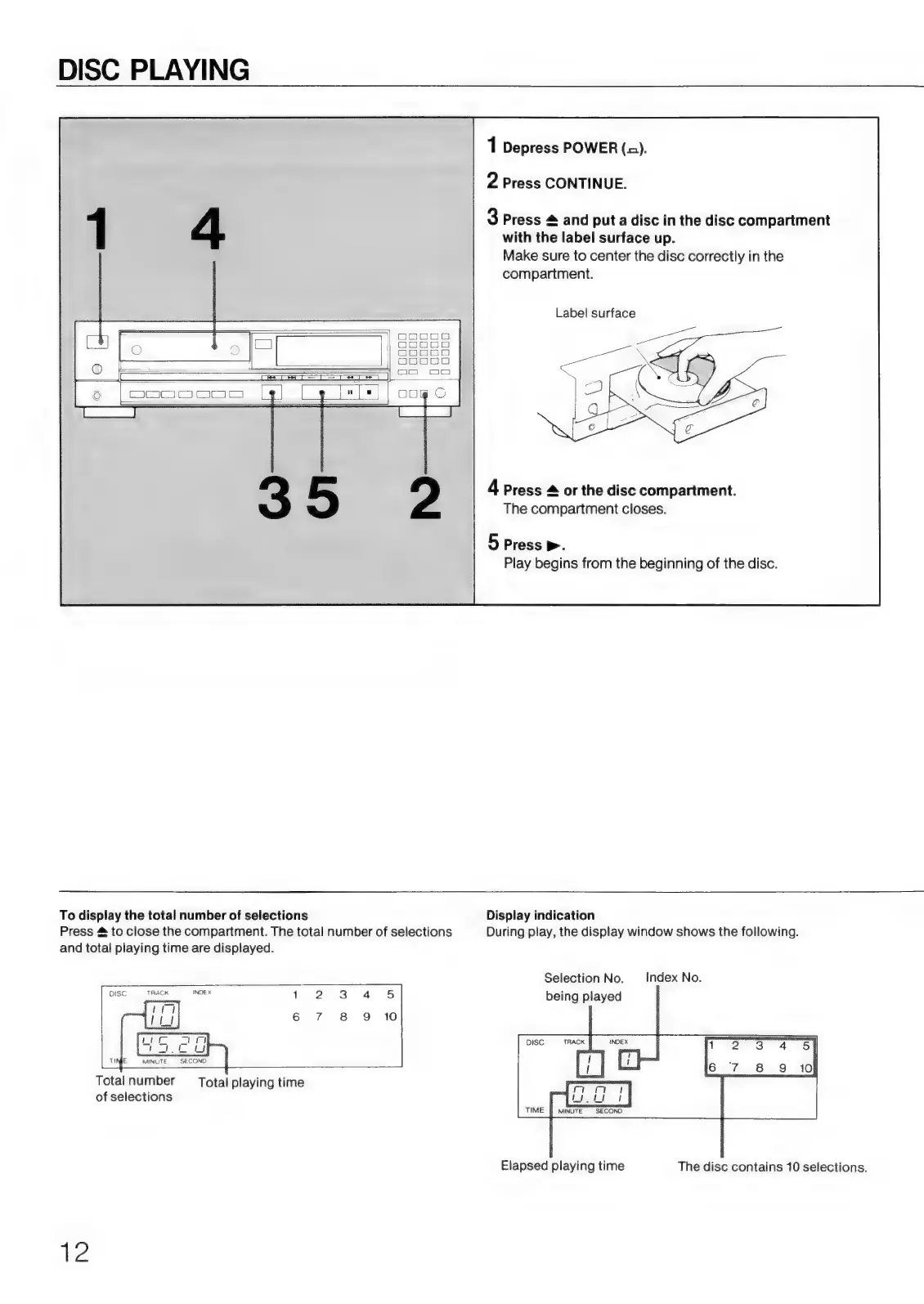
DISC
PLAYING
1
Depress
POWER
(a).
2
Press
CONTINUE.
3
Press
&
and
put
a
disc
in
the
disc
compartment
with
the
label
surface
up.
Make
sure
to
center
the
disc
correctly
in
the
compartment.
Label
surface
4
Press
#
or
the
disc
compartment.
The
compartment
closes.
5
Press
>.
Play
begins
from
the
beginning
of
the
disc.
To
display
the
total
number
of
selections
Press
&
to
close
the
compartment.
The
total
number
of
selections
and
total
playing
time
are
displayed.
DISC
TRACK
INDE
x
1
2 3
4
5
TINE
MINUTE
SECOND
Total
number
Total
playing
time
of
selections
12
Display
indication
During
play,
the
display
window
shows
the
following.
Selection
No.
Index
No.
being
played
MINUTE
SECOND
Elapsed
playing
time
The
disc
contains
10
selections.

Related product manuals