EasyManua.ls Logo

Sony CDP-555ESD - Shuffle Play; Repeat Play

Sony CDP-555ESD
48 pages
Print Icon
To Next Page IconTo Next Page
To Previous Page IconTo Previous Page
Loading...
SHUFFLE
PLAY
To
play
the
selections
in
a
random
order.
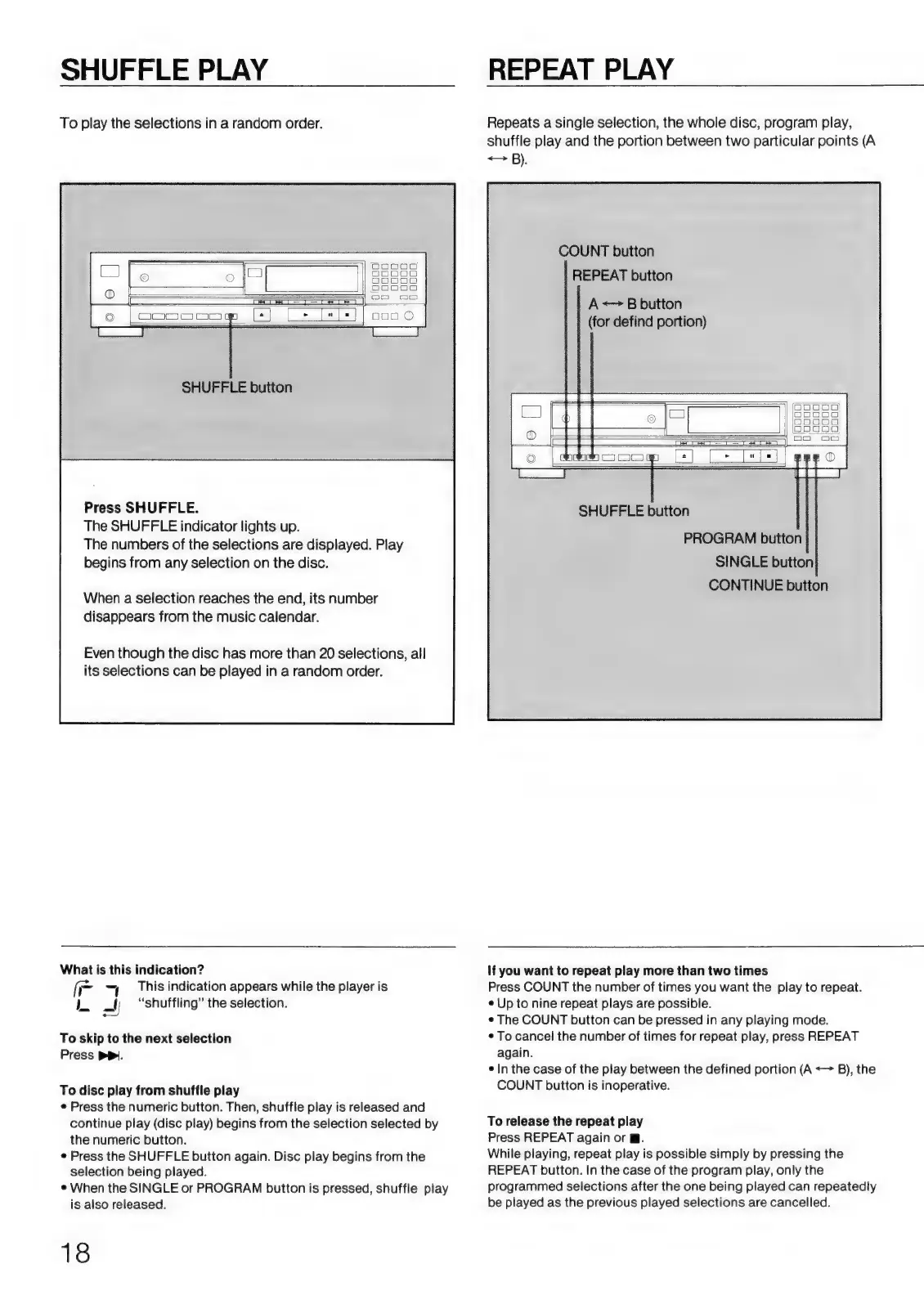
SHUFFLE
button
Press
SHUFFLE.
The
SHUFFLE
indicator
lights
up.
The
numbers
of
the
selections
are
displayed.
Play
begins
from
any
selection
on
the
disc.
When
a
selection
reaches
the
end,
its
number
disappears
from
the
music
calendar.
Even
though
the
disc
has
more
than
20
selections,
all
its
selections
can
be
played
in
a
random
order.
REPEAT
PLAY
Repeats
a
single
selection,
the
whole
disc,
program
play,
shuffle
play
and
the
portion
between
two
particular
points
(A
<>
B).
COUNT
button
REPEAT
button
A
+>
B
button
(for
defind
portion)
CONTINUE
button
What
is
this
indication?
(=
This
indication
appears
while
the
player
is
IL
=l;
“shuffling”
the
selection.
oo
To
skip
to
the
next
selection
Press
pp.
To
disc
play
from
shuffle
play
e
Press
the
numeric
button.
Then,
shuffle
play
is
released
and
continue
play
(disc
play)
begins
from
the
selection
selected
by
the
numeric
button.
e
Press
the
SHUFFLE
button
again.
Disc
play
begins
from
the
selection
being
played.
e
When
the
SINGLE
or
PROGRAM
button
is
pressed,
shuffle
play
is
also
released.
18
If
you
want
to
repeat
play
more
than
two
times
Press
COUNT
the
number
of
times
you
want
the
play
to
repeat.
e
Up
to
nine
repeat
plays
are
possible.
e
The
COUNT
button
can
be
pressed
in
any
playing
mode.
e
To
cancel
the
number
of
times
for
repeat
play,
press
REPEAT
again.
e
In
the
case
of
the
play
between
the
defined
portion
(A
—>
B),
the
COUNT
button
is
inoperative.
To
release
the
repeat
play
Press
REPEAT
again
or
@.
While
playing,
repeat
play
is
possible
simply
by
pressing
the
REPEAT
button.
In
the
case
of
the
program
play,
only
the
programmed
selections
after
the
one
being
played
can
repeatedly
be
played
as
the
previous
played
selections
are
cancelled.

Related product manuals