EasyManua.ls Logo

Sony CDP-555ESD - Before Connection

Sony CDP-555ESD
48 pages
Print Icon
To Next Page IconTo Next Page
To Previous Page IconTo Previous Page
Loading...
CONNECTIONS
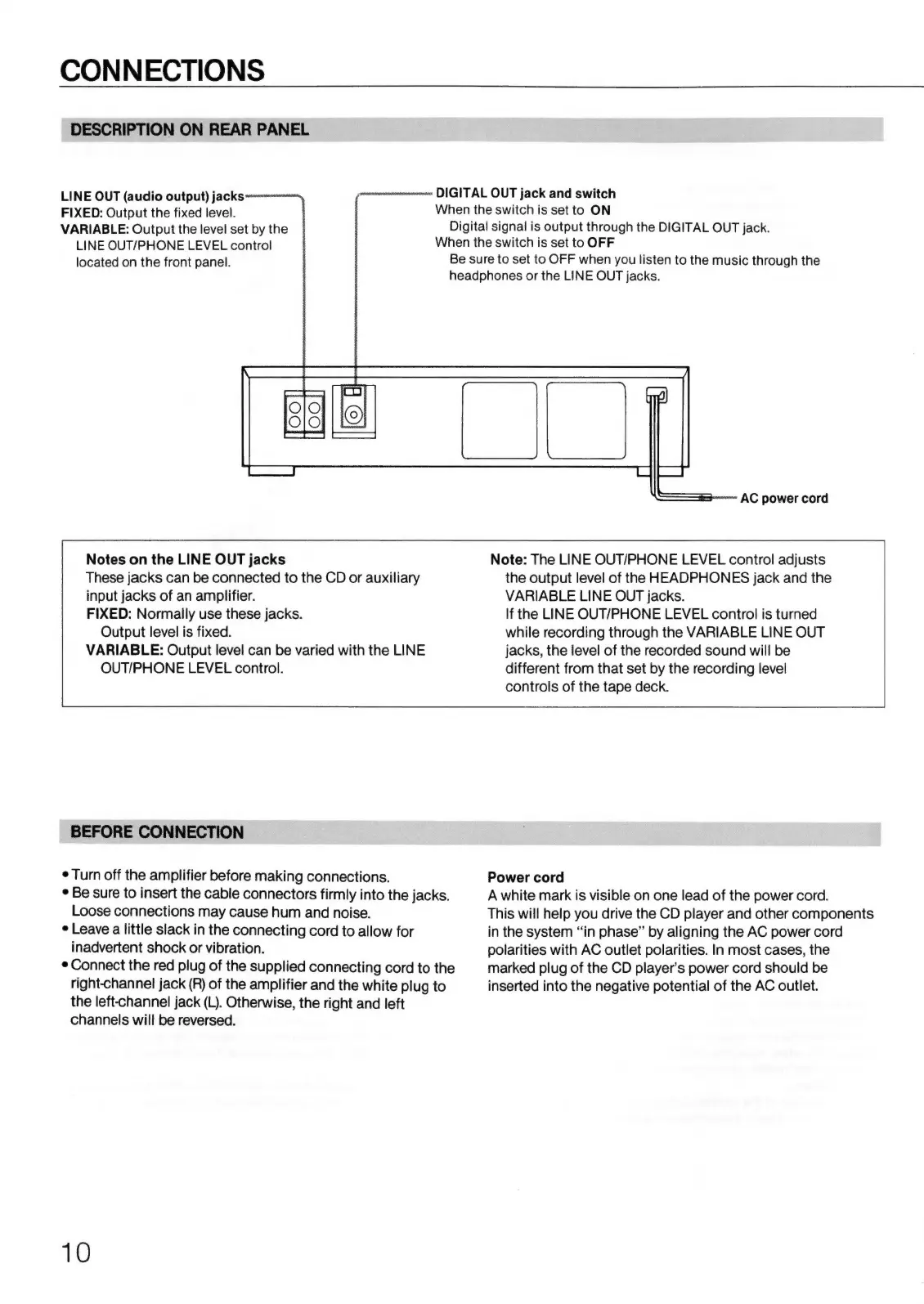
DESCRIPTION
ON
REAR
PANEL
LINE
OUT
(audio
output)
jacks
FIXED:
Output
the
fixed
level.
VARIABLE:
Output
the
level
set
by
the
LINE
OUT/PHONE
LEVEL
control
located
on
the
front
panel.
Notes
on
the
LINE
OUT
jacks
These
jacks
can
be
connected
to
the
CD
or
auxiliary
input
jacks
of
an
amplifier.
FIXED:
Normally
use
these
jacks.
Output
level
is
fixed.
VARIABLE:
Output
level
can
be
varied
with
the
LINE
OUT/PHONE
LEVEL
control.
BEFORE
CONNECTION
e
Turn
off
the
amplifier
before
making
connections.
e
Be
sure
to
insert
the
cable
connectors
firmly
into
the
jacks.
Loose
connections
may
cause
hum
and
noise.
e
Leave
a
little
slack
in
the
connecting
cord
to
allow
for
inadvertent
shock
or
vibration.
e
Connect
the
red
plug
of
the
supplied
connecting
cord
to
the
right-channel
jack
(R)
of
the
amplifier
and
the
white
plug
to
the
left-channel
jack
(L).
Otherwise,
the
right
and
left
channels
will
be
reversed.
10
DIGITAL
OUT
jack
and
switch
When
the
switch
is
set
to
ON
Digital
signal
is
output
through
the
DIGITAL
OUT
jack.
When
the
switch
is
set
to
OFF
Be
sure
to
set
to
OFF
when
you
listen
to
the
music
through
the
headphones
or
the
LINE
OUT
jacks.
AC
power
cord
Note:
The
LINE
OUT/PHONE
LEVEL
control
adjusts
the
output
level
of
the
HEADPHONES
jack
and
the
VARIABLE
LINE
OUT
jacks.
If
the
LINE
OUT/PHONE
LEVEL
control
is
turned
while
recording
through
the
VARIABLE
LINE
OUT
jacks,
the
level
of
the
recorded
sound
will
be
different
from
that
set
by
the
recording
level
controls
of
the
tape
deck.
Power
cord
A
white
mark
is
visible
on
one
lead
of
the
power
cord.
This
will
help
you
drive
the
CD
player
and
other
components
in
the
system
“in
phase”
by
aligning
the
AC
power
cord
polarities
with
AC
outlet
polarities.
In
most
cases,
the
marked
plug
of
the
CD
player’s
power
cord
should
be
inserted
into
the
negative
potential
of
the
AC
outlet.

Related product manuals