EasyManua.ls Logo

Sony CDP-991 - Understanding Information Displays; Playback Time and Display Adjustments

Sony CDP-991
43 pages
Print Icon
To Next Page IconTo Next Page
To Previous Page IconTo Previous Page
Loading...
Telicelatir:)
splay
Checking
the
total
number
of
selections
and
total
play
time
There
are
two
ways.
a)
Place
your
disc
on
the
tray
and
then
either
press
&
to
automatically
close
the
tray
or
manually
close
it.
b)
Press
TIME/MEMO
(or
TIME
on
the
remote
commander)
during
stop.
Total
number
Total
of
selection
time
laying
“a
calendar
aja[slas-
i
ce
If
disc
contains
more
than
20
selections
D
appears
in
the
display
window
behind
20
on
the
music
calendar.
00.
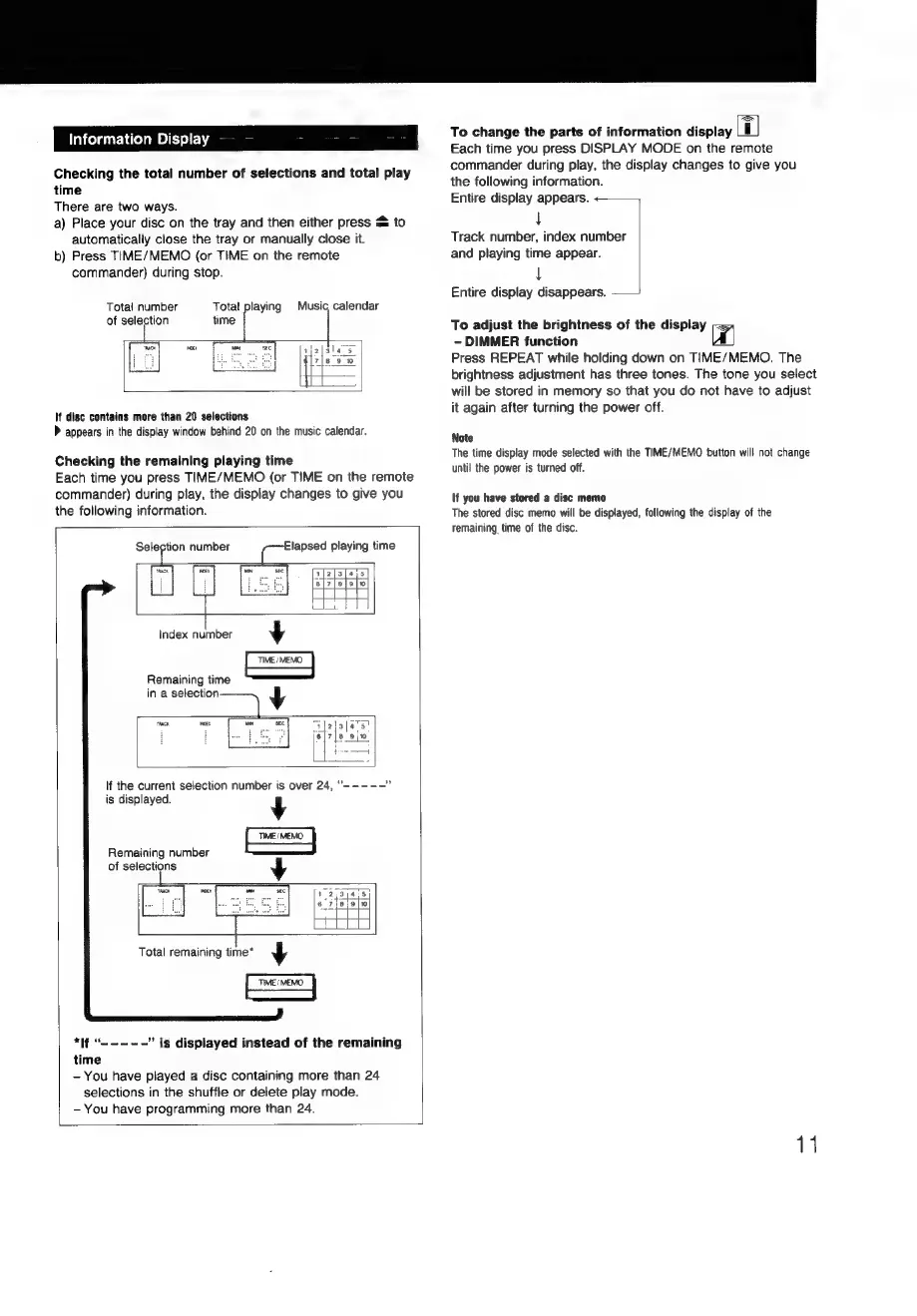
Checking
the
remaining
playing
time
Each
time
you
press
TIME/MEMO
(or
TIME
on
the
remote
commander)
during
play,
the
display
changes
to
give
you
the
following
information.
Selection
number
lapsed
playing
time
gute
Index
number
¥
Remaining
time
in
a
selection
rack
woes
a]
Teo
=
lf
the
current
selection
number
is
over
24,
“----~
7
is
displayed.
Remaining
number
of
selections
*It
“-----
is
displayed
instead
of
the
remaining
time
-
You
have
played
a
disc
containing
more
than
24
selections
in
the
shuffle
or
delete
play
mode.
-—
You
have
programming
more
than
24.
To
change
the
parts
of
information
display
|
Each
time
you
press
DISPLAY
MODE
on
the
remote
commander
during
play,
the
display
changes
to
give
you
the
following
information.
Entire
display
appears.
—_,
|
Track
number,
index
number
and
playing
time
appear.
{
Entire
display
disappears.
——
To
adjust
the
brightness
of
the
display
2
-
DIMMER
function
Press
REPEAT
while
holding
down
on
TIME/MEMO.
The
brightness
adjustment
has
three
tones.
The
tone
you
select
will
be
stored
in
memory
so
that
you
do
not
have
to
adjust
it
again
after
turning
the
power
off.
Note
The
time
display
mode
selected
with
the
TIME/MEMO
button
will
not
change
unti]
the
power
is
turned
off.
If
you
have
stored
a
disc
memo
The
stored
disc
memo
will
be
displayed,
following
the
display
of
the
remaining
time
of
the
disc.
14

Related product manuals