-
CD
Playing
a
disc
1 Press
(OPEN).
2 Insert the disc (label side up).
3 Close the front panel.
Playback starts automatically.
Ejecting the disc
1 Press
(OPEN).
2
Press~.
The
disc is ejected.
3 Close the front panel.
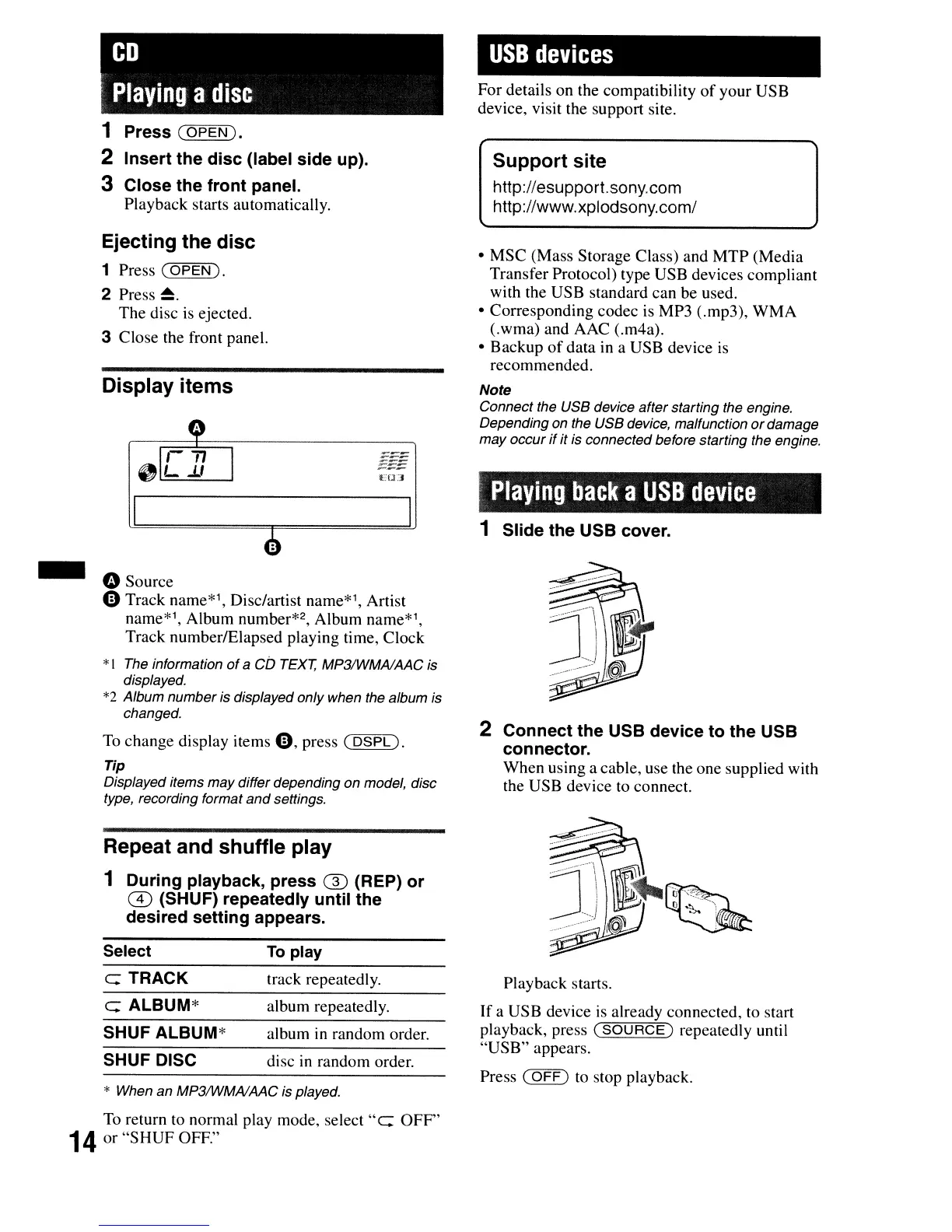
Display items
E1LI
o Source
°Track name*1, Disc/artist name*1, Artist
name*1, Album number*2, Album name*1,
Track numberlElapsed playing time, Clock
*I The information
of
a
CD
TEXT,
MP3IWMAlAAC
is
displayed.
*2 Album number is displayed only when the album is
changed.
To
change display items
0,
press
(DSPL).
Tip
Displayed items may differ depending
on
model, disc
type, recording format
and
settings.
USB
devices
For details on the compatibility
of
your USB
device, visit the support site.
Support site
http://esupport.sony.com
http://www.xplodsony.com/
• MSC (Mass Storage Class) and
MTP
(Media
Transfer Protocol) type USB devices compliant
with the USB standard can be used.
• Corresponding codec is MP3 (.mp3),
WMA
(.wma) and AAC (.m4a).
• Backup
of
data in a USB device
is
recommended.
Note
Connect the USB device after starting the engine.
Depending on the USB device, malfunction
or
damage
may occur
if
it is connected before starting the engine.
Playing
back
a
USB
device
1 Slide the USB cover.
2 Connect the USB device to the USB
connector.
When using a cable, use the one supplied with
the USB device to connect.
Repeat and shuffle play
1 During playback, press ® (REP) or
m(SHUF) repeatedly until the
desired setting appears.
* When an
MP3IWMAIMC
is played.
To
return to normal play mode, select "e: OFF"
14
or
"SHUF
OFF."
Select
e: TRACK
e: ALBUM*
SHUF ALBUM*
SHUF DISC
To
play
track repeatedly.
album repeatedly.
album
in
random order.
disc
in
random order.
Playback starts.
If
a USB device is already connected, to start
playback, press
(SOURCE)
repeatedly until
"USB"
appears.
Press
(OFF)
to
stop playback.






 To Next Page