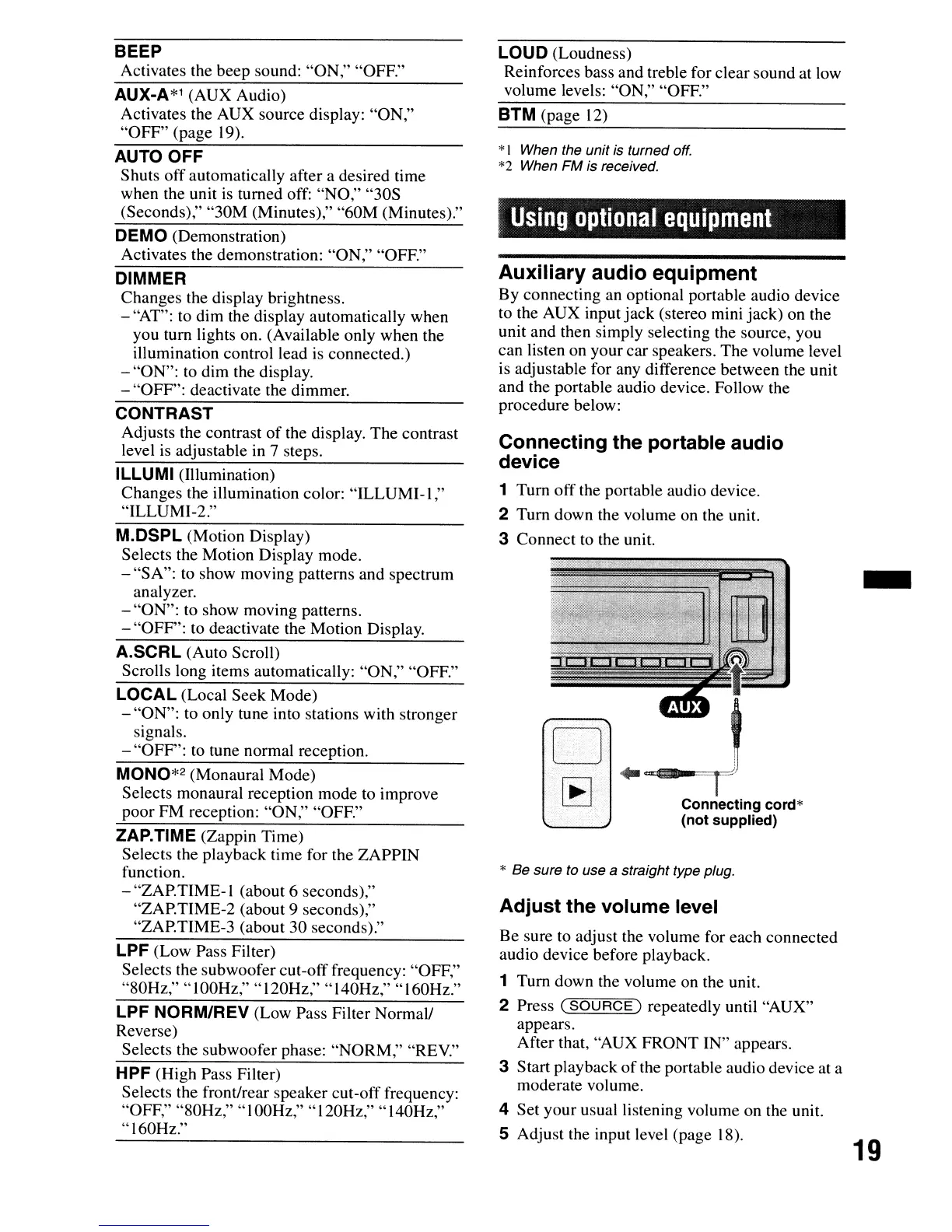
* Be sure to use a straight type plug.
BTM (page
12)
Using
optional
equipment
-
19
t
...
...,._~
...
=mr-
Connecting
cord*
(not supplied)
o
~
Connecting the portable audio
device
1 Turn off the portable audio device.
2 Turn down the volume on the unit.
3 Connect to the unit.
Adjust the volume level
Be sure to adjust the volume for each connected
audio device before playback.
1 Tum down the volume on the unit.
2 Press
(SOURCE)
repeatedly until "AUX"
appears.
After that, "AUX FRONT IN" appears.
3 Start playback
of
the portable audio device at a
moderate volume.
4 Set your usual listening volume on the unit.
S Adjust the input level (page 18).
Auxiliary audio equipment
By connecting an optional portable audio device
to the AUX input
jack
(stereo mini jack) on the
unit and then simply selecting the source, you
can listen on your car speakers. The volume level
is adjustable for any difference between the unit
and the portable audio device. Follow the
procedure below:
*I When the unit is turned
off.
*2 When FM is received.
lOUD
(Loudness)
Reinforces bass and treble for clear sound at low
volume levels: "ON," "OFF."
A.SCRl
(Auto Scroll)
Scrolls long items automatically: "ON," "OFF."
LOCAL (Local Seek Mode)
- "ON": to only tune into stations with stronger
signals.
- "OFF": to tune normal reception.
MONO*2 (Monaural Mode)
Selects monaural reception mode to improve
poor FM reception: "ON," "OFF."
CONTRAST
Adjusts the contrast
of
the display. The contrast
level
is
adjustable in 7 steps.
DIMMER
Changes the display brightness.
- "AT": to dim the display automatically when
you tum lights on. (Available only when the
illumination control lead
is
connected.)
- "ON": to dim the display.
- "OFF": deactivate the dimmer.
ZAP.TIME (Zappin Time)
Selects the playback time for the ZAPPIN
function.
- "ZAP.TIME-I (about 6 seconds),"
"ZAP.TIME-2 (about 9 seconds),"
"ZAP.TIME-3 (about 30 seconds)."
LPF (Low Pass Filter)
Selects the subwoofer cut-off frequency: "OFF,"
"80Hz," "100Hz," "120Hz," "140Hz," "160Hz."
lPF
NORM/REV (Low Pass Filter Normal!
Reverse)
Selects the subwoofer phase: "NORM," "REV."
HPF (High Pass Filter)
Selects the front/rear speaker cut-off frequency:
"OFF," "80Hz," "100Hz," "120Hz," "140Hz,"
"160Hz."
AUTO OFF
Shuts off automatically after a desired time
when the unit
is
turned off: "NO," "30S
(Seconds)," "30M (Minutes)," "60M (Minutes)."
DEMO (Demonstration)
Activates the demonstration: "ON," "OFF."
M.DSPl
(Motion Display)
Selects the Motion Display mode.
- "SA": to show moving patterns and spectrum
analyzer.
- "ON": to show moving patterns.
- "OFF": to deactivate the Motion Display.
IllUMI
(Illumination)
Changes the illumination color: "ILLUMI-l
,"
"ILLUMI-2."
AUX-A*l
(AUX Audio)
Activates the AUX source display: "ON,"
"OFF" (page 19).
BEEP
Activates the beep sound: "ON," "OFF."





 To Next Page