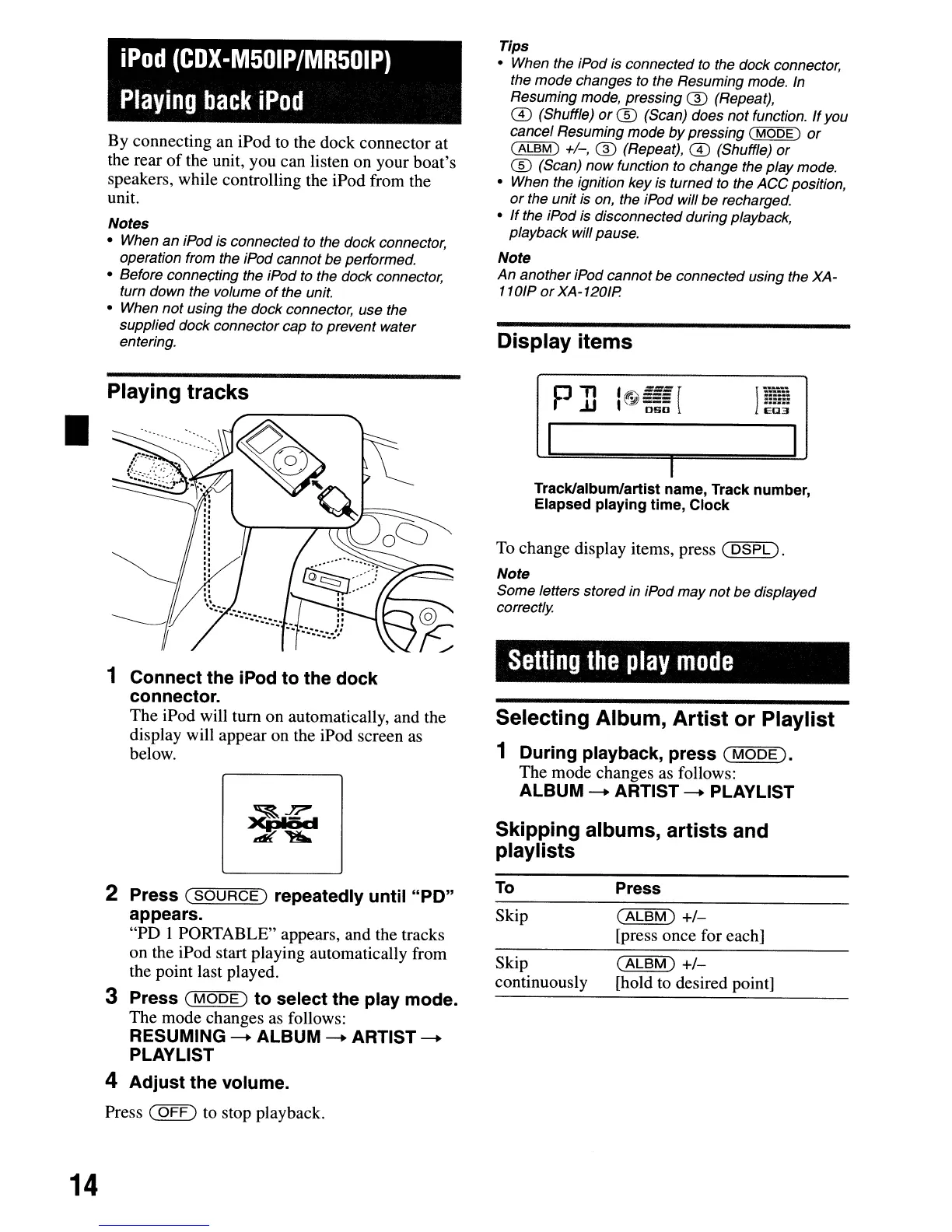
Display items
Setting
the
play
mode
I
1
······
E03
I
To change display items, press
(DSPL).
Note
Some
letters stored in iPod
may
not
be
displayed
correctly
Selecting Album, Artist or Playlist
1 During playback, press
(MODE).
The mode changes as follows:
ALBUM
-+
ARTIST
-+
PLAYLIST
Skipping albums, artists and
play
lists
I
Track/album/artist name, Track number,
Elapsed playing time, Clock
Tips
• When the iPod is connected to the dock connector,
the
mode
changes to the Resuming mode. In
Resuming mode, pressing
® (Repeat),
ill
(Shuffle) or
CD
(Scan) does
not
function.
If
you
cancel Resuming
mode
by
pressing (
MODE)
or
(ALBM)
+/-, ® (Repeat),
ill
(Shuffle) or
CD
(Scan)
now
function to change the play mode.
• When the ignition key is turned to the
ACC
position,
or
the unit is on, the iPod will be recharged.
•
If
the iPod is disconnected during playback,
playback will pause.
Note
An
another iPod cannot be connected using the XA-
110lP
or
XA-1201P.
iPod
(CDX-M50IP/MR50IP)
Playing
back
iPod
1 Connect the iPod to the dock
connector.
The iPod will tum on automatically, and the
display will appear on the iPod screen
as
below.
Playing tracks
By connecting an iPod
to
the dock connector at
the rear
of
the unit, you can listen on your boat's
speakers, while controlling the iPod from the
unit.
Notes
• When
an
iPod is connected to the dock connector,
operation from the iPod cannot be performed.
• Before connef;ting the iPod to the dock connector,
turn down the volume
of
the unit.
• When
not
using the dock connector, use the
supplied dock connector
cap
to prevent water
entering.
•
2 Press
(SOURCE)
repeatedly until "PO"
appears.
"PD I PORTABLE" appears, and the tracks
on the iPod start playing automatically from
the point last played.
3 Press
(MODE)
to select the play mode.
The mode changes
as
follows:
RESUMING
-+
ALBUM
-+
ARTIST
-+
PLAYLIST
4 Adjust the volume.
Press
(OFF)
to stop playback.
To
Skip
Skip
continuously
Press
(ALBM)
+/-
[press once for each]
(ALBM)
+/-
[hold to desired point]
14
Display items
Setting
the
play
mode
I
1
······
E03
I
To change display items, press
(DSPL).
Note
Some
letters stored in iPod
may
not
be
displayed
correctly
Selecting Album, Artist or Playlist
1 During playback, press
(MODE).
The mode changes as follows:
ALBUM
-+
ARTIST
-+
PLAYLIST
Skipping albums, artists and
play
lists
I
Track/album/artist name, Track number,
Elapsed playing time, Clock
Tips
• When the iPod is connected to the dock connector,
the
mode
changes to the Resuming mode. In
Resuming mode, pressing
® (Repeat),
ill
(Shuffle) or
CD
(Scan) does
not
function.
If
you
cancel Resuming
mode
by
pressing (
MODE)
or
(ALBM)
+/-, ® (Repeat),
ill
(Shuffle) or
CD
(Scan)
now
function to change the play mode.
• When the ignition key is turned to the
ACC
position,
or
the unit is on, the iPod will be recharged.
•
If
the iPod is disconnected during playback,
playback will pause.
Note
An
another iPod cannot be connected using the XA-
110lP
or
XA-1201P.
iPod
(CDX-M50IP/MR50IP)
Playing
back
iPod
1 Connect the iPod to the dock
connector.
The iPod will tum on automatically, and the
display will appear on the iPod screen
as
below.
Playing tracks
By connecting an iPod
to
the dock connector at
the rear
of
the unit, you can listen on your boat's
speakers, while controlling the iPod from the
unit.
Notes
• When
an
iPod is connected to the dock connector,
operation from the iPod cannot be performed.
• Before connef;ting the iPod to the dock connector,
turn down the volume
of
the unit.
• When
not
using the dock connector, use the
supplied dock connector
cap
to prevent water
entering.
•
2 Press
(SOURCE)
repeatedly until "PO"
appears.
"PD I PORTABLE" appears, and the tracks
on the iPod start playing automatically from
the point last played.
3 Press
(MODE)
to select the play mode.
The mode changes
as
follows:
RESUMING
-+
ALBUM
-+
ARTIST
-+
PLAYLIST
4 Adjust the volume.
Press
(OFF)
to stop playback.
To
Skip
Skip
continuously
Press
(ALBM)
+/-
[press once for each]
(ALBM)
+/-
[hold to desired point]
14



 To Next Page