II
20
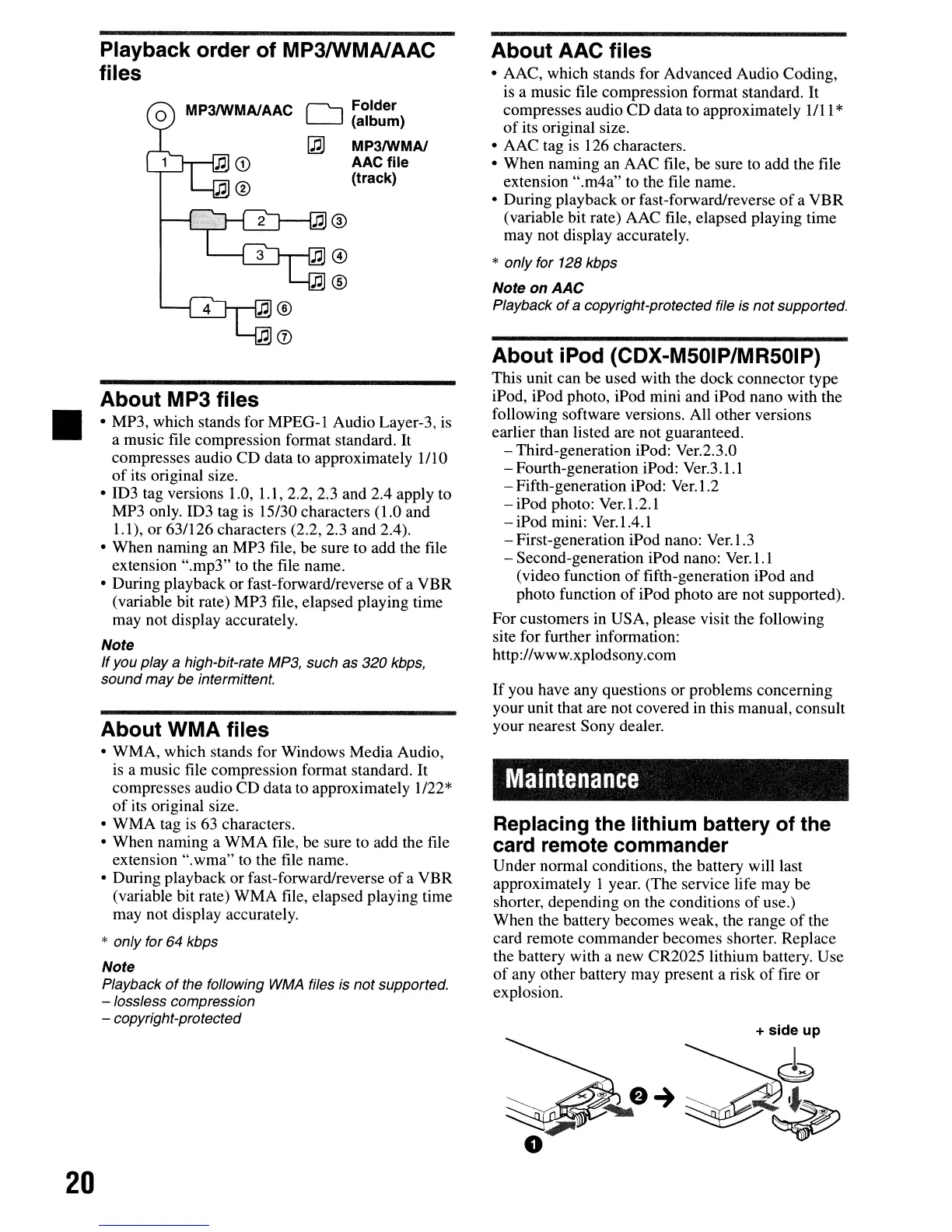
Playback order of MP3IWMAIAAC
files
(""""--, Folder
L-J
(album)
~
MP3IWMA/
AAC
file
(track)
About MP3 files
• MP3, which stands for
MPEG-l
Audio Layer-3,
is
a music file compression format standard. It
compresses audio CD data to approximately 1/10
of
its original size.
• ID3 tag versions 1.0, 1.1, 2.2, 2.3 and
204
apply to
MP3 only.
103
tag
is
15/30 characters (1.0 and
1.1), or 63/126 characters (2.2, 2.3 and
204).
• When naming an MP3 file, be sure to add the file
extension ".mp3"
to
the file name.
• During playback or fast-forward/reverse
of
a VBR
(variable bit rate) MP3 file, elapsed playing time
may not display accurately.
Note
Ifyou
playa
high-bit-rate MP3, such
as
320 kbps,
sound
may
be intermittent.
About WMA files
• WMA, which stands for Windows Media Audio,
is a music file compression format standard. It
compresses audio CD data to approximately 1/22*
of
its original size.
• WMA tag
is
63 characters.
• When naming a WMA file, be sure to add the file
extension ".wma" to the file name.
• During playback or fast-forward/reverse
of
a VBR
(variable bit rate) WMA file, elapsed playing time
may not display accurately.
* only for 64 kbps
Note
Playback
of
the foffowing
WMA
files is not supported.
- lossless compression
- copyright-protected
About AAC files
• AAC, which stands for Advanced Audio Coding,
is a music file compression format standard.
It
compresses audio CD data to approximately 1/11 *
of
its original size.
• AAC tag is 126 characters.
• When naming an AAC file, be sure
to
add the file
extension ".m4a"
to
the file name.
• During playback or fast-forward/reverse
of
a VBR
(variable bit rate) AAC file, elapsed playing time
may not display accurately.
* only for 128 kbps
NoteonAAC
Playback
of
a copyright-protected file is not supported.
About iPod (CDX-M50IP/MR50IP)
This unit can be used with the dock connector type
iPod, iPod photo, iPod mini and iPod nano with the
following software versions. All other versions
earlier than listed are not guaranteed.
- Third-generation iPod: Ver.2.3.0
- Fourth-generation iPod: Ver.3.1.1
- Fifth-generation iPod: Ver.l.2
- iPod photo: Ver.l.2.1
- iPod mini: Ver.IA.I
- First-generation iPod nano: Ver.I.3
- Second-generation iPod nano: Ver.l.l
(video function
of
fifth-generation iPod and
photo function
of
iPod photo are not supported).
For customers in USA, please visit the following
site for further information:
http://www.xplodsony.com
If
you have any questions or problems concerning
your unit that are not covered
in
this manual, consult
your nearest Sony dealer.
Maintenance
Replacing the lithium battery of the
card remote commander
Under normal conditions, the battery will last
approximately I year. (The service life may be
shorter, depending on the conditions
of
use.)
When the battery becomes weak, the range
of
the
card remote commander becomes shorter. Replace
the battery with a new CR2025 lithium battery. Use
of
any other battery may present a risk
of
fire or
explosion.
II
20
Playback order of MP3IWMAIAAC
files
(""""--, Folder
L-J
(album)
~
MP3IWMA/
AAC
file
(track)
About MP3 files
• MP3, which stands for
MPEG-l
Audio Layer-3,
is
a music file compression format standard. It
compresses audio CD data to approximately 1/10
of
its original size.
• ID3 tag versions 1.0, 1.1, 2.2, 2.3 and
204
apply to
MP3 only.
103
tag
is
15/30 characters (1.0 and
1.1), or 63/126 characters (2.2, 2.3 and
204).
• When naming an MP3 file, be sure to add the file
extension ".mp3"
to
the file name.
• During playback or fast-forward/reverse
of
a VBR
(variable bit rate) MP3 file, elapsed playing time
may not display accurately.
Note
Ifyou
playa
high-bit-rate MP3, such
as
320 kbps,
sound
may
be intermittent.
About WMA files
• WMA, which stands for Windows Media Audio,
is a music file compression format standard. It
compresses audio CD data to approximately 1/22*
of
its original size.
• WMA tag
is
63 characters.
• When naming a WMA file, be sure to add the file
extension ".wma" to the file name.
• During playback or fast-forward/reverse
of
a VBR
(variable bit rate) WMA file, elapsed playing time
may not display accurately.
* only for 64 kbps
Note
Playback
of
the foffowing
WMA
files is not supported.
- lossless compression
- copyright-protected
About AAC files
• AAC, which stands for Advanced Audio Coding,
is a music file compression format standard.
It
compresses audio CD data to approximately 1/11 *
of
its original size.
• AAC tag is 126 characters.
• When naming an AAC file, be sure
to
add the file
extension ".m4a"
to
the file name.
• During playback or fast-forward/reverse
of
a VBR
(variable bit rate) AAC file, elapsed playing time
may not display accurately.
* only for 128 kbps
NoteonAAC
Playback
of
a copyright-protected file is not supported.
About iPod (CDX-M50IP/MR50IP)
This unit can be used with the dock connector type
iPod, iPod photo, iPod mini and iPod nano with the
following software versions. All other versions
earlier than listed are not guaranteed.
- Third-generation iPod: Ver.2.3.0
- Fourth-generation iPod: Ver.3.1.1
- Fifth-generation iPod: Ver.l.2
- iPod photo: Ver.l.2.1
- iPod mini: Ver.IA.I
- First-generation iPod nano: Ver.I.3
- Second-generation iPod nano: Ver.l.l
(video function
of
fifth-generation iPod and
photo function
of
iPod photo are not supported).
For customers in USA, please visit the following
site for further information:
http://www.xplodsony.com
If
you have any questions or problems concerning
your unit that are not covered
in
this manual, consult
your nearest Sony dealer.
Maintenance
Replacing the lithium battery of the
card remote commander
Under normal conditions, the battery will last
approximately I year. (The service life may be
shorter, depending on the conditions
of
use.)
When the battery becomes weak, the range
of
the
card remote commander becomes shorter. Replace
the battery with a new CR2025 lithium battery. Use
of
any other battery may present a risk
of
fire or
explosion.



 To Next Page