PI
t
(+)1.
(-)
buttons
To
control CD/PD*1, the same as
(ALBM)
+/-
on the unit.
Setup, sound setting, etc., can be operated by
t •.
f)I
SeRl
(scroll) button
To
scroll the display item.
~
Number buttons
To
receive stored stations (press); store
stations (press and hold).
*1 COX-M50IPIMR50IP only
*2 In the case
of
a COIMO changer,
HO
radio tuner
or
SAT tuner being connected; when
(SOURCE)
is
pressed, the connected device ("MO:' "HO:'
'XM"
or
"SR") will appear
in
the display, depending
on
which device is connected. Furthermore,
if
(
MODE)
is pressed, you can switch the changer,
HO
radio tuner band
or
SAT tuner band.
(A
HO
radio tuner
or
SAT tuner can only
be
connected
to
the COX-M50IPIM30.)
Note
If the unit
is
turned
off
and
the display disappears, it
cannot be operated with the card remote commander
unless
(SOURCE)
on the unit is pressed,
or
a disc
is
inserted
to
activate the unit first.
About
AUX
cap
When not using the AUX input jack
(rnJ), use the
supplied
AUX
cap to prevent water entering. Keep the
AUX
cap out
of
the reach
of
children
to
prevent
accidental swallowing.
It---+---
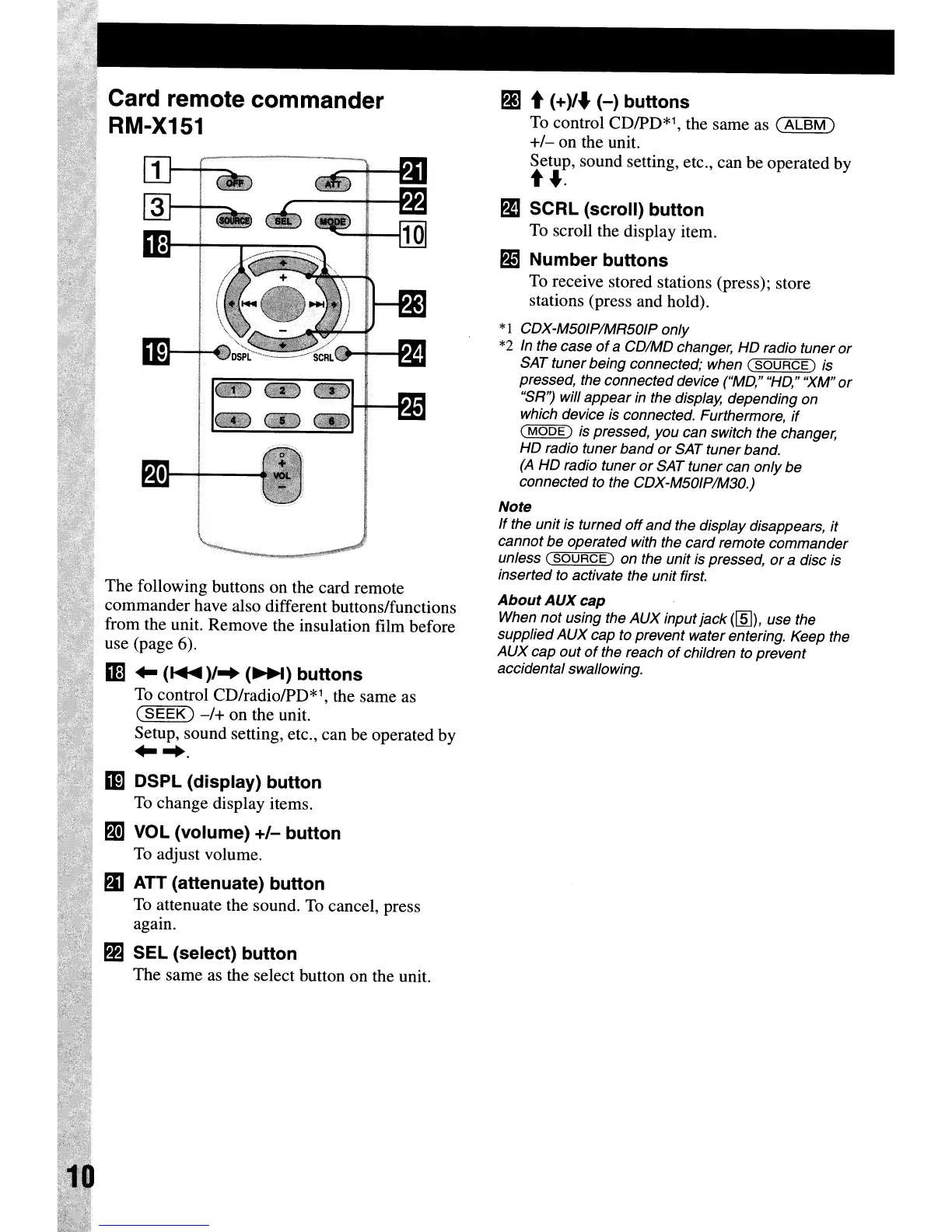
The following buttons on the card remote
commander have also different buttons/functions
from the unit. Remove the insulation film before
use (page 6).
1m
~
(~)/
..
(~)
buttons
To
control CD/radio/PD*1, the same as
(SEEK)
-/+
on the unit.
Setup, sound setting, etc., can be operated by
~
...
1m
DSPl
(display) button
To
change display items.
PI
VOL (volume)
+/-
button
To
adjust volume.
mATT
(attenuate) button
To
attenuate the sound.
To
cancel, press
again.
SEl
(select) button
The same as the select button on the unit.
Card remote commander
RM-X151
PI
t
(+)1.
(-)
buttons
To
control CD/PD*1, the same as
(ALBM)
+/-
on the unit.
Setup, sound setting, etc., can be operated by
t •.
f)I
SeRl
(scroll) button
To
scroll the display item.
~
Number buttons
To
receive stored stations (press); store
stations (press and hold).
*1 COX-M50IPIMR50IP only
*2 In the case
of
a COIMO changer,
HO
radio tuner
or
SAT tuner being connected; when
(SOURCE)
is
pressed, the connected device ("MO:' "HO:'
'XM"
or
"SR") will appear
in
the display, depending
on
which device is connected. Furthermore,
if
(
MODE)
is pressed, you can switch the changer,
HO
radio tuner band
or
SAT tuner band.
(A
HO
radio tuner
or
SAT tuner can only
be
connected
to
the COX-M50IPIM30.)
Note
If the unit
is
turned
off
and
the display disappears, it
cannot be operated with the card remote commander
unless
(SOURCE)
on the unit is pressed,
or
a disc
is
inserted
to
activate the unit first.
About
AUX
cap
When not using the AUX input jack
(rnJ), use the
supplied
AUX
cap to prevent water entering. Keep the
AUX
cap out
of
the reach
of
children
to
prevent
accidental swallowing.
It---+---
The following buttons on the card remote
commander have also different buttons/functions
from the unit. Remove the insulation film before
use (page 6).
1m
~
(~)/
..
(~)
buttons
To
control CD/radio/PD*1, the same as
(SEEK)
-/+
on the unit.
Setup, sound setting, etc., can be operated by
~
...
1m
DSPl
(display) button
To
change display items.
PI
VOL (volume)
+/-
button
To
adjust volume.
mATT
(attenuate) button
To
attenuate the sound.
To
cancel, press
again.
SEl
(select) button
The same as the select button on the unit.
Card remote commander
RM-X151



 To Next Page