EasyManua.ls Logo

Sony CFD-758 - Playing Specific Tracks

Sony CFD-758
36 pages
Print Icon
To Next Page IconTo Next Page
To Previous Page IconTo Previous Page
Loading...
Playing
Specific
Tracks
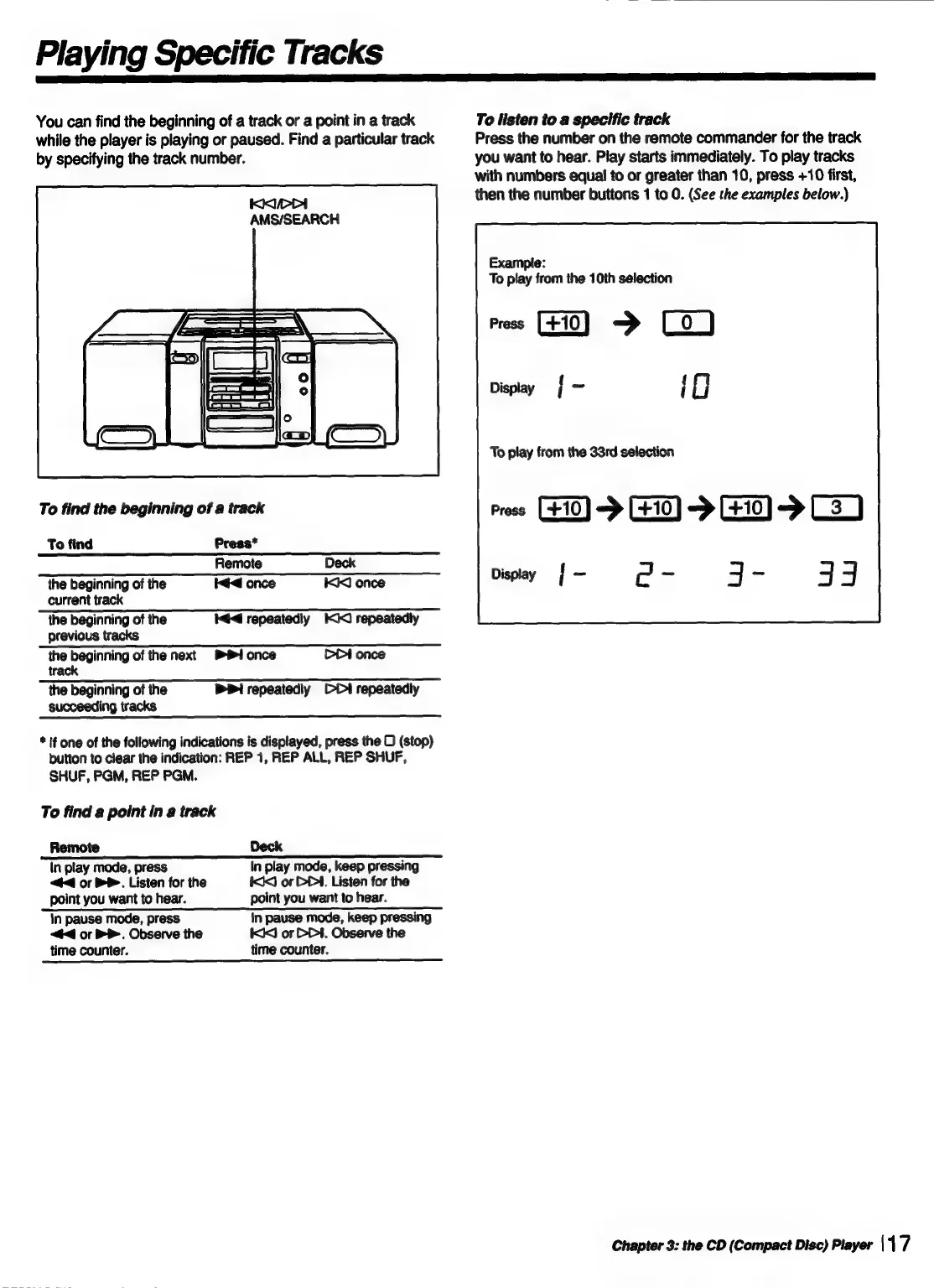
You
can
find
the
beginning
of
a
track
or
a
point
in
a
track
while
the
player
is
playing
or
paused.
Find
a
particular
track
by
specifying
the
track
number.
KKIPPI
AMS/SEARCH
To
find
the
beginning
of
a
track
To
find
Press*
Remote
Deck
the
beginning
of
the
id
once
1)
once
current
track
the
beginning
of
the
44
repeatediy
I<)
repeatedly
previous
tracks
the
beginning
of
the
next
#1
once
track
CPt
once
the
beginning
of
the
succeeding
tracks
PPI
repeatediy
ODI
repeatedly
*
if
one
of
the
following
indications
is
displayed,
press
the
D
(stop)
button
to
clear
the
indication:
REP
1,
REP
ALL,
REP
SHUF,
SHUF,
PGM,
REP
PGM.
To
find
a
point
in
a
track
Remote
Deck
(n
play
mode,
press
In
play
mode,
keep
pressing
<4
or
PP.
Listen
for
the
I
or
DP.
Listen
for
the
point
you
want
to
hear.
point
you
want
to
hear.
in
pause
mode,
press
in
pause
mode,
keep
pressing
<<
or
BP.
Observe
the
KCI
or
D4.
Observe
the
time
counter.
time
counter.
To
listen
to
a
specific
track
Press
the
number
on
the
remote
commander
for
the
track
you
want
to
hear.
Play
starts
immediately.
To
play
tracks
with
numbers
equal
to
or
greater
than
10,
press
+10
first,
then
the
number
buttons
1
to
0.
(See
the
examples
below.)
Example:
Te
play
from
the
10th
selection
me
FO)
>
Depa
|
-
iO
To
play
from
the
33rd
selection
ress
GEO)
->
GO)
>
G0)
>
CH)
@-
49-
33
Display
H
-
Chapter
3:
the
CD
(Compact
Disc)
Player
\17

Related product manuals