EasyManua.ls Logo

Sony CFD-758 - Playing Tracks in the Desired Order (Program Play);9

Sony CFD-758
36 pages
Print Icon
To Next Page IconTo Next Page
To Previous Page IconTo Previous Page
Loading...
Playing
Tracks
in
the
Desired
Order
(program
play)
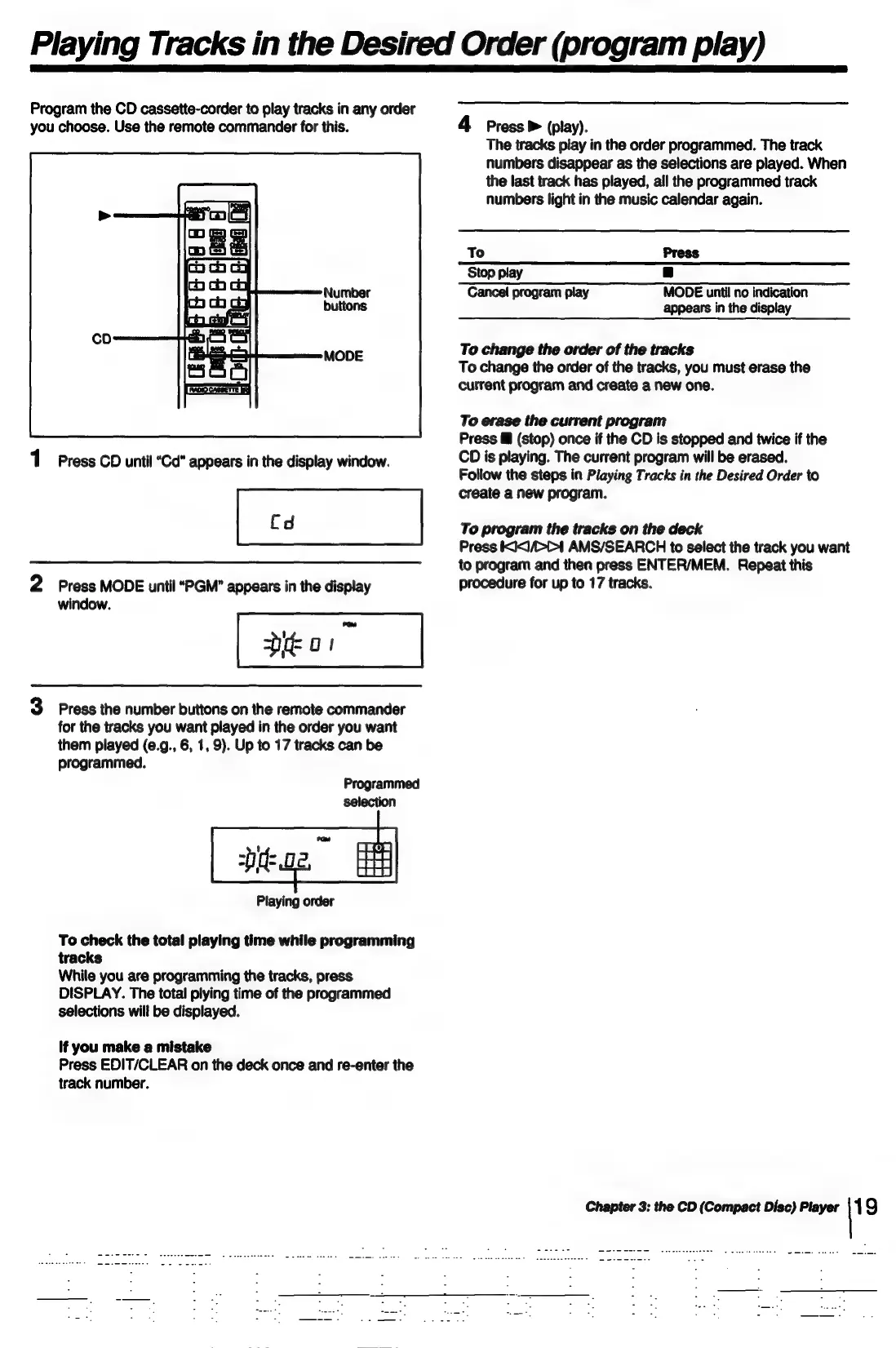
Program
the
CD
cassette-corder
to
play
tracks
in
any
order
you
choose.
Use
the
remote
commander
for
this.
Number
buttons
MODE
1
Press
CD
until
“Cd”
appears
in
the
display
window.
2
Press
MODE
until
“PGM”"
appears
in
the
display
window.
3
Press
the
number
buttons
on
the
remote
commander
for
the
tracks
you
want
played
in
the
order
you
want
them
played
(e.g.,
6,
1,
9).
Up
to
17
tracks
can
be
programmed.
Programmed
selection
Playing
order
To
check
the
total
playing
time
while
programming
tracks
While
you
are
programming
the
tracks,
press
DISPLAY.
The
total
plying
time
of
the
programmed
selections
will
be
displayed.
If
you
make
a
mistake
Press
EDIT/CLEAR
on
the
deck
once
and
re-enter
the
track
number.
4
Press
>
(play).
The
tracks
play
in
the
order
programmed.
The
track
numbers
disappear
as the
selections
are
played.
When
the
last
track
has
played,
all
the
programmed
track
numbers
light
in
the
music
calendar
again.
To
Press
Stop
play
B
Cancel
program
play
MODE
until
no
indication
appears
in
the
display
To
change
the
order
of
the
tracks
To
change
the
order
of
the
tracks,
you
must
erase
the
current
program
and
create
a
new
one.
To
erase
the
current
program
Press
&@
(stop)
once
if
the
CD
is
stopped
and
twice
if
the
CD
is
playing.
The
current
program
will
be
erased.
Follow
the
steps
in
Playing
Tracks
in
the
Desired
Order
to
create
a
new
program.
To
program
the
tracks
on
the
deck
Press
KX/>C1
AMS/SEARCH
to
select
the
track
you
want
to
program
and
then
press
ENTER/MEM.
Repeat
this
procedure
for
up
to
17
tracks.
Chapter
3:
the
CD
(Compact
Disc)
Player
|19

Related product manuals