Entering data on your Sony CLIÉ™ handheld 43
Practicing entering data using the on-screen keyboard
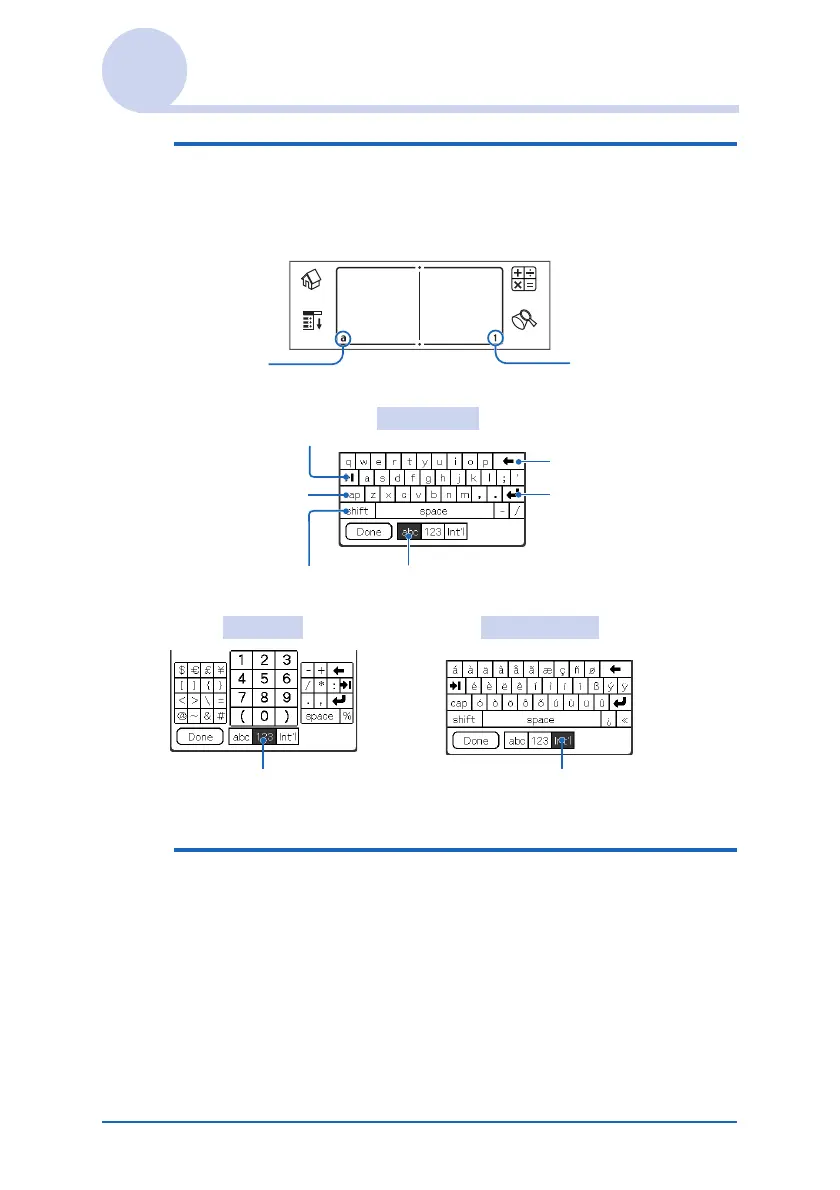
3 Tap “a” to open the alphabetic keyboard, or
tap “1” to open the numeric keyboard.
The selected keyboard is displayed.
4 Select the required keyboard and tap the
characters to enter text and numbers.
You can use the on-screen keyboard in the same way as in
the keyboard of your computer. To enter a capital letter, tap
“cap” and then tap the character button. To delete a
character, tap <.
Tap here for the
alphabetic
keyboard
Tap here for the
numeric keyboard
Alphabetic
Tab
Caps lock
Caps shift
Back Space
Carriage return
Tap here to display alphabetic keyboard
Numeric International
Tap here to display the
numeric keyboard
Tap here to display the
international keyboard
Continued on next page
• • • • • • • • • • • • • • • • • • •


 To Next Page
 Loading...









