74
Parental Control (limiting playback by children)
3
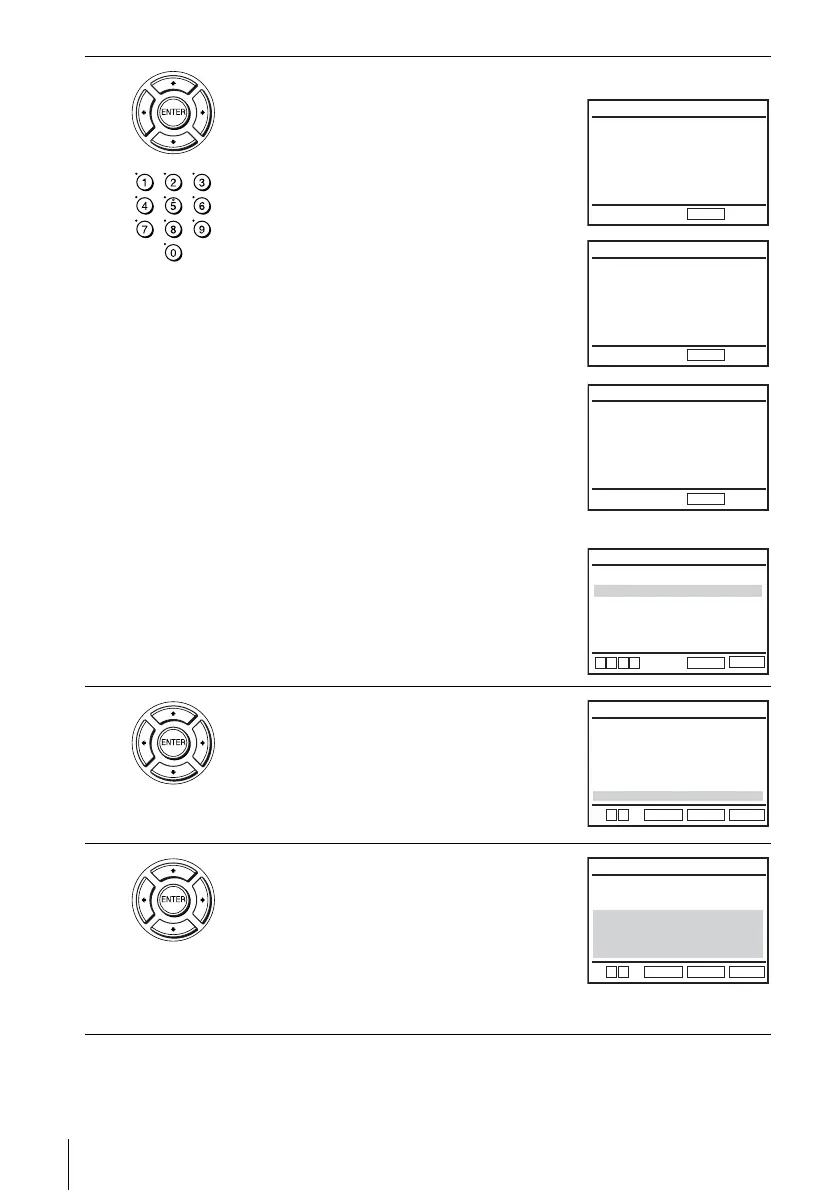
Press b to set the parental control.
• If you have not entered a password
The display for registering a new password
appears.
Enter a 4-digit password using the number
buttons.
The display for confirming the password
appears.
Re-enter the password.
• When you have already registered a
password
The display for entering the password appears.
Enter a 4-digit password using the number
buttons.
After registering a password, if you set
“Use
Password
” to “No,” “PASSWORD CHECK”
screen will not appear.
4
Press V/v to select “Rating Level,” then press
ENTER.
5
Press V/v to select the level you want, then
press ENTER.
The options are as follows.
Level 8 (Adult) y Level 7 y Level 6 y
Level 5 y Level 4 y Level 3 y Level 2
y Level 1 (Kids Safe)
The lower the value, the stricter the limitation.
Enter Password
––––
CREATE PASSWORD
-
~
9
RETURN
CREATE PASSWORD
-
~
9
RETURN
Re-enter Password
––––
PASSWORD CHECK
-
~
9
RETURN
Enter Password
––––
Use Password
RETURN
PARENTAL SETUP
SET UP
[ Yes ]
v
V
b
B
Rating Level
Change Password
:1
RETURN
RATING LEVEL
SET UP
ENTER
V
Level 8 Adult
Level 7
Level 6
Level 5
Level 4
Level 3
Level 2
Level 1 Kids Safe
v
RETURN
RATING LEVEL
SET UP
ENTER
Level 8 Adult
Level 7
Level 6
Level 5
Level 4
Level 3
Level 2
Level 1 Kids Safe
V
v















 To Next Page