Getting Started
21
US
After connecting all the components, speakers, and AC power cord (mains lead), output a test tone to
check that all the speakers are connected correctly. For details on outputting a test tone, see page 83.
If no sound is heard from a speaker while outputting a test tone, or a test tone is output from a speaker
other than the one currently displayed on the Setup Display, the speaker may be short-circuited. If this
happens, check the speaker connection again.
• Be sure to match the speaker cord to the appropriate terminal on the components: 3 to 3, and # to #. If the cords
are reversed, the sound will lack bass and may be distorted.
Installing the speakers on the wall
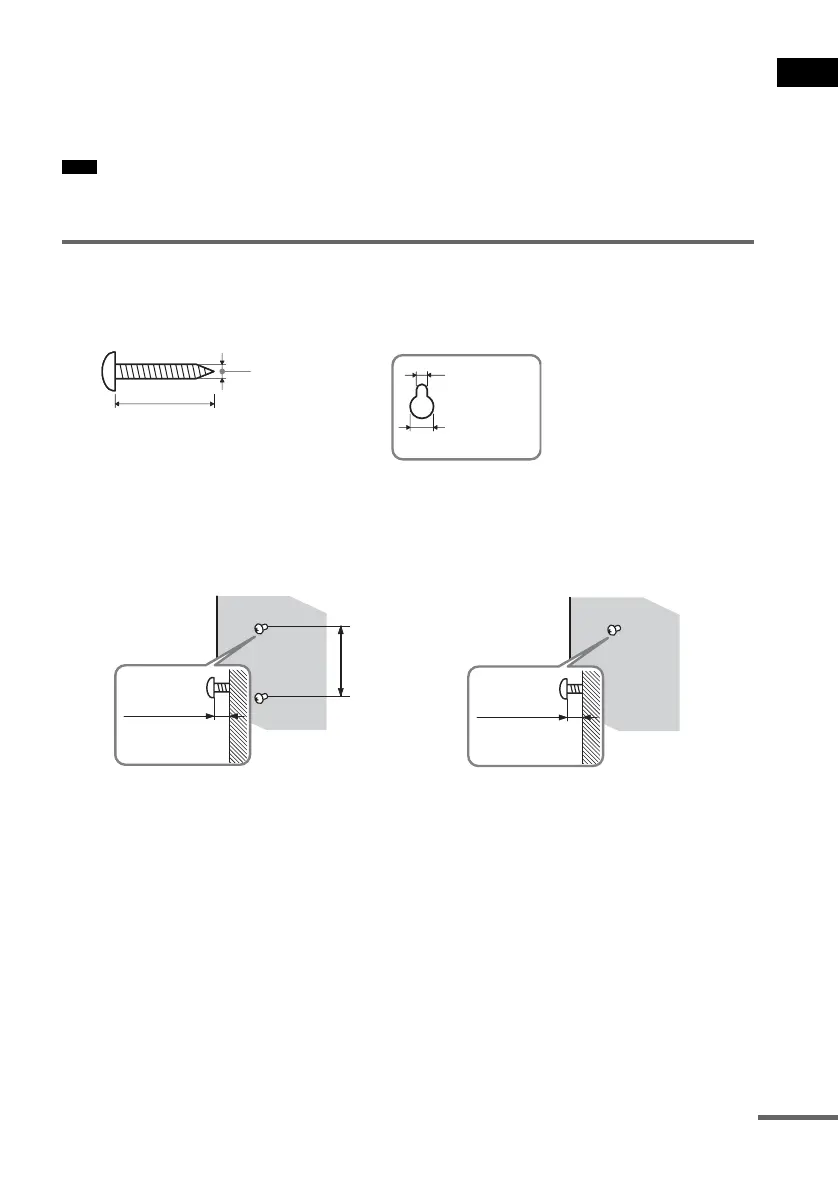
1 Prepare screws (not supplied) that are suitable for the hole on the back of each speaker.
See the illustrations below.
2 Fasten the screws to the wall.
The screws should protrude 7 to 8 mm (9/32 to 11/32 inch) for the front speakers, 8 to 9
mm (11/32 to 3/8 inch) for the surround speakers.
3 Peel the seals off the two screw points on the rear of the speaker.
(Front speakers only)
Note
25 mm (1 inch)
4 mm (
5
/
32
inch)
Hole on the back of
the speaker
4.6 mm
(
3
/
16
inch)
10 mm
(
13
/
32
inch)
7 to 8 mm
(
9
/
32
to
11
/
32
inch)
For the front speakers
8 to 9 mm
(
11
/
32
to
3
/
8
inch)
For the surround speakers
165 mm
(6
1
/
2
inch)
continued



 To Next Page